AI Chat
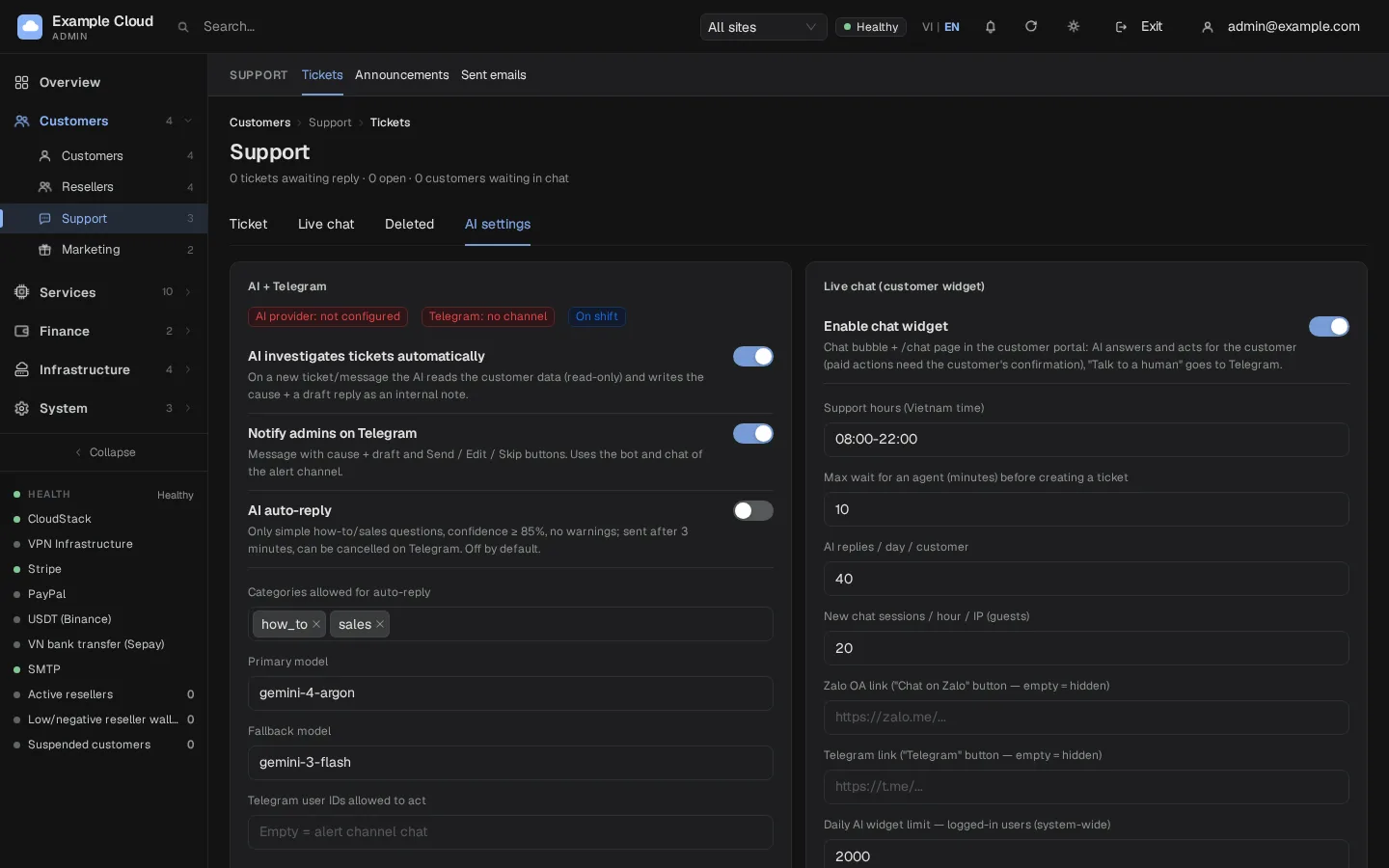
Where in the admin: Customers › Support › Ticket, tab AI settings (
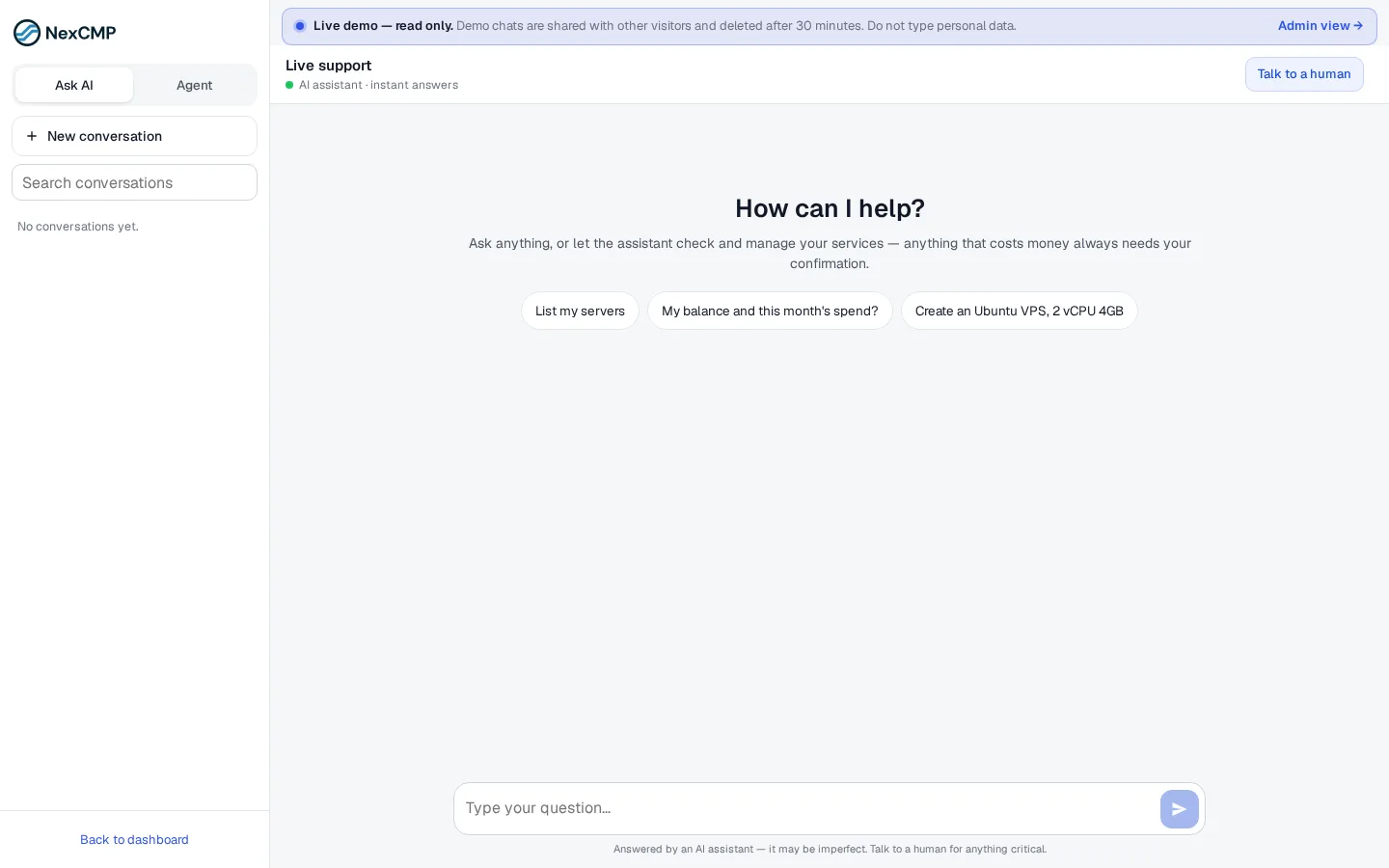
/support/tickets?tab=settings). Provider and module: System › Settings › AI provider (/settings/ai). Where in the portal: the floating chat button and the page/chat(mode Ask AI).
What it does
AI Chat answers customers' questions at any hour, looks up their own account data (balance, services, payments, recent errors), and can act for them — create a VM, change a plan — after the customer confirms. When the assistant cannot help, the customer clicks Talk to a human: the chat goes to your staff on Telegram and, if nobody answers in time, becomes a ticket. The same AI settings also let the system investigate tickets for your staff.
Requirements
| Item | Requirement |
|---|---|
| Module and provider | The AI module on and an AI provider saved and in use. Without a provider the assistant says it is not configured. |
| Customers | Signed-in customers only. In an installed NexCMP there is no public site, so a visitor who is not signed in gets "Sign in to use AI Chat". |
| Staff channel (optional) | A Telegram bot and chat for admin alerts (see Telegram notifications). The same channel receives chat hand-offs and ticket drafts. |
| Dependencies | AI provider. |
Prepare the infrastructure
Not required beyond the AI provider. If you want staff hand-off:
- Create a Telegram bot with @BotFather and note the token.
- Create a group or use your private chat with the bot, and note the chat ID.
- Enter both under System › Settings › Admin alerts (see Telegram notifications). The support features reuse that bot and chat.
Connect in NexCMP
Make sure the AI module is on and the provider tests green (AI provider).
Open Customers › Support › Ticket and select the tab AI settings. The top of the left card shows three tags: AI provider: configured, Telegram: channel present and On shift or Off shift.
Left card AI + Telegram:
Switch or field Default Meaning AI investigates tickets automatically On For a new ticket or message the AI reads the customer's data (read-only) and writes the likely cause and a draft reply as an internal note. It never sends to the customer. Telegram alerts to admin On The note arrives on Telegram with the buttons Send, Edit and Skip. AI auto-reply Off Sends simple how-to or sales answers by itself when every safety condition holds (confidence of 85 % or more, no warnings); sent after 3 minutes and cancellable on Telegram. Categories allowed to auto-reply how_to,salesOnly these. Primary model, Fallback model set from the provider Normally leave as saved by the AI provider page. Telegram user ID allowed to act empty Empty means the chat of the alert channel. Right card Live chat (customer widget):
Field Default Meaning Enable chat widget On The chat bubble and the /chatpage.Support hours (Vietnam time) 08:00-22:00When staff are expected to answer on Telegram. Outside these hours, or when no Telegram channel exists, Talk to a human turns the chat into a ticket at once. Max wait for staff (minutes), then convert to ticket 10 1 to 240. AI turns / day / customer 40 1 to 1000. After the limit the assistant invites the customer to talk to a human. New chats / hour / IP 20 1 to 1000. Zalo OA link empty https://zalo.me/...Shows the button Chat on Zalo (with a QR code) in the chat. Empty hides it.Telegram link empty https://t.me/...Shows a Telegram button. Empty hides it.System-wide daily cap of AI turns, signed-in customers 2000 System-wide daily cap, guests 500 Own pool; not used while guests cannot chat. System-wide daily cap of automatic ticket investigations 200 Admin path (the "Open admin" Telegram button) empty Your admin URL, for example https://cloud.example.com/admin.Each switch or field saves when you change it.
At the bottom, Reply templates (title, language VI/EN/ZH, text up to 4,000 characters) give staff canned answers.
What the assistant can and cannot do
- Read: it searches your knowledge base and your public documentation, and reads the signed-in customer's own data through read-only tools. It cannot see another customer.
- Act: it uses the customer's own API permissions. A read runs at once. Anything that changes or costs money creates a confirmation card ("Needs your confirmation", with Costs money or Delete tags); nothing happens until the customer clicks Confirm. A chat can hold at most 3 pending cards and an account at most 10 confirmed write actions per hour.
- Never: it cannot open consoles, create SSH or console tokens, download Kubernetes access files, reset passwords, or show secrets such as proxy passwords or S3 secrets. Secrets are never put into the model's context or the chat history.
- Safety: its answers pass an output filter; the customer's text and tool results are treated as data, not as instructions.
- Honesty banner: the chat shows "Answered by an AI assistant — it may be imperfect. Talk to a human for anything critical."
Staff hand-off
- The customer clicks Talk to a human and may leave an e-mail.
- A message with the conversation reaches the staff Telegram chat. Staff answer by replying to that message; the reply appears in the customer's chat as "[brand] Support".
- If nobody answers within the wait time (default 10 minutes), the chat becomes a ticket under Customers › Support › Ticket. The same happens immediately outside the support hours or when Telegram is not configured, and the customer is told a ticket was opened.
- Admins also see running chats in the Live chat tab.
Verify
- Sign in as a test customer, open the chat and ask a question about your services. The assistant answers.
- Ask it to create something that costs money: a confirmation card appears and nothing is created until you click Confirm.
- Click Talk to a human. The message reaches your Telegram chat (if configured) or, after the wait, a ticket appears.
- With Zalo and Telegram links filled in, both shortcut buttons appear in the chat.
Limits & notes
- Rate limits (per IP): 20 messages per minute and a handful of hand-offs per hour; 40 messages per conversation. These are fixed.
- Cost: every AI turn calls your provider. Lower AI turns / day / customer to cap spending.
- Auto-reply is off by default. Switch it on only after you have watched drafts for a while.
- Languages: the assistant answers in the customer's language; Vietnamese is detected from the text.
- Resellers: reseller sites use tickets instead of the widget.
Troubleshooting
| Symptom | Cause | Fix |
|---|---|---|
| Customers do not see the chat | AI module off, or Enable chat widget off | Turn both on. |
| "Sign in to use AI Chat" | Visitor is not signed in | Expected in NexCMP: sign in first. |
| The assistant says no AI provider is configured | Provider missing, not in use, or key missing | Complete AI provider. |
| AI replies "talk to a human" after a few questions | Daily limit per customer reached | Raise AI turns / day / customer. |
| Telegram tag shows "no channel" | Bot or chat ID not configured | Set up Telegram notifications. |
| Zalo or Telegram button missing | The link field is empty | Fill in the link. |
| "Too many requests" in the chat | More than 20 messages a minute from one IP | Wait a minute. |
| Chat conversation full | 40 messages reached | Start a new conversation. |