Payment channels
Where in the admin: Finance › Payment channels (
/payments). Switches and fees: Finance › Payment channels › Fees & limits (/payments/fees).
NexCMP uses a prepaid USD wallet. Customers add money to the wallet through a payment channel; every service is then paid from the wallet. A channel is only shown to customers when it is both enabled and configured.
What it does
Payment channels connect your payment accounts (Stripe, PayPal, Binance, a Vietnamese bank) to the customer wallet. A confirmed payment becomes exactly one wallet credit — each credit is keyed by the gateway payment ID, so a repeated webhook can never add money twice. Use this page to see which channels are ready, how they performed over the last 30 days, and which ones need attention.
Requirements
| Item | Requirement |
|---|---|
| Public HTTPS address | Gateways send webhooks to https://<domain>/v1/billing/..., so your panel must be reachable from the Internet over valid TLS (see DNS and Cloudflare). |
| Accounts | Your own account with each provider you want to use. Credentials are entered in the admin and are never shown again (only the last 4 characters). |
| Admin role | An administrator account. |
| Dependencies | None. The VN bank channel additionally needs an exchange rate. |
The channels
| Channel | What the customer sees | Set up in | Article |
|---|---|---|---|
| Card (Stripe) | Card form, saved card | Payment channels › Stripe | Stripe |
| Apple Pay, Google Pay, Link | Wallet buttons (Stripe Express Checkout) | Stripe, plus domain registration | Stripe |
| Alipay | Redirect to Alipay (charged in JPY by Stripe) | Stripe, plus Fees & limits | Stripe |
| PayPal | PayPal buttons, saved PayPal account | Payment channels › PayPal | PayPal |
| USDT | Deposit address and exact amount | Payment channels › USDT | USDT |
| VN bank transfer | QR code and transfer details (Vietnamese interface only) | Payment channels › VN bank transfer | Bank transfer (Vietnam) |
Prepare the infrastructure
Not required. Everything is configured in the admin; there is nothing to install on the server.
Connect in NexCMP
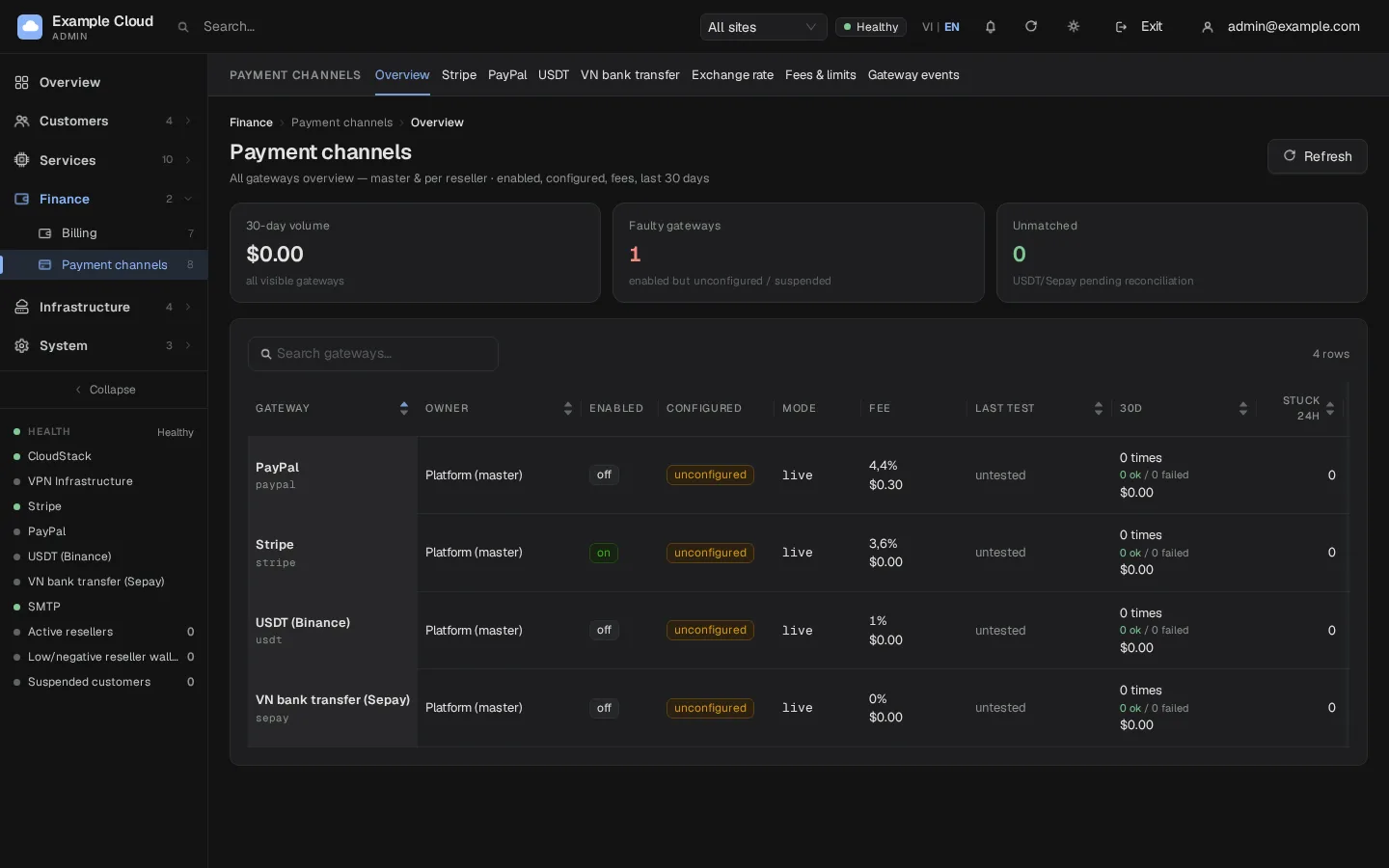
- Open Finance › Payment channels (
/payments). The overview table lists every channel with its state. - Open the channel's own tab (Stripe, PayPal, USDT, VN bank transfer) and follow its article. Each tab ends with a Save button and, where available, a Test button.
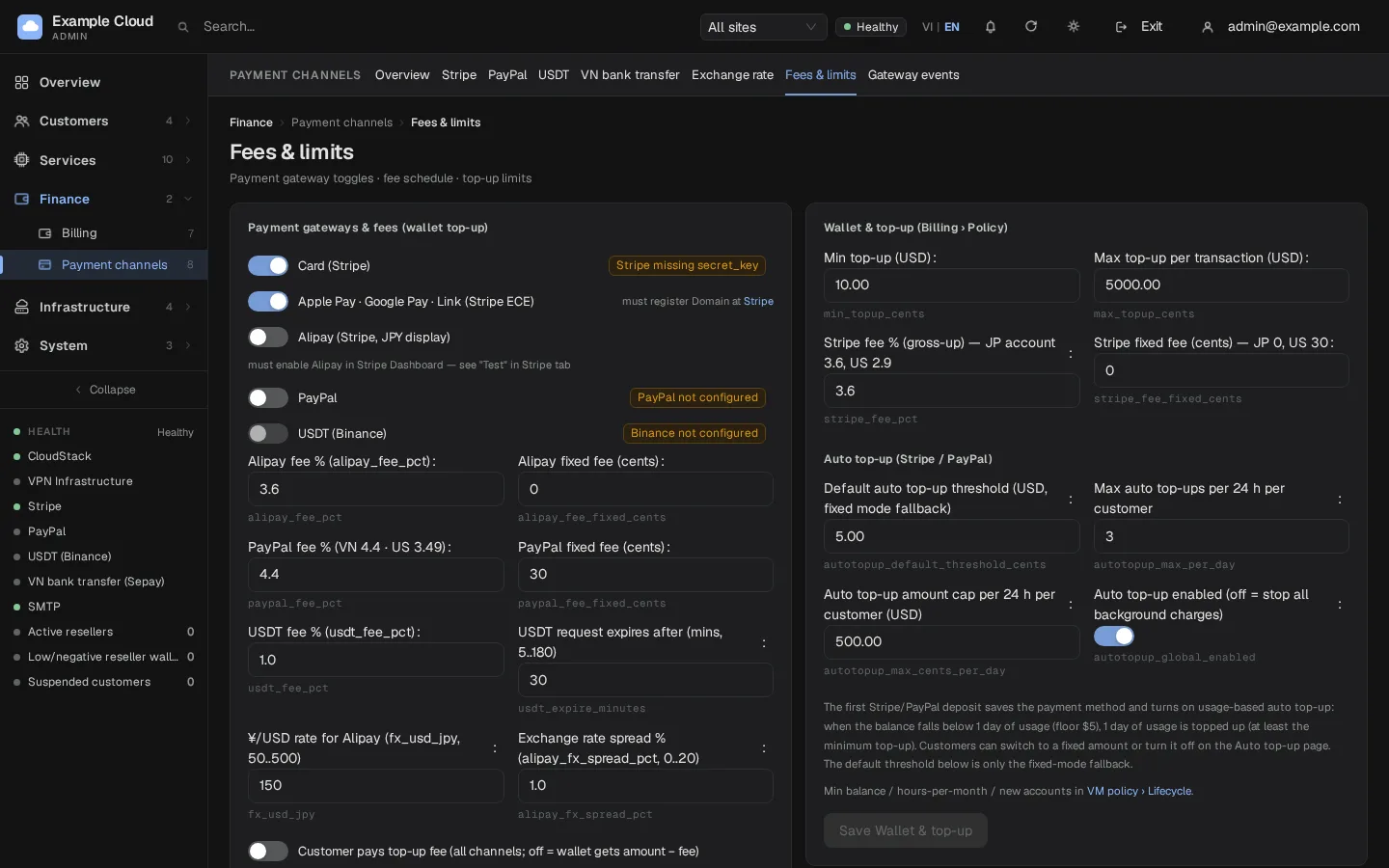
- Open Fees & limits (
/payments/fees), find the card Payment gateways & fees (wallet top-up), turn the channel on with its switch and click Save channels & fees.
Switches and fees (Fees & limits)
| Setting | Default | Meaning |
|---|---|---|
| Card (Stripe) | On | Card form on the deposit screen. Hidden until Stripe has a secret key. |
| Apple Pay, Google Pay, Link | On | Wallet buttons. They only appear when the domain is verified at Stripe. |
| Alipay | Off | Needs Alipay activated in the Stripe Dashboard. |
| PayPal | Off | Shown only when PayPal is configured. |
| USDT (Binance) | Off | The switch is locked until the deposit address has been verified against Binance. |
| Stripe fee % / fixed (cents) | 3.6 % and 0 | Used to show the customer the fee and to compute the credited amount. Set it to your real Stripe tariff. |
| PayPal fee % / fixed | 4.4 % and 30 cents | Same, for PayPal. |
| USDT fee % | 1 % | Same, for USDT. |
| Customer pays top-up fee | Off | On: the customer pays amount + fee and the wallet receives the full amount. Off: the fee is deducted and the wallet receives the amount minus the fee. |
The customer always sees the fee and the final wallet credit before paying. Turning a channel off hides the button and the server refuses new payments with method_disabled (HTTP 403).
Top-up limits
The minimum and maximum amount per top-up are on the same page — see Minimum top-up.
Verify
- On the overview table the channel shows Enabled and Configured; the Last test column is filled after you click Test on the channel's tab.
- Sign in to the portal as a test customer and open Billing › Deposit. The channel button is present.
- Make a small payment (see the channel's article for test cards or sandbox accounts). The balance rises, a Top-up received notification appears, and the payment is listed in Finance › Billing › Top-ups (
/billing/deposits).
Limits & notes
- Overview columns: 30 days (number of payments, successes, failures and volume), Stuck 24h (payments still pending after a day) and Unmatched (USDT or bank transfers that arrived but match no order). The KPI row adds the 30-day volume, the number of faulty channels (enabled but not configured, or stuck payments) and the total unmatched.
- Webhook events are listed under Payment channels › Gateway events (
/payments/events). Stripe has its own tab; PayPal and USDT share one. A failed event can be replayed — the wallet ledger is idempotent, so replaying never credits twice. - Resellers can have their own Stripe, PayPal, USDT and bank channels. Their rows also appear here, and the site selector in the header filters them. See Resellers.
- Refunds: Stripe and PayPal payments can be refunded from the payment list; USDT payments cannot be refunded to the source (the server answers
usdt_no_refund). - Maintenance mode still accepts gateway webhooks, so a payment made just before maintenance is not lost.
Troubleshooting
| Symptom | Cause | Fix |
|---|---|---|
| Channel missing on the customer's deposit screen | Switched off, not configured, or (VN bank) the interface is not Vietnamese | Check Fees & limits and the channel tab; see Bank transfer (Vietnam). |
| The KPI Faulty channels is above 0 | A channel is enabled without credentials, or payments are pending for more than 24 hours | Open the row and click Configure; for stuck payments open Gateway events and replay. |
| Customer paid but the balance did not change | The webhook did not arrive | Check the webhook URL on the channel tab, then replay the event in Gateway events. |
Server answers method_disabled | The switch is off | Turn it on in Fees & limits and save. |
| USDT switch is greyed out | Deposit address not verified | Click Test & verify address on the USDT tab. |