Proxmox VE
Open Source Proxmox billing software and customer portal
NexCMP turns your Proxmox VE clusters into a cloud you can sell. Customers order virtual machines in a portal on your domain, are billed by the hour or month from a prepaid wallet, and resellers run their own white-label sites. NexCMP Free is $0 and includes every module.
Proxmox VE is a VM source in NexCMP from version 1.3.0. It runs next to Apache CloudStack: one install can sell VMs from both.NexCMP Source: full source code for $499, one-time. Use, modify and self-host for your own business. You may sell the services you operate; you may not resell or redistribute the source code or builds. Source license terms
 API tokennode, storage, bridge
What NexCMP adds to Proxmox VE
Proxmox VE runs your hosts and virtual machines. It is not a billing system or a place where your customers order and manage servers. NexCMP is that layer: a customer portal and admin console that provisions VMs on your Proxmox VE clusters through the Proxmox API, charges for them, and gives your resellers their own storefronts.
You keep using Proxmox VE to run the cluster. Your customers never log in to it: they see plans, operating systems and their own servers in the NexCMP portal, and no cluster, node or VM ID.
Plans, a prepaid wallet, invoices, payment gateways, vouchers, resellers, quotas and support tickets all work for Proxmox VE virtual machines.
How your customers manage a Proxmox VE virtual machine
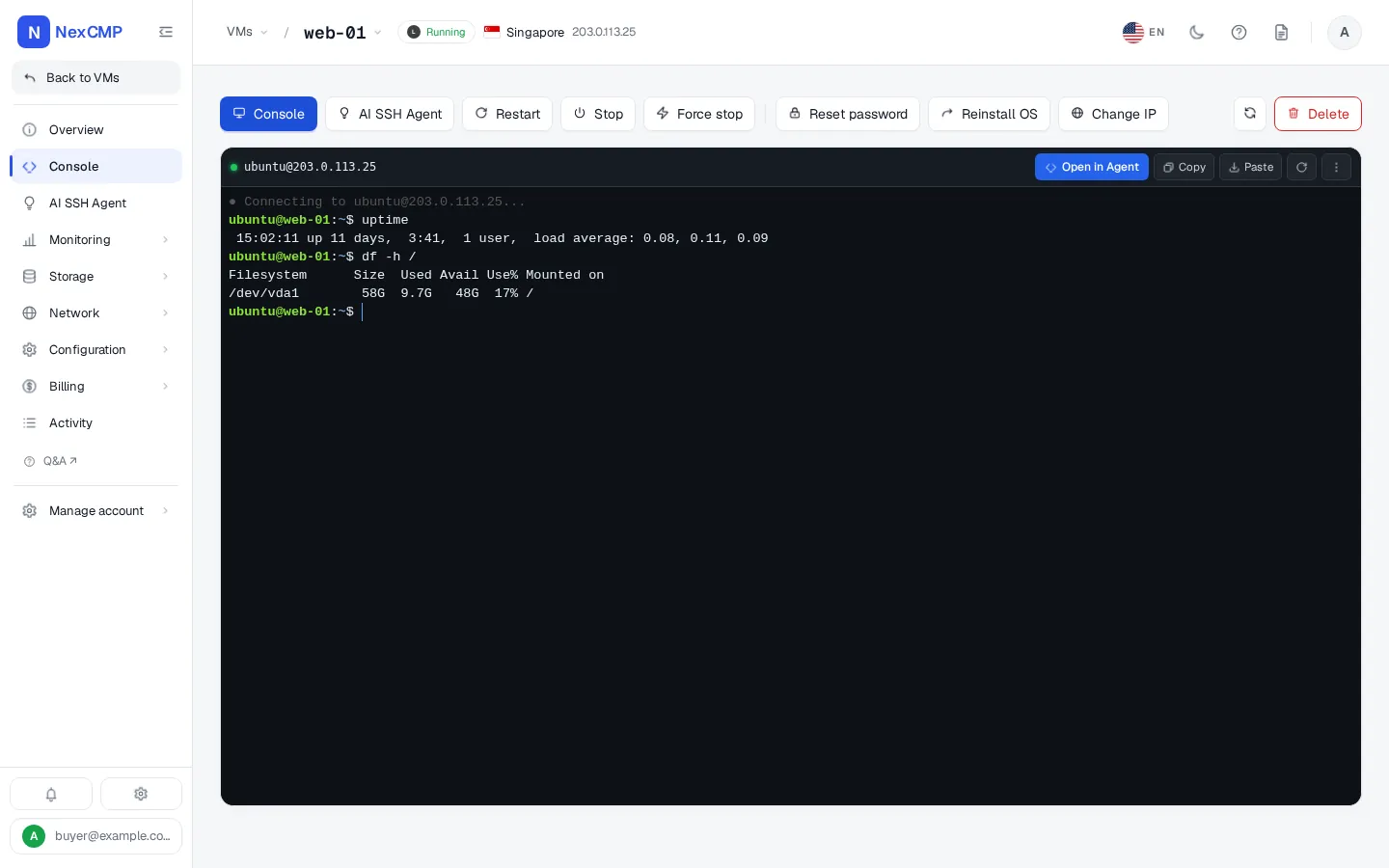
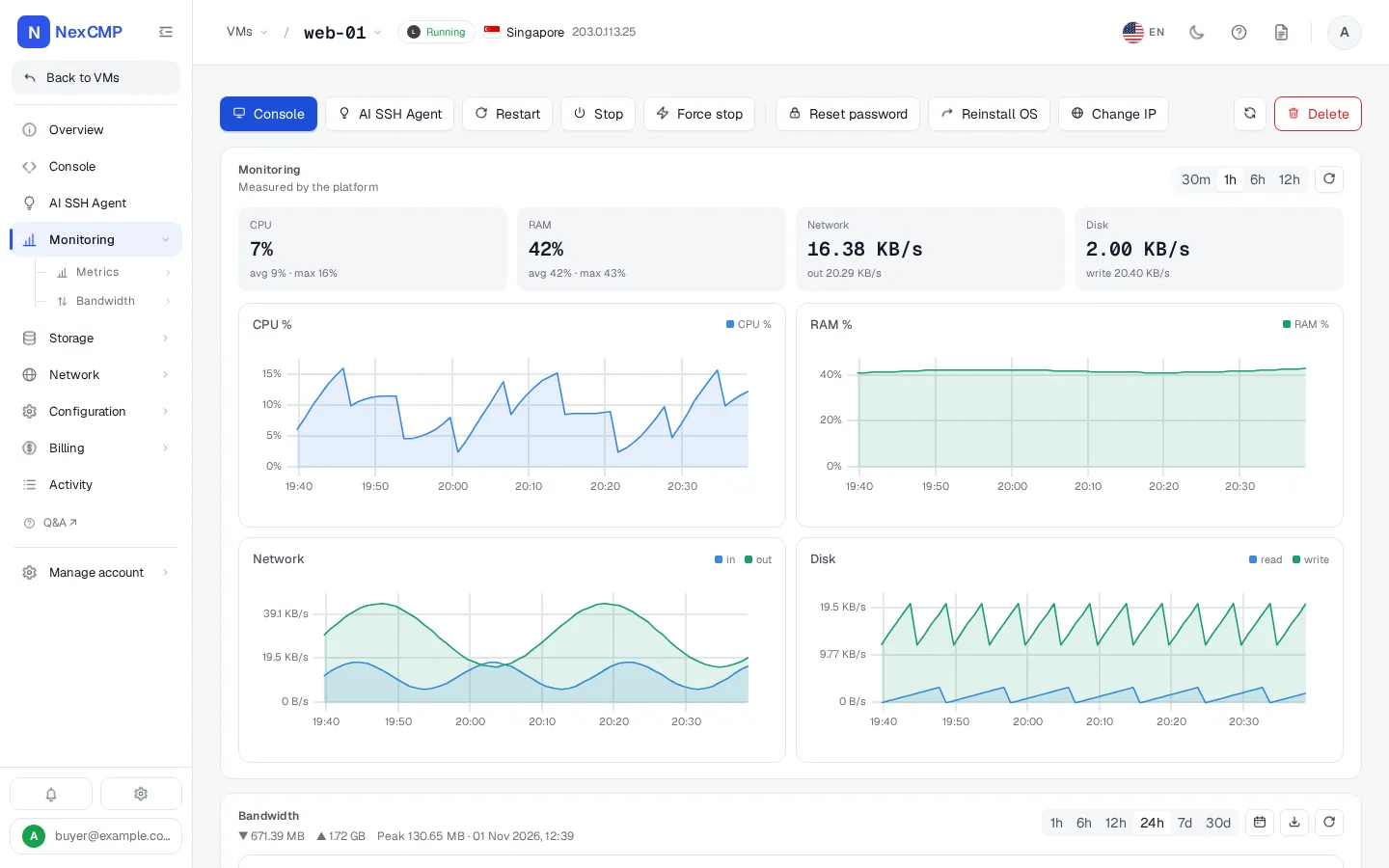
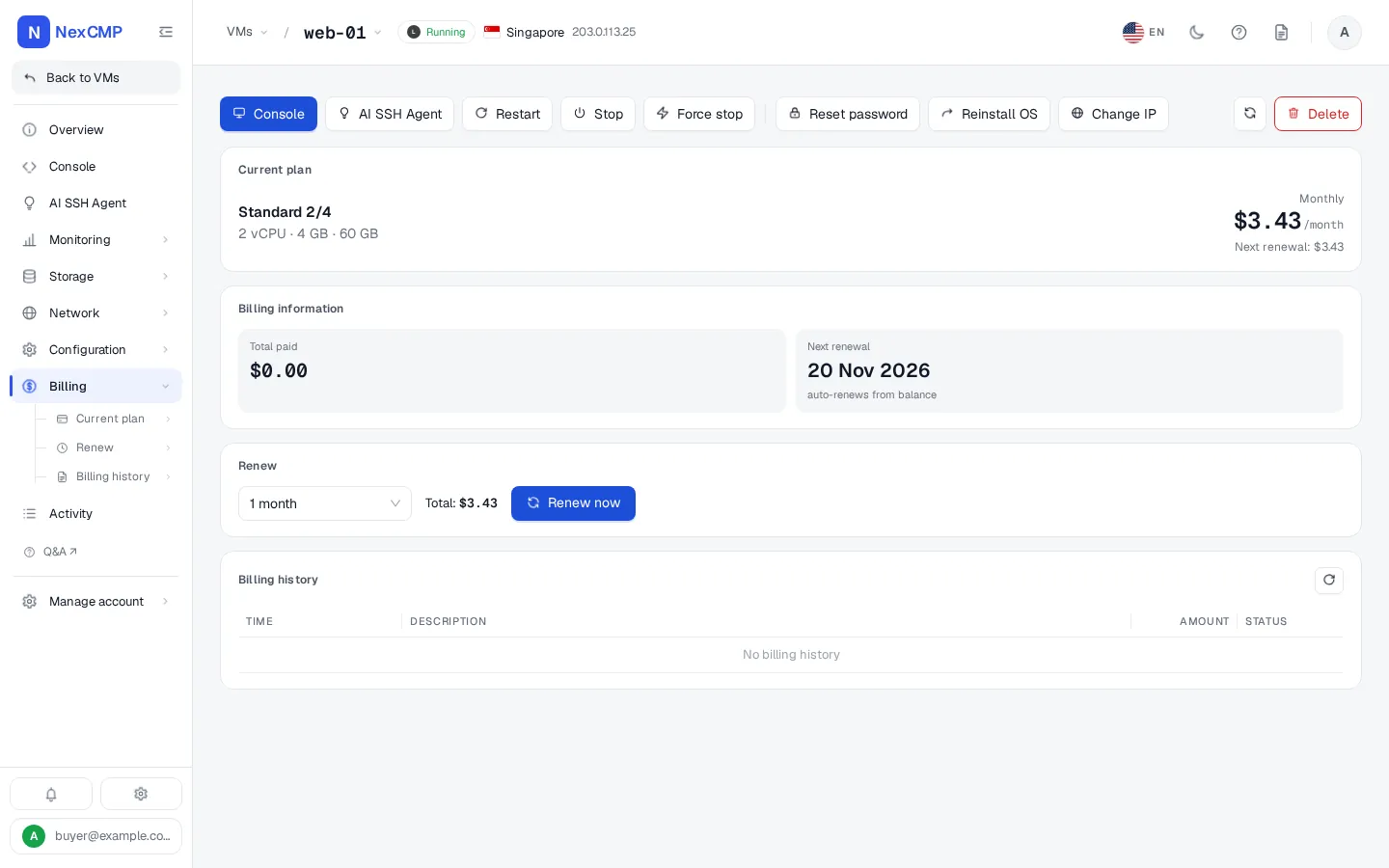
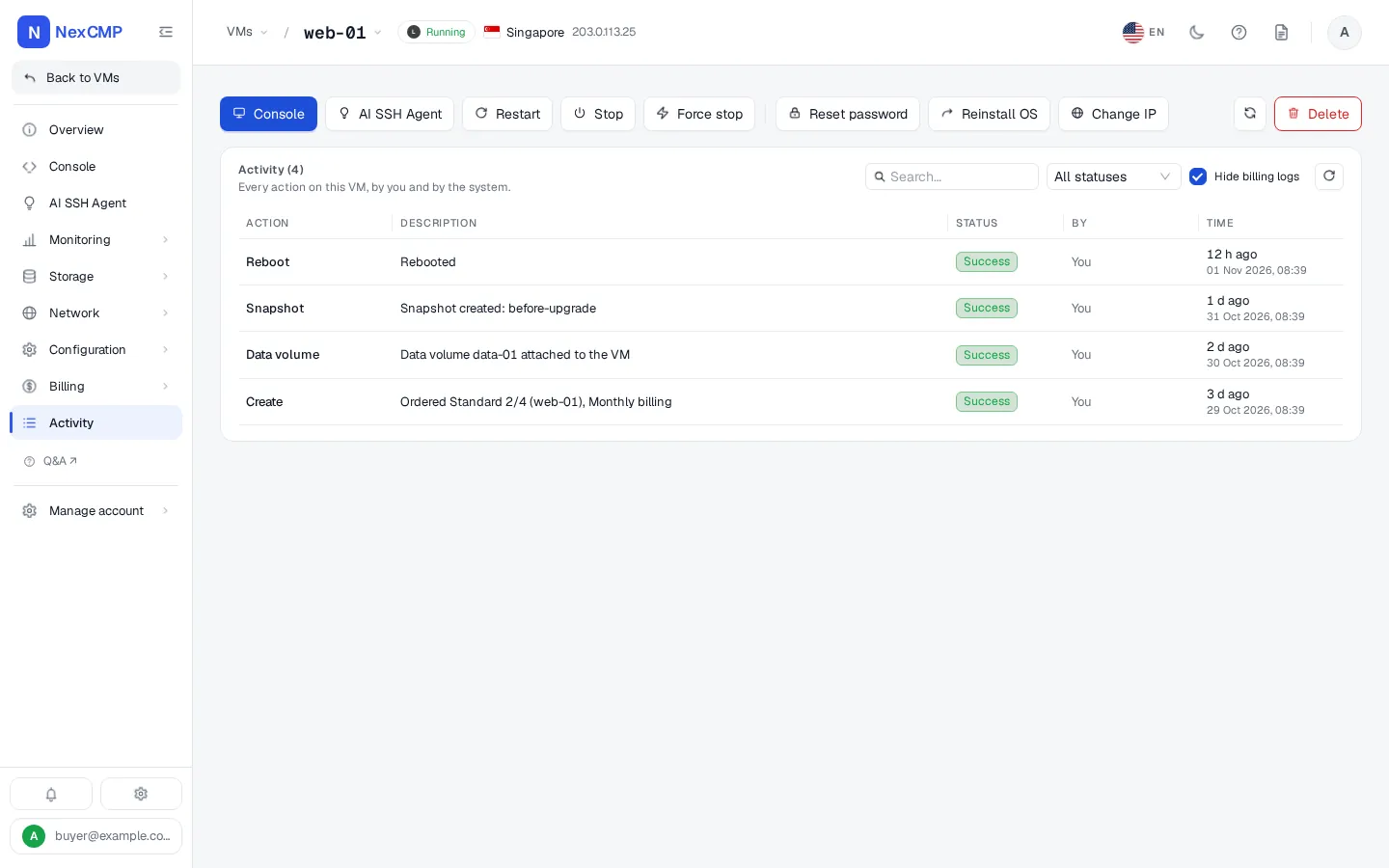
The customer portal is the same for CloudStack and Proxmox VE servers; tabs a provider cannot serve are hidden. Screens show sample data from a CloudStack zone.
Overview
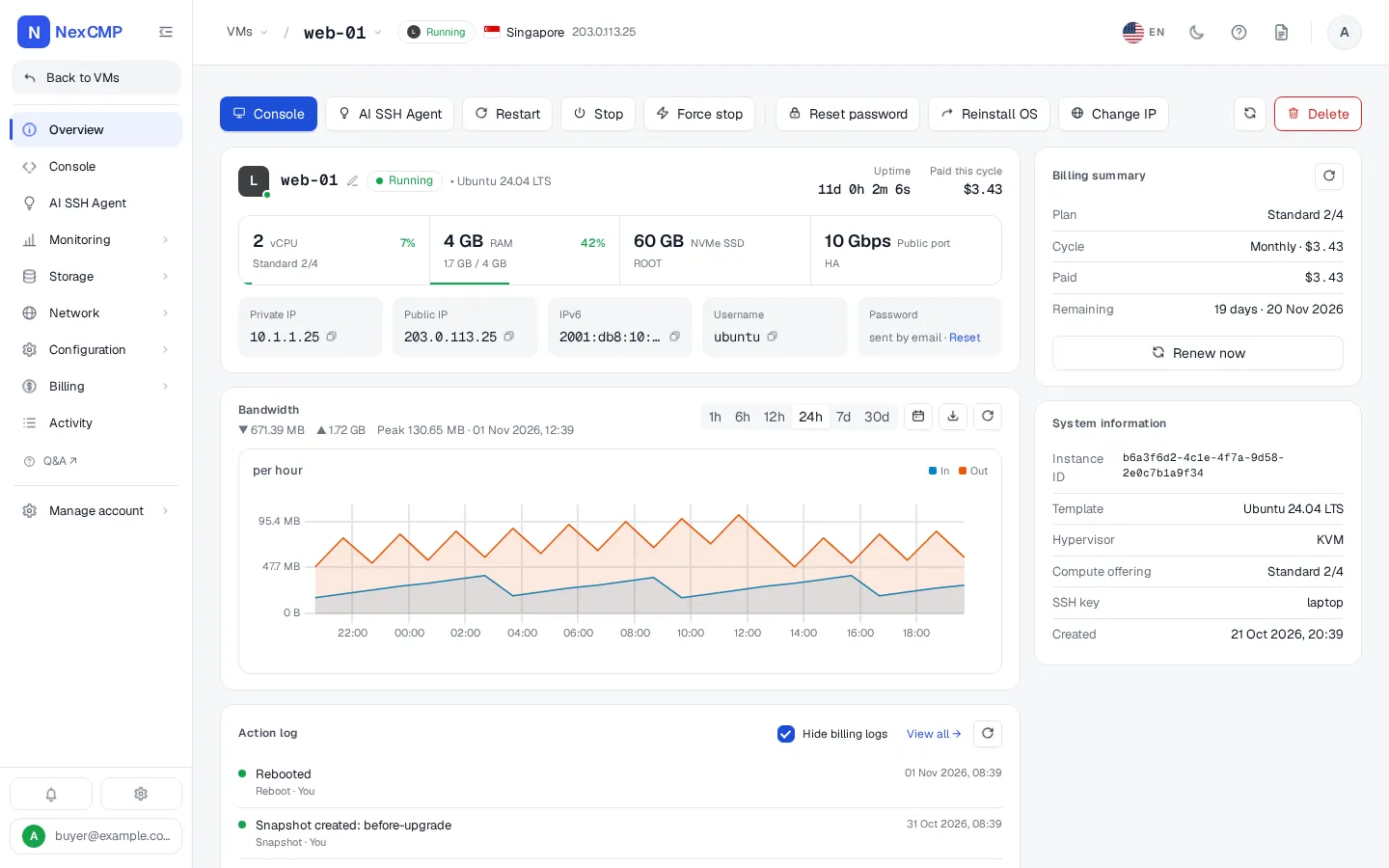
Console
Monitoring
Billing
Activity
Proxmox VE features in NexCMP
What the Proxmox VE source does today — the customer portal only shows what a source supports.
One or more clusters
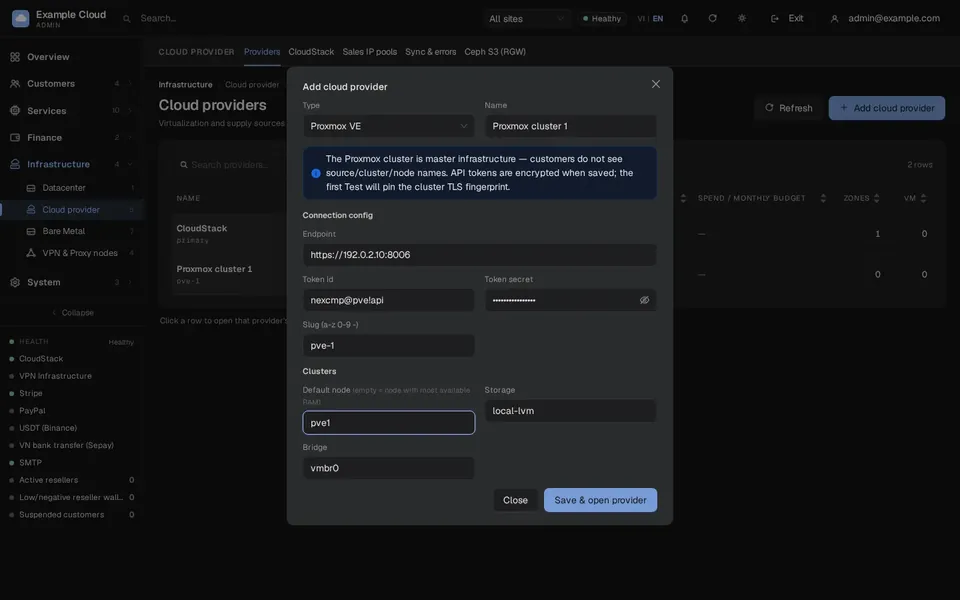
Add Proxmox VE clusters under Infrastructure > Providers. Edit or switch off a cluster without touching the others, and test the connection from the admin console.
Encrypted token, pinned TLS
The API token is stored encrypted. The first successful connection test pins the cluster's TLS certificate (SHA-256), so later connections only trust that certificate.
IP pools
Give each cluster IP pools with gateway, DNS and bridge. NexCMP assigns the next free address when a VM is created and returns it when the VM is deleted. Network, broadcast and gateway addresses are never handed out, and an address is never assigned twice.
OS templates from cloud images
Build operating-system templates on a cluster from cloud images; the build runs in the background. Customers pick an OS by name and version.
Plans bound to a source
Every plan has an infrastructure source. A plan set to a Proxmox cluster only offers the operating systems built on that cluster. Duplicate a plan to sell the same size from another source.
CPU, RAM and disk
NexCMP picks a node with enough free memory, clones the template and sets vCPU, RAM, disk, network and the login.
Browser console
A noVNC console in the customer portal. It connects through a one-time ticket and a secure WebSocket bridge that checks the cluster's pinned certificate.
Metrics
CPU, memory, network and disk graphs for every VM, read from Proxmox VE.
Snapshots
Create, list, restore and delete snapshots from the portal, up to five per VM.
Reinstall and password reset
Reinstall rebuilds the VM from its OS template and keeps its IP and configuration, with a new password set through the QEMU guest agent. Customers can also reset the password from the portal.
Power actions and delete
Start, stop, reboot and force stop. Deleting a VM frees its disk and returns its IP address to the pool.
Resize
Change vCPU and RAM or grow the disk. The VM is shut down, changed and started again automatically.
Import existing VMs
Bring virtual machines that already run on a cluster under NexCMP management.
Proxmox VE next to CloudStack
One install can sell from CloudStack and Proxmox VE. A zone can be backed by both at the same time; each plan says which one it uses.
What your customers can do with Proxmox VE servers
Each item is a button or form in the customer portal for a VM that runs on your Proxmox VE cluster.
Order and pay
Pick a location, a plan, a billing cycle, an operating system, a hostname and a quantity, then pay from the prepaid wallet. Top up the wallet through the payment channels you enable, redeem codes and read the billing history.
Power control
Start, stop, reboot and force stop the server.
Console
Open the browser console, even when the network inside the VM is broken.
Reinstall and password
Reinstall the operating system from its template, keeping the IP address and configuration, and reset the root password.
Resize
Change vCPU and RAM or grow the disk. The VM is shut down, changed and started again.
Snapshots
Create, list, restore and delete snapshots, up to five per VM.
Statistics
CPU, memory, network and disk graphs, plus the server's activity log and billing tab.
Delete
Delete the server; hourly billing stops, its disk is freed and its IP address returns to your pool.
Support
Ask the AI chat, open a ticket or talk to your staff from the same portal.
What you can do as the operator
Each item is in the NexCMP admin console.
Connect clusters
Add one or more Proxmox VE clusters with an API token, test the connection, pin the TLS certificate, edit or switch off a cluster, and replace its token later.
Cluster settings
Choose the default node, disk storage, network bridge, optional VLAN, CPU type and the first VM id for customer VMs.
IP pools
Define address pools with gateway, DNS and bridge. NexCMP assigns and returns addresses itself.
OS templates
List the cloud-init templates you built per node, or build one from a cloud image with the template card in the admin console.
Zones and plans
Attach a cluster to a zone, then create plans with the cluster as their infrastructure source, price them by hour or month, and clone a plan to sell the same size from another source.
Import existing VMs
List the VMs already on a cluster and assign one to a customer account at no charge. The customer can run it but only an administrator can delete it. A protected import is done from the command line.
Resellers
Create white-label resellers with their own domain, brand and wholesale prices; they sell the same plans.
Billing and money
Enable payment channels (Stripe, PayPal, USDT, bank transfer in Vietnam), issue top-up codes, set quotas for new accounts and read the wallet ledger, invoices and reports.
Customers and support
Find customers, act on their VMs, log in as a customer for one hour, and answer tickets and chats.
Control and audit
Read the audit log, send alerts to Telegram and e-mail, protect the console with two-factor authentication, and back up and update NexCMP.
How it works
From a Proxmox VE cluster to the first customer VM.
Install NexCMP
Get NexCMP free at nexcmp.com/deploy, then run the one-command installer on an Ubuntu 22.04 or 24.04 x86_64 server. Update later from the admin console.
Connect your Proxmox VE cluster
In the admin console open Infrastructure > Providers and add the cluster with its API address and an API token. Run Test connection: NexCMP checks the cluster and pins its TLS certificate.
Add an IP pool and OS templates
Define the address range, gateway, DNS and bridge VMs should use, then build OS templates on the cluster from cloud images.
Create plans and choose the source
Set the size and the hourly or monthly price of each plan and pick the Proxmox cluster as its infrastructure source. Resellers can sell the same plans on their own domains.
Customers order and manage VMs
A customer picks a plan and an OS and pays from the prepaid wallet. NexCMP picks a node, clones the template, configures the VM, starts it and bills it by the hour or month. The customer then uses the console, metrics, snapshots, reinstall and power actions from the portal.
Requirements
NexCMP 1.3.0 or later, installed on an Ubuntu 22.04 or 24.04 x86_64 server with at least 2 GB of RAM. The NexCMP server must be able to reach the Proxmox VE API on port 8006; the console goes through the same port.
Proxmox VE: the Proxmox source is developed and tested against Proxmox VE 9.2. Other versions are not tested.
- Storage for templates: the storage used to build OS templates must allow the import content type, so cloud images can be downloaded to it.
- Guest agent: password reset and reinstall use the QEMU guest agent. The template builder installs it on first boot; the agent starts a few minutes after a new VM first boots.
- Network: a bridge on the cluster and an IP range for the pool that your customers' VMs can use.
Proxmox API token permissions
Create a dedicated Proxmox user and an API token for NexCMP with privilege separation enabled, and give a role to both the user and the token at path /. With privilege separation, the token's effective rights are the overlap of the two. These are the privileges NexCMP is tested with; the example uses a custom role named NexCMP.
pveum role add NexCMP --privs "VM.Allocate VM.Clone VM.Config.CDROM VM.Config.CPU VM.Config.Cloudinit VM.Config.Disk VM.Config.HWType VM.Config.Memory VM.Config.Network VM.Config.Options VM.PowerMgmt VM.Audit VM.Console VM.Snapshot VM.Snapshot.Rollback VM.Backup VM.GuestAgent.Audit VM.GuestAgent.Unrestricted Datastore.Audit Datastore.AllocateSpace Datastore.AllocateTemplate Sys.Audit Sys.AccessNetwork SDN.Use SDN.Audit Pool.Audit Mapping.Audit Mapping.Use"
pveum user add nexcmp@pve
pveum user token add nexcmp@pve nexcmp --privsep 1
pveum acl modify / --roles NexCMP --users nexcmp@pve
pveum acl modify / --roles NexCMP --tokens 'nexcmp@pve!nexcmp'
How NexCMP compares for Proxmox billing
Billing panels with a Proxmox VE integration, as each vendor publishes it.
NexCMP
- Proxmox VE support (as published)
- Proxmox VE as a built-in VM source, next to Apache CloudStack (from 1.3.0)
- Hourly / prepaid billing
- Yes — hourly or monthly from a prepaid wallet, native
- Starting price
- Free (Source $499 one-time)
WHMCS
- Proxmox VE support (as published)
- Proxmox VE, OpenStack, SolusVM, Apache CloudStack (via a third-party module)
- Hourly / prepaid billing
- Partial — hourly/usage billing needs a third-party module (e.g. ModulesGarden)
- Starting price
- $34.95/mo — Plus, up to 250 clients
HostBill
- Proxmox VE support (as published)
- Apache CloudStack, OpenStack, Proxmox, Virtualizor, VMware vCloud Director, SolusVM 2, Virtuozzo
- Hourly / prepaid billing
- Yes — hourly, prepaid credit and hybrid billing are native
- Starting price
- $599 one-time — Startup edition
Blesta
- Proxmox VE support (as published)
- Proxmox (first-party module), Virtualizor (official module), SolusVM v1, VirtFusion
- Hourly / prepaid billing
- Not confirmed publicly
- Starting price
- $17.95/mo — Monthly Branded
ClientExec
- Proxmox VE support (as published)
- Proxmox VE, SolusVM, Virtualizor
- Hourly / prepaid billing
- Not confirmed publicly
- Starting price
- $16.95/mo — Branded Leased
Paymenter
- Proxmox VE support (as published)
- Proxmox, Virtualizor, VirtFusion, plus panel integrations (cPanel, Plesk, DirectAdmin)
- Hourly / prepaid billing
- Not confirmed publicly
- Starting price
- Free — open source; managed cloud from $5/mo
Vendor facts come from each vendor's public pages, read on 2026-09-27 (see the sources below and the Compare page). Prices may exclude tax and may have changed — check the vendor. NexCMP covers virtual machines on Proxmox VE and Apache CloudStack; it is not a general web-hosting automation platform.
Free Proxmox billing: what you get
NexCMP Free is $0 for the first year: the full build with every module, unlimited reseller domains and one primary domain per license. There is no per-VM, per-customer, per-node or per-cluster fee. Free is for network operators with their own ASN and subnet: apply at nexcmp.com/deploy with an email on the company domain listed for the ASN or subnet in the registry; each application is reviewed.
If you want the code itself, NexCMP Source is $499 one-time, bought directly or added to your Free license: download the full source, modify it and build your own version to run on your panel, with all apps built for you and 30 working days with an expert engineer.
Proxmox billing: frequently asked
Does NexCMP support Proxmox VE?
Is Proxmox billing in NexCMP really free?
Which Proxmox VE version do I need?
What permissions does the Proxmox API token need?
Can I sell Proxmox VE and Apache CloudStack from one NexCMP?
Do my customers see Proxmox?
How are IP addresses assigned to Proxmox VMs?
What can a customer do with a Proxmox VM?
Does NexCMP replace the Proxmox web interface?
Can resellers sell Proxmox VMs on their own domain?
Sources
Competitor facts in the comparison table come from these vendor pages, read on 2026-09-27. Confirm current terms with each vendor.
Get NexCMP free
Free, with Proxmox VE and every other module included. Install it on your server today, or look at the customer portal screens first.

Last updated: