Kubernetes and Private Cloud
Where in the admin: Kubernetes: Infrastructure › Cloud provider › CloudStack › Kubernetes (CKS) (
/infra/cloudstack?tab=k8s), then Services › Kubernetes (Overview, Clusters, Versions, Policy). Private Cloud: Services › Private Cloud (Overview/vpc, VPC/vpc/list, Plans & pricing/vpc/plans). Switch both modules on under System › Admin › License & updates.
What it does
- Kubernetes. Customers create managed Kubernetes clusters on your CloudStack with CloudStack Kubernetes Service (CKS). The control plane is free; customers pay for worker nodes. NexCMP creates a separate network and public IP for each cluster and keeps each customer's clusters apart.
- Private Cloud. Customers get a private network (a CloudStack VPC) with a router, subnets (tiers), firewall rules (network ACLs) and virtual machines inside it. It is sold by bandwidth plan with dedicated, unmetered speed (for example 50, 100, 500 Mbps, 1 and 3 Gbps). Each customer can have one VPC by default.
Both are built on CloudStack and use its API through the same connection.
Requirements
Kubernetes
| Item | Requirement |
|---|---|
| CloudStack | 4.23 (tested). CKS must be enabled (cloud.kubernetes.service.enabled = true). |
| Account | A Domain Admin account in the dedicated domain, so NexCMP can create a CloudStack project for each customer and resource limits inside it. See CloudStack. |
endpoint.url | The CloudStack global setting must point to your management API, reachable from the cluster VMs. NexCMP shows the value and the result of an endpoint check. |
| Versions | At least one Kubernetes supported-version entry with its binaries ISO, in state Enabled. Versions that are past end of life cannot be put on sale. |
| Control-plane offering | A free service offering with exactly 2 vCPU, 2048 MB RAM and a CPU cap (limitcpuuse = true), visible to the account. The server rejects anything else with cp_offering_invalid. |
| Network | A CKS-capable isolated network offering that is enabled. |
| IPs | Free public IPv4 addresses in the sellable range; each cluster uses one. |
| Capacity | Each cluster costs you 2 to 4 GB of RAM for the control plane and a small router VM. Watch the capacity tabs. |
Private Cloud
| Item | Requirement |
|---|---|
| CloudStack | 4.23 (tested) with VPC enabled. |
| VPC offering | One VPC offering. A dual-stack offering gives each tier an IPv6 /64 as well. |
| Tier network offerings | One network offering per bandwidth plan, created for VPC, with the network rate (Mbps) equal to the plan, plus one locked offering of 1 Mbps that is applied when a VPC is locked for non-payment. |
| Account | The dedicated account (Domain Admin recommended). VPC networks stay in the account, not in projects. |
| IPs | Free public IPv4 addresses (each VPC uses one for source NAT). |
| Address space | Each VPC receives a /16 from 10.128.0.0/9. Keep that range unused on your own networks. |
| Depends on | CloudStack connected; the module Private Cloud. |
Prepare the infrastructure
Kubernetes: enable CKS and add versions
Enable the service and set the endpoint, then restart the management server:
bashcmk update configuration name=cloud.kubernetes.service.enabled value=true cmk update configuration name=endpoint.url value=https://cloudstack.example.com/client/api sudo systemctl restart cloudstack-managementendpoint.urlis called back by the cluster's controller, so it must be an address the cluster VMs can reach.Build a Kubernetes binaries ISO for the version you want to sell, with the
create-kubernetes-binaries-iso.shscript from the CloudStack source tree, host it on a web server and register it:bashcmk add kubernetessupportedversion name="Kubernetes 1.35.0" semanticversion=1.35.0 \ url=https://files.example.com/setup-v1.35.0-calico-amd64.iso zoneid=<zone-id> \ mincpunumber=2 minmemory=2048 cmk list kubernetessupportedversions filter=name,semanticversion,state,isostateWait for the ISO state to become Ready and the version to be Enabled.
Create the control-plane offering, limited to the NexCMP domain:
bashcmk create serviceoffering name=K8S-CP-2-2 displaytext="Kubernetes control plane" \ cpunumber=2 cpuspeed=1000 memory=2048 limitcpuuse=true offerha=false domainid=<domain-id>Check that a CKS network offering is enabled:
bashcmk list networkofferings state=Enabled forvpc=false filter=id,name
Private Cloud: create the offerings
In the CloudStack UI (Service Offerings › Network Offerings › Add network offering) or with cmk:
List what you have:
bashcmk list vpcofferings filter=id,name,state cmk list networkofferings forvpc=true filter=id,name,networkrate,stateUse an enabled VPC offering (dual-stack if you want IPv6). If you need a new one, clone CloudStack's default VPC offering and enable it.
For each bandwidth plan you sell, create a network offering for VPC (clone the default "isolated network offering for VPC networks") and set Network rate (Mb/s) to the plan's speed:
50,100,500,1000,3000. Enable each offering.Create one more offering with network rate 1 (
VPC-LOCKED-1M) for locked VPCs: customers can still reach their servers over SSH, but the speed is limited.Note the UUID of every offering. NexCMP needs them in the next section.
The shipped offering IDs do not exist in your cloud
The Private Cloud form is pre-filled with offering UUIDs that belong to another CloudStack installation. Replace every one with your own, or the first VPC order fails.
Connect in NexCMP
Kubernetes
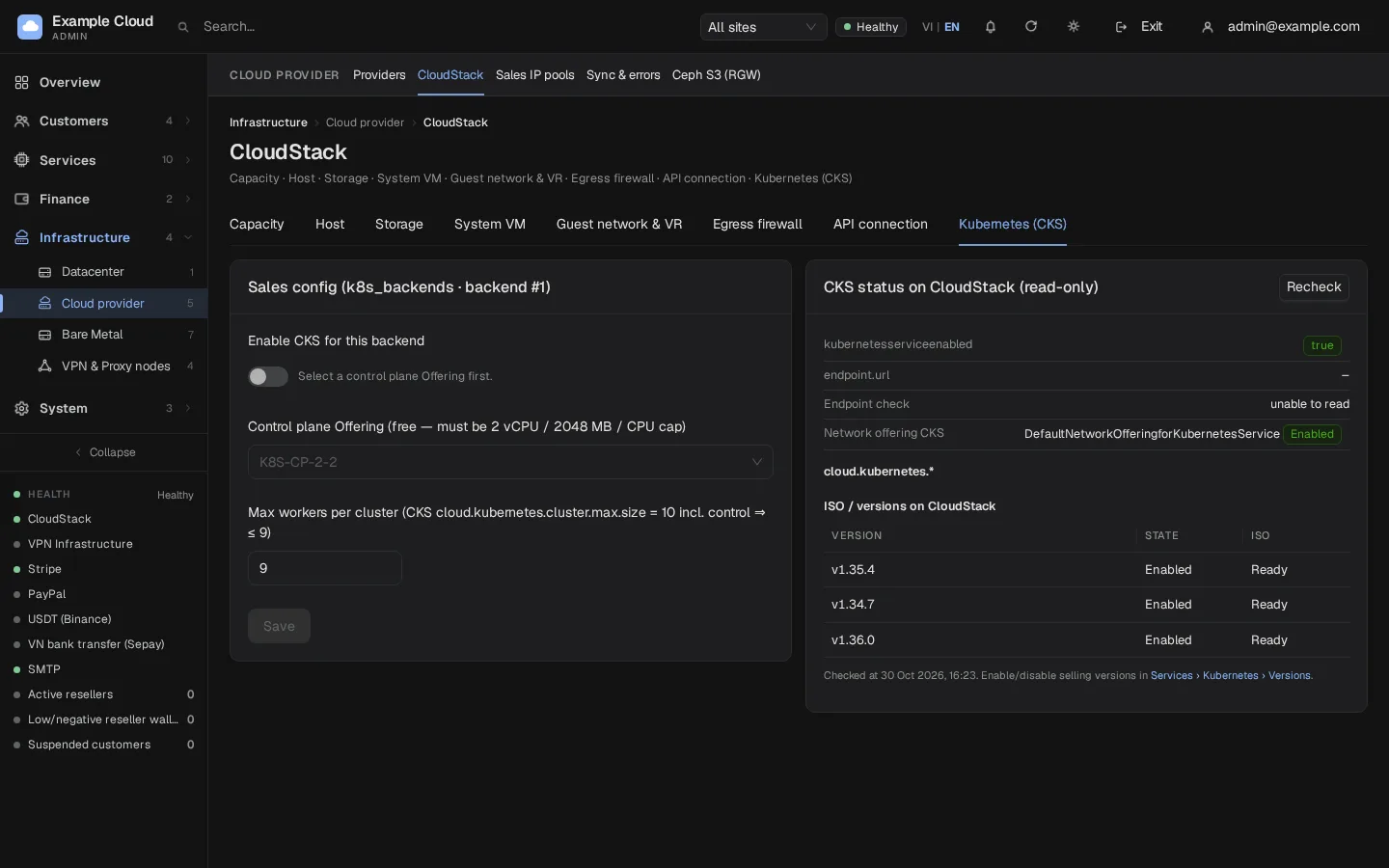
Open Infrastructure › Cloud provider › CloudStack and choose the tab Kubernetes (CKS). The right-hand card CKS status on CloudStack (read-only) shows
kubernetesserviceenabled,endpoint.urlwith Endpoint check, the CKS network offering, thecloud.kubernetes.*settings and the list of ISOs and versions. Click Recheck after you fix something.In Sales config, choose the Control plane Offering (a warning appears if it is not exactly 2 vCPU / 2048 MB / CPU cap), set Max workers per cluster (1 to 9: CKS allows 10 nodes including the control node), switch Enable CKS for this backend on and Save. The switch stays disabled until an offering is chosen.
Open Services › Kubernetes › Versions and click Sync from CloudStack. Switch Available for new clusters on for the versions you sell, set the default and, if you like, an End of life (EOL) date.
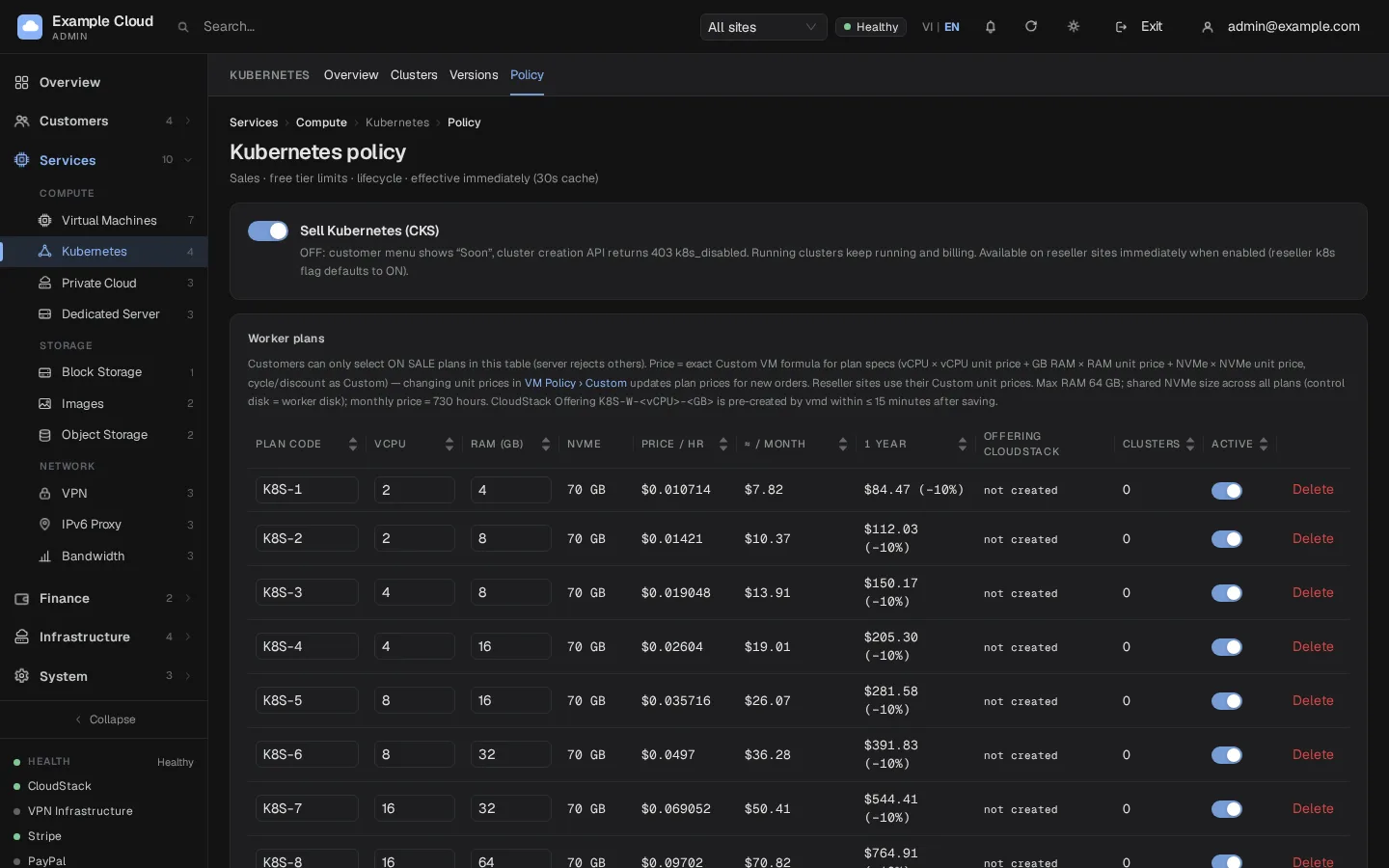
Open Services › Kubernetes › Policy. In Worker plans add plans with a Plan code (A-Z, 0-9, hyphen, up to 16 characters). Set NVMe per worker (GB), Min and max workers and the cluster limits (active clusters per account, creations per 24 hours, global cap, concurrent CKS operations). Then switch Sell Kubernetes (CKS) on. At least one plan must stay on sale.
Private Cloud
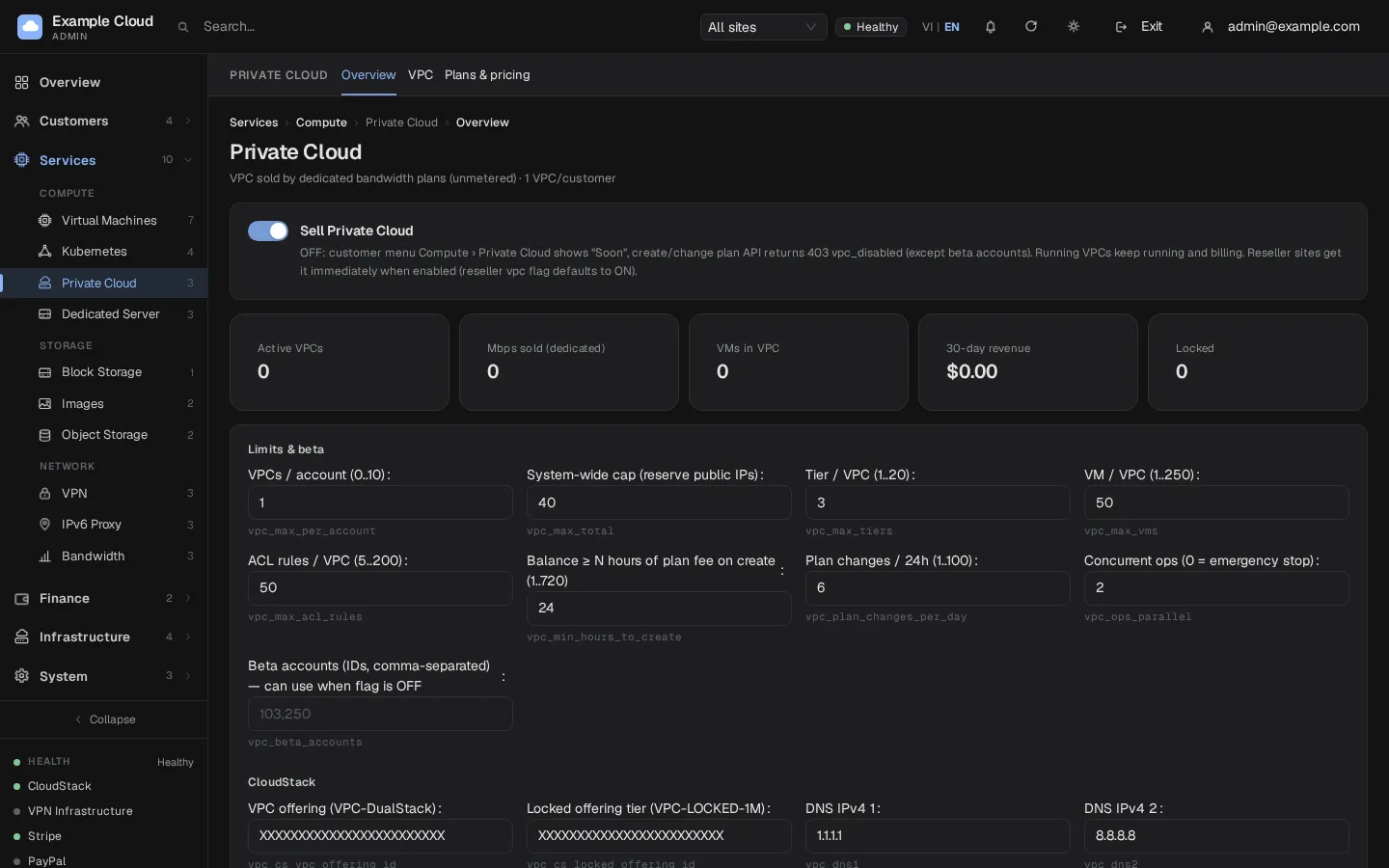
Open Services › Private Cloud (Overview). In the policy card replace VPC offering and Locked offering tier with your own UUIDs. Check the limits (VPCs per account, tiers, VMs and ACL rules per VPC, balance in hours of plan fee needed to create, plan changes per 24 hours, concurrent operations where 0 is an emergency stop) and the DNS servers. Click Save (a reason is asked).
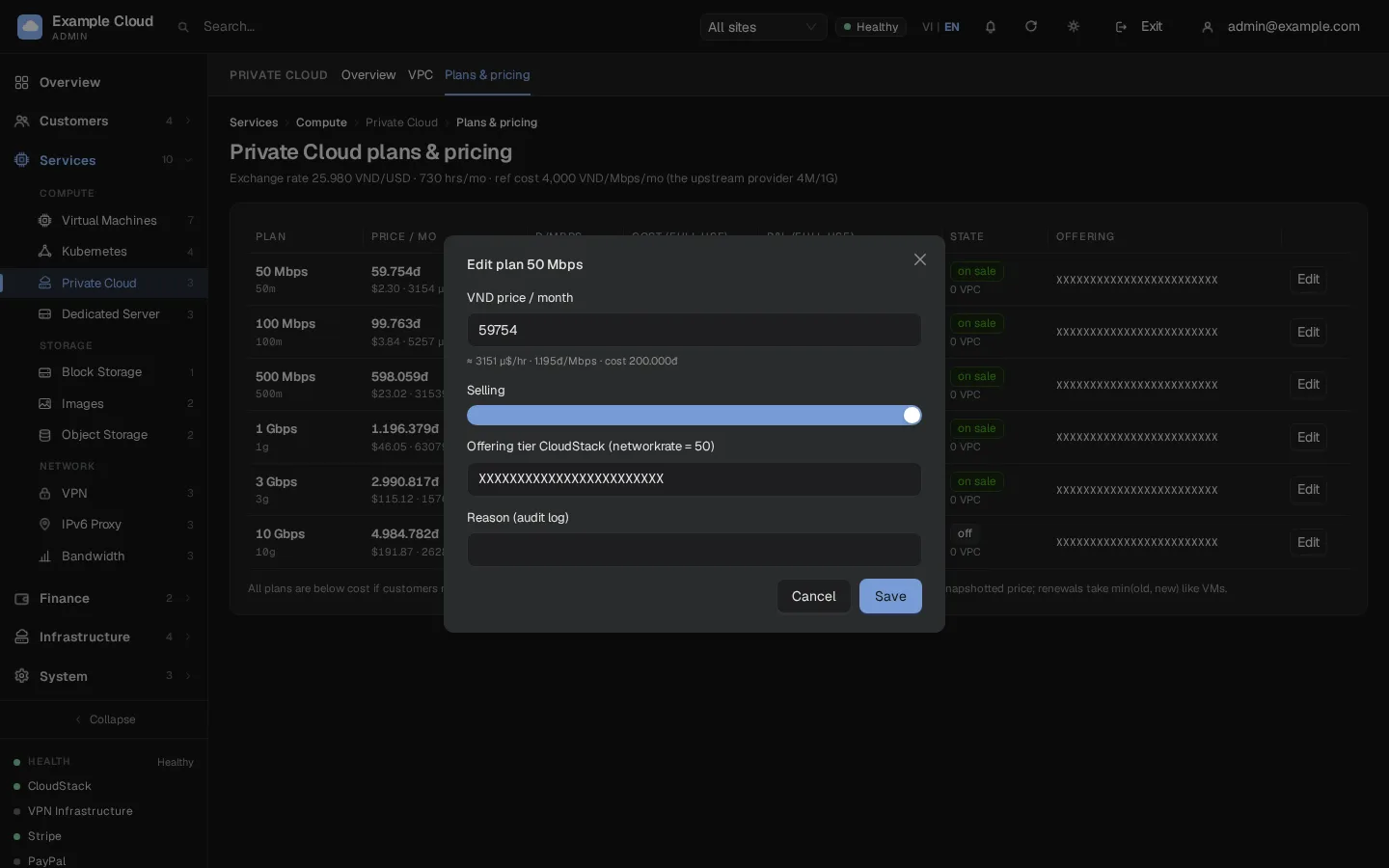
Open Services › Private Cloud › Plans & pricing. For each plan click Edit and set the VND price per month, On sale and the CloudStack tier offering UUID whose network rate equals the plan's Mbps. The row shows cost and profit at full use, so you can see which plans are below your cost.
Switch Sell Private Cloud on. To try it first, add test account IDs to Beta accounts: those accounts can use the service while the sales switch is off.
Verify
- Kubernetes: the status card shows
kubernetesserviceenabled: true, a good endpoint check and an enabled version. Create a one-worker test cluster as a customer; it should reach running andkubectl get nodesshould show it ready. Delete it afterwards: the network and IP go back to the pool. - Private Cloud: create a VPC with the smallest plan as a test customer. The VPC shows active, a tier gets its subnet, a VM in the tier reaches the Internet through the VPC router, and Change plan to a larger plan takes effect within about 20 seconds without dropping connections.
Limits and notes
- Kubernetes: workers are billed like VMs at the plan prices and count as VMs in the VM limits. A cluster can have at most 9 workers because of the CKS limit of 10 nodes.
- Kubernetes: the control plane, router and public IP of a cluster are free to the customer; you carry their cost.
- Private Cloud: all plans are unmetered. Prices in the form are Vietnamese dong per month; the cost column uses a reference price that is not yours, so use your own numbers.
- A locked VPC is limited to 1 Mbps, is not billed and is not deleted automatically.
- Private Cloud uses one router per VPC, not a redundant pair. If its host fails, CloudStack rebuilds it in a few minutes.
Troubleshooting
| Symptom | Cause | Fix |
|---|---|---|
cp_offering_invalid / "This Offering is not 2 vCPU / 2048 MB / limitcpuuse" | The control-plane offering has other sizes or no CPU cap | Create the offering as in step 3 and choose it again. |
| Enable CKS switch is disabled | No control-plane offering chosen | Choose one first. |
kubernetesserviceenabled: false | CKS is off in CloudStack | Enable it and restart the management server. |
| Endpoint check fails | endpoint.url is not reachable from the cluster VMs | Set a reachable URL, restart the management server, click Recheck. |
| "EOL: cannot enable for sale" | The version's end-of-life date has passed | Register a newer version. |
| "No versions: click Sync from CloudStack" | No Kubernetes version registered | Register a version and sync. |
| "CKS backend is OFF: customers cannot create clusters even if the sales flag is enabled" | The sales switch is on but the CKS backend is off | Enable CKS on the CloudStack tab. |
| "At least 1 plan must be on sale" | Last worker plan removed | Keep at least one plan, or switch Kubernetes sales off. |
| Cluster stuck creating | Not enough capacity or a missing ISO | Check the capacity tabs and the version's ISO state. |
| A new VPC fails in the first step | The VPC offering or tier offering ID is not valid | Replace every offering UUID with one from your CloudStack. |
| "cs_offering_id must be a UUID" | An offering ID is not a UUID | Paste the id from cmk list networkofferings. |
| Plan change fails | The new tier offering does not exist or the network rate is wrong | Check the offering UUID and its network rate. |