AI provider
Where in the admin: System › Settings › AI provider (
/settings/ai). The AI module switch is there and on System › Admin › License & updates (/license), card Module.
What it does
AI Chat (automatic support chat) and the AI Agent (VM administration in plain language) do not ship with a built-in model. You choose your own provider: any service that offers an OpenAI-compatible chat/completions API — for example OpenAI, OpenRouter, a LiteLLM gateway or your own vLLM server. NexCMP stores the endpoint and the API key (encrypted) and uses them for every AI feature. You pay the provider directly.
Requirements
| Item | Requirement |
|---|---|
| Endpoint | An OpenAI-compatible base URL (https://api.openai.com/v1, https://ai.example.com/v1). NexCMP appends /chat/completions to a URL that ends in /v1; for any other URL it appends /v1/chat/completions; a URL that already ends in /chat/completions is used as is. |
| Model | A model that supports tool (function) calling. Both AI Chat and the Agent rely on it. |
| API key | A key for that endpoint. Prefer a key with a spending cap on the provider side (for example a LiteLLM virtual key with a monthly budget). |
| Network | The panel server must reach the endpoint over HTTP(S). A URL typed in the form is only allowed to point to the Internet on ports 80, 443, 8080 or 8443; to use an internal address save the provider first and then test. |
| Dependencies | The AI module on. For the Agent see AI Agent. |
Prepare the infrastructure
Sign up with the provider and create an API key. If the provider supports budgets or rate limits, set a monthly limit.
Note the base URL and the exact model name (and, optionally, up to four fallback models).
Test it from the NexCMP server before entering it:
bashcurl -s https://ai.example.com/v1/chat/completions \ -H "Authorization: Bearer XXXX" -H "Content-Type: application/json" \ -d '{"model":"gpt-4o-mini","messages":[{"role":"user","content":"Reply with one word: OK"}]}'A JSON answer with
choices[0].message.contentmeans the endpoint works.
Connect in NexCMP
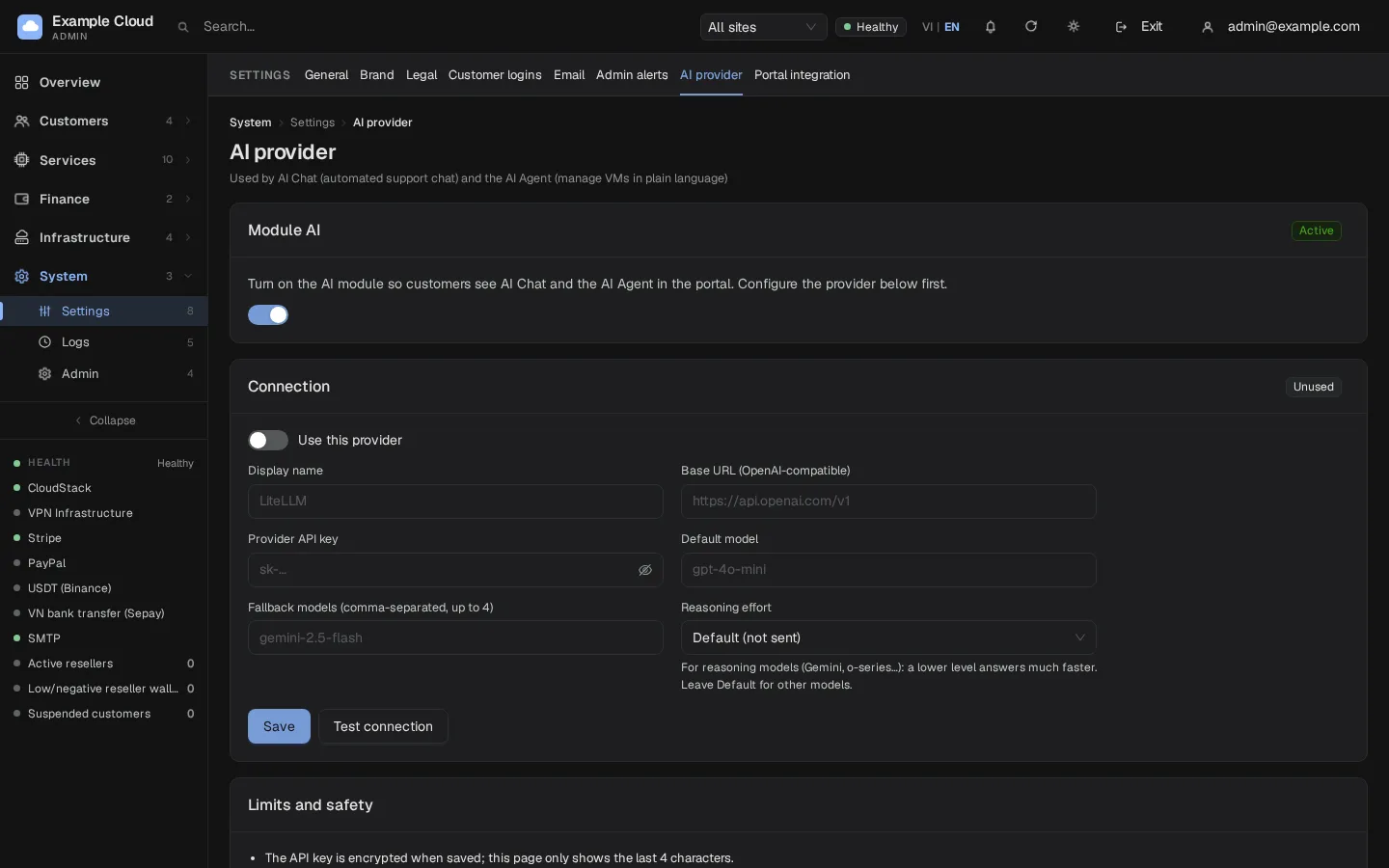
Open System › Settings › AI provider.
In the card Module AI switch the module on. Until it is on, customers do not see AI Chat or the AI Agent in the portal. (You can also switch it in License & updates.)
In the card Connection fill in:
Field Example Notes Use this provider on Needs a base URL, a model and a key to be switched on. Display name LiteLLMUp to 60 characters. Base URL (OpenAI-compatible) https://ai.example.com/v1http://orhttps://, up to 300 characters, no spaces.Provider API key sk-XXXXStored encrypted; afterwards only the last 4 characters are shown. Leave empty to keep the stored key. Default model gpt-4o-miniLetters, digits and - _ . / : @.Fallback models gemini-2.5-flashComma separated, up to 4. Used when the default model fails. Reasoning effort Default (not sent) Minimal,Low,MediumorHigh. For reasoning models (Gemini, o-series) a low level answers much faster. Leave on Default for normal models.Click Save, then Test connection. The test sends one short question and shows
Connected — <model>, <ms> msor the error returned by the provider.
What saving does
- The provider settings are saved as one configuration entry and the key is encrypted with AES-256-GCM, bound to this purpose, using the installation's master key.
- The support settings Primary model and Fallback model (used by AI Chat) are set to your default and first fallback model automatically.
- The change is written to the audit log (endpoint, model, whether the key changed — never the key).
Verify
- Test connection shows green.
- Sign in to the portal as a test customer: the menu now offers AI Chat (or the chat bubble) and AI Agent.
- Ask AI Chat "What is my balance?". An answer that quotes your real balance shows that the provider handles tool calls correctly.
Limits & notes
- One provider. NexCMP uses a single configured provider for Chat, Agent and ticket investigation. Fallback models give resilience within that provider.
- Key safety. The saved key is sent only to the saved endpoint. If you change the Base URL you must type the key again before testing.
- Limits per customer. AI Chat is for signed-in customers only, with per-minute and per-chat message limits. The Agent has a daily call limit per account. See AI Chat and AI Agent.
- Privacy. Customer questions and the data the AI reads for that customer (read-only) are sent to your provider. Say so in your privacy policy.
- Cost control. NexCMP does not meter AI cost; use the provider's budget features.
- The module can be switched off at any time: the AI menu items disappear and the AI routes answer 404
module_disabled. Some background jobs of AI Chat (ticket investigation, delayed replies) pick up the change at the next restart of the panel.
Troubleshooting
| Symptom | Cause | Fix |
|---|---|---|
base_url must be an http(s) URL | Missing scheme or spaces | Use https://host/v1. |
api_key is required to enable the provider | No key stored | Enter the key and save. |
base_url and model are required to enable the provider | Empty field | Fill both. |
| "Base URL blocked: public http(s) only, ports 80/443/8080/8443" | Testing an unsaved internal address or other port | Save the provider first, then test. |
api_key is required (enter the key again when you change the endpoint) | The Base URL differs from the saved one | Retype the key. |
model: letters, digits and - _ . / : @ | Invalid character | Use the provider's exact model id. |
fallback_models: up to 4 model names | Too many | Keep four or fewer. |
| Test fails with 401 | Wrong key | Check the key and the endpoint. |
| Test fails with 404 or "model not found" | Wrong path or model | Check the base URL (/v1) and the model id. |
Too many tests — wait a minute (429) | More than 10 tests per minute | Wait. |
| Portal still shows no AI menu | Module off, or provider not "in use" | Turn the module on and enable the provider. |