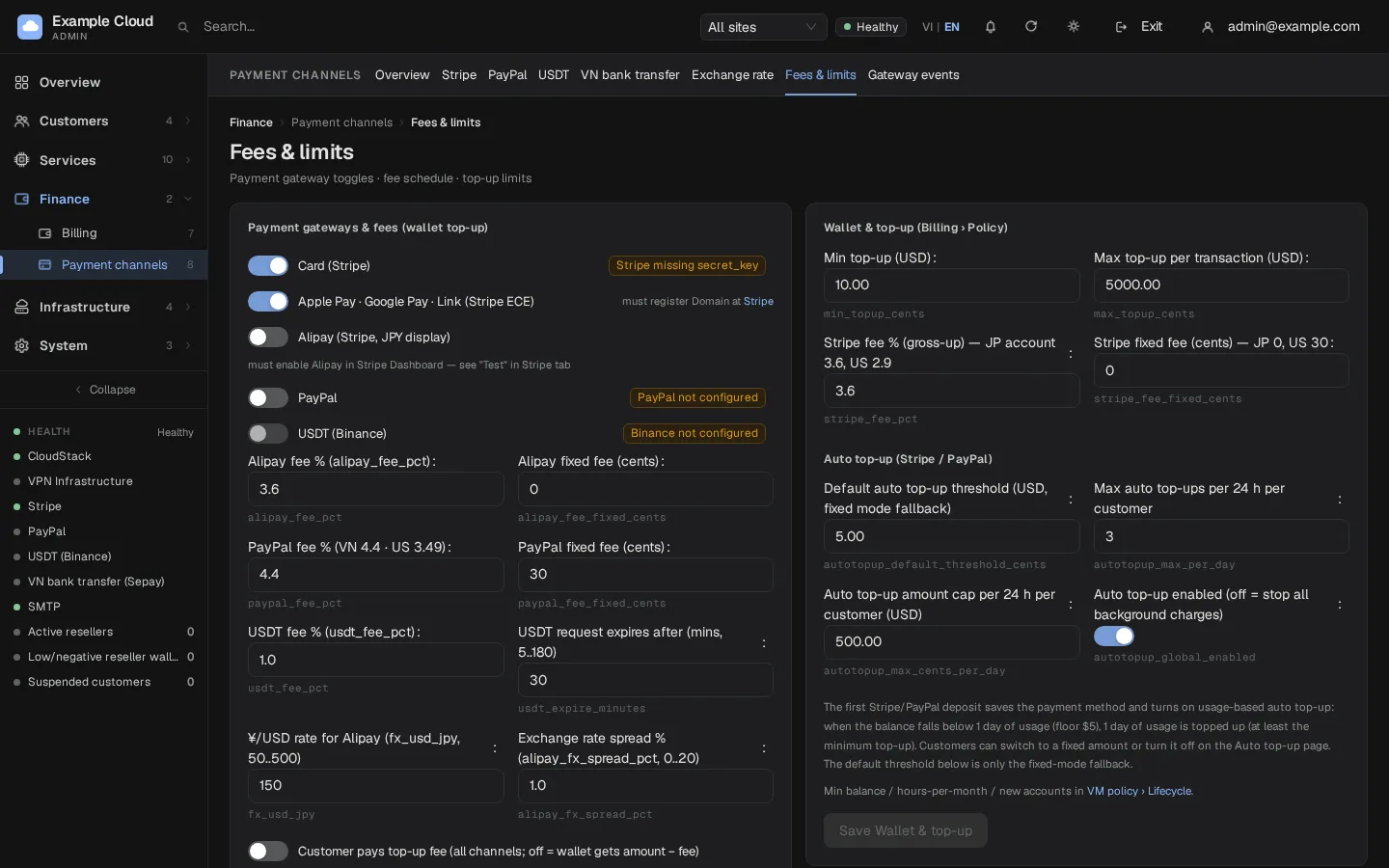
Minimum top-up
Where in the admin: Finance › Payment channels › Fees & limits (
/payments/fees), card Wallet & top-up (Billing › Policy).
What it does
Every payment channel rejects an amount below the minimum top-up or above the maximum top-up per transaction. The defaults are $10.00 and $5,000.00. Use the minimum to avoid tiny payments that cost more in gateway fees than they are worth.
Requirements
| Item | Requirement |
|---|---|
| Role | An administrator. |
| Dependencies | None. |
Set the limits
- Open Finance › Payment channels › Fees & limits (
/payments/fees). - In the card Wallet & top-up (Billing › Policy) edit Min top-up (USD) and Max top-up per transaction (USD).
- Click Save Wallet & top-up.
| Setting | Default | Allowed range | Rule |
|---|---|---|---|
| Min top-up (USD) | $10.00 | $0 to $10,000 | Must be less than or equal to the maximum. |
| Max top-up per transaction (USD) | $5,000.00 | $1 to $1,000,000 | Must be at least the minimum. |
The values are stored in cents (min_topup_cents, max_topup_cents).
Where the limits apply
| Place | Behaviour |
|---|---|
| Card, Apple/Google Pay, Link, Alipay, PayPal, USDT | Amounts outside the range are refused by the server. The portal shows "Enter an amount between {min} and {max}". |
| VN bank transfer | The VND amount must be inside the Sepay limits and its USD value (what the wallet receives) inside the minimum and maximum. The portal shows the larger of the two VND minimums. See Bank transfer (Vietnam). |
| Automatic top-up | Every automatic charge is at least the minimum and at most the maximum. In fixed mode the customer's amount must be between the minimum and $1,000. |
| Top-up codes (Vouchers) | Not affected. |
| Admin credit / debit | Not affected. |
| Reseller wallet top-up | A separate minimum (rs_topup_min_cents, default $20) under Resellers › Defaults. |
Related floors
The minimum top-up is not the only balance rule. These are in Services › Virtual Machines › Policy (/vm/policy):
| Rule | Default | Meaning |
|---|---|---|
Minimum balance (min_balance_cents) | $5.00 | The least wallet balance a customer needs to create a VM. |
| Quotas | Off | When Quotas are on, creating a VM also needs a balance covering a number of hours of that VM. See Quotas. |
Verify
- In the portal open Billing › Deposit and type an amount just under your minimum. The pay button is disabled and the range message appears.
- Enter the minimum and confirm the payment starts.
Limits & notes
- A change applies to new payments. Orders already created keep the amounts they were created with.
- The customer-facing hint ("Minimum $10.00, maximum $5,000.00") and the quick-amount buttons follow the new limits automatically.
- If you display VND (the Exchange rates page), the minimum is converted at the stored rate for display only; the wallet and the limits stay in USD.
Troubleshooting
| Symptom | Cause | Fix |
|---|---|---|
| "Minimum top-up must be less than or equal to the maximum" | Values crossed | Lower the minimum or raise the maximum. |
| Customer cannot pay a small amount through VN bank transfer | Sepay VND minimum or the USD minimum is higher | Lower Min / order on the bank page or the USD minimum. |
Server error invalid_argument on a top-up | Amount outside the range | Ask for an amount inside the displayed range. |