Quotas
Where in the admin: Services › Virtual Machines › Policy › Quota tab (
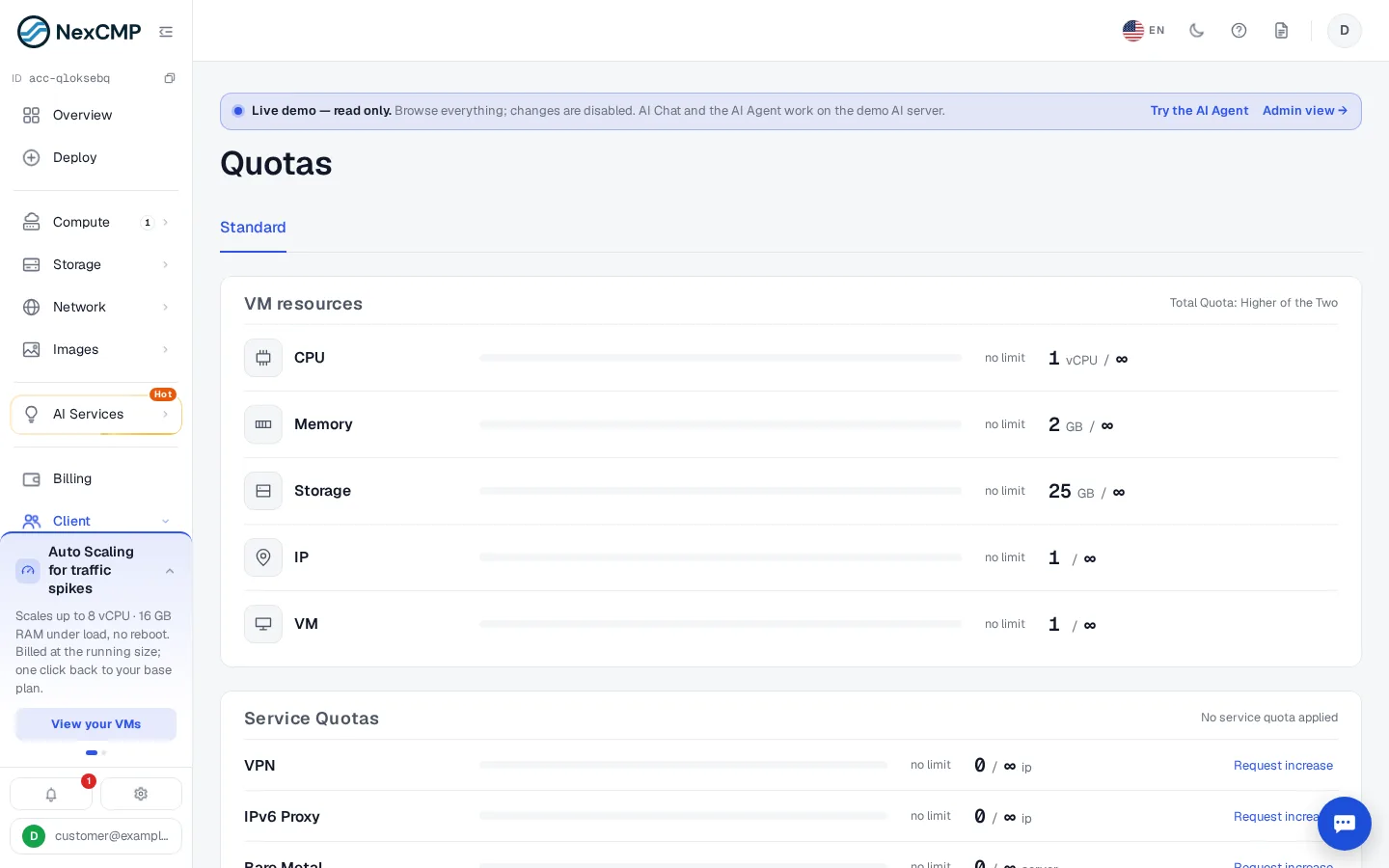
/vm/policy?tab=quota). Per customer: Customers › List › a customer › Overview (/customers/<id>), card Quota. Where in the portal: Client › Quotas (/client/quotas).
What it does
Quotas protect you from abuse by new accounts: the more real money a customer has put into the wallet, the more resources they may create. There are two layers:
- VM and Kubernetes resources: total vCPU, RAM and disk, and the number of VMs. Tiers are your fixed plans.
- Service quotas: how many IPs, clusters, VPCs, GB of storage and so on, in five tiers (L0 to L4) driven by the money deposited.
Quotas are checked before anything is charged. A request over the limit is refused with HTTP 403 quota_exceeded and a message telling the customer how much to top up.
Requirements
| Item | Requirement |
|---|---|
| Role | An administrator. |
| Switch | Enable quota (quota_enabled) is off by default. Nothing below applies until you turn it on. |
| Fixed plans | At least one non-custom plan (see Plans) — the resource tiers are your fixed plans. Without any plan only the VM-count rule applies. |
| Dependencies | Service quota rows exist only for the products that are enabled in your installation (VPN, IPv6 proxy, Kubernetes, Private Cloud, Images, Object Storage, Dedicated). |
How the basis is calculated
NexCMP does not look at card payments alone. The basis is the customer's posted wallet balance: gateway top-ups, administrator credits (Credit / debit) and redeemed wallet vouchers all count once, through the wallet ledger. Order discounts and service credits from promotion codes are not wallet money and do not count. The highest basis a customer ever reached is kept (per site) — spending or refunds never lower an already unlocked tier.
VM and Kubernetes resources
- The tiers are the site's fixed plans, sorted by the cost of running them for 24 hours.
- A customer is on the highest tier whose 24-hour cost is not above their basis. The limit is that plan's vCPU, RAM and disk. A customer who cannot afford even the cheapest plan still gets the cheapest plan's resources.
- The usage counted against the limit is every live VM (including locked ones), purchased data volumes (even when detached) and Kubernetes workers and control planes (workers also count as VMs).
- VM count: up to Max VMs at 24h tier (default 2). From the next VM on, the customer's current wallet balance must cover 30 days (720 hours) of all their existing VMs plus the new one, up to Max VMs when meeting 30-day threshold (default 10).
- Creating a VM also needs a balance of at least N hours of that VM (Create VM: balance ≥ N hours, default 2) and the platform minimum balance.
- Making a VM smaller is never blocked. Only the growing dimension is checked, so a customer who is above the disk limit can still add vCPU if the vCPU limit allows.
Configure
Open Services › Virtual Machines › Policy and select the Quota tab.
Switch on Enable quota.
Review the three numbers (all editable):
Field Default Range Create VM: balance ≥ N hours 2 1 to 720 Max VMs at 24h tier 2 1 to 100 Max VMs when meeting 30-day threshold 10 1 to 1000 (not below the previous field) In Tier-based service quotas edit the table (below).
Click Save. NexCMP asks for a reason, which is written to the audit log together with the old and new values. The change applies to all customers.
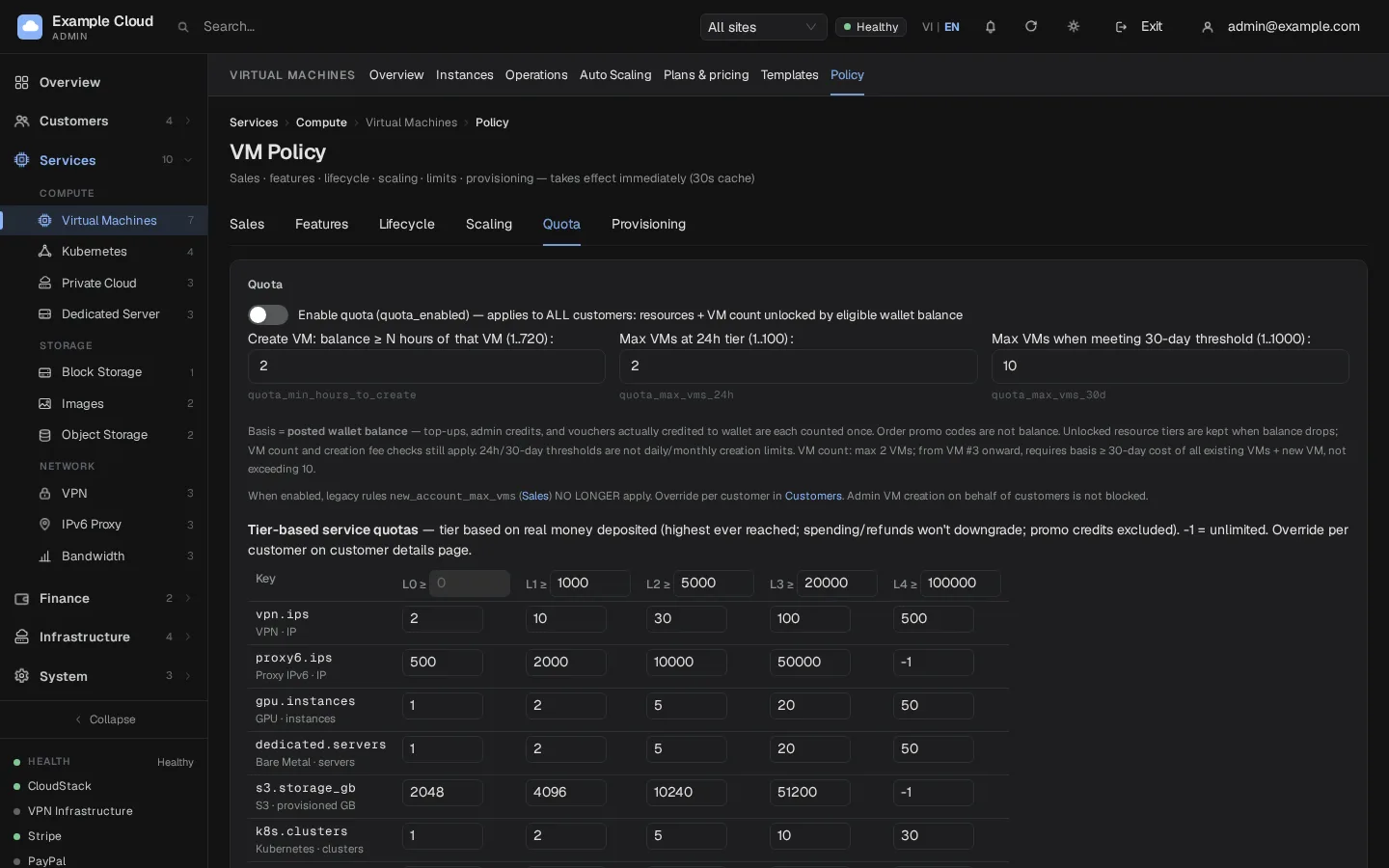
Service quota table
The table has five tiers. The header cells L0 to L4 hold the deposit threshold in cents: the defaults 0, 1000, 5000, 20000, 100000 mean L0 for a new account, L1 from $10, L2 from $50, L3 from $200 and L4 from $1,000. The first threshold must stay 0. Each row sets the quota of one key per tier; -1 means unlimited.
| Key | Meaning | L0 | L1 | L2 | L3 | L4 |
|---|---|---|---|---|---|---|
vpn.ips | VPN IPs | 2 | 10 | 30 | 100 | 500 |
proxy6.ips | IPv6 proxy IPs | 500 | 2000 | 10000 | 50000 | -1 |
dedicated.servers | Bare-metal servers | 1 | 2 | 5 | 20 | 50 |
s3.storage_gb | Object Storage GB allocated | 2048 | 4096 | 10240 | 51200 | -1 |
k8s.clusters | Kubernetes clusters | 1 | 2 | 5 | 10 | 30 |
k8s.workers | Kubernetes worker nodes | 3 | 9 | 18 | 50 | 200 |
vpc.count | Private Cloud networks | 1 | 2 | 5 | 10 | 30 |
images.gb | Custom image storage GB | 50 | 100 | 200 | 500 | 2000 |
The table also lists a few rows for products that are not part of this release; leave them unchanged. A key whose product is turned off is hidden and never enforced. A value must be -1 or between 0 and 10,000,000.
Service quotas follow the funds basis, like the VM tiers: the highest wallet balance reached, not the total of card payments. Reseller customers use the same defaults and the reseller can only view them.
Per-customer overrides
Open Customers › List, then the customer. In Overview find the card Quota.
VM resources: click Quota override and choose one of
- By top-up balance (remove override) — default behaviour;
- Unlimited (including VM count) — removes every cap for this customer;
- a plan tier — fixes the resource ceiling to that plan; the VM-count rule still applies.
Enter a reason. Platform administrators can set any tier; an override set by a reseller cannot exceed the customer's retained basis.
Services: the table under Service quotas shows each key with In use, the effective limit and its Source (tier or override). Click Edit on a row, type the New quota (
-1= unlimited, empty = back to the tier default) and a reason.
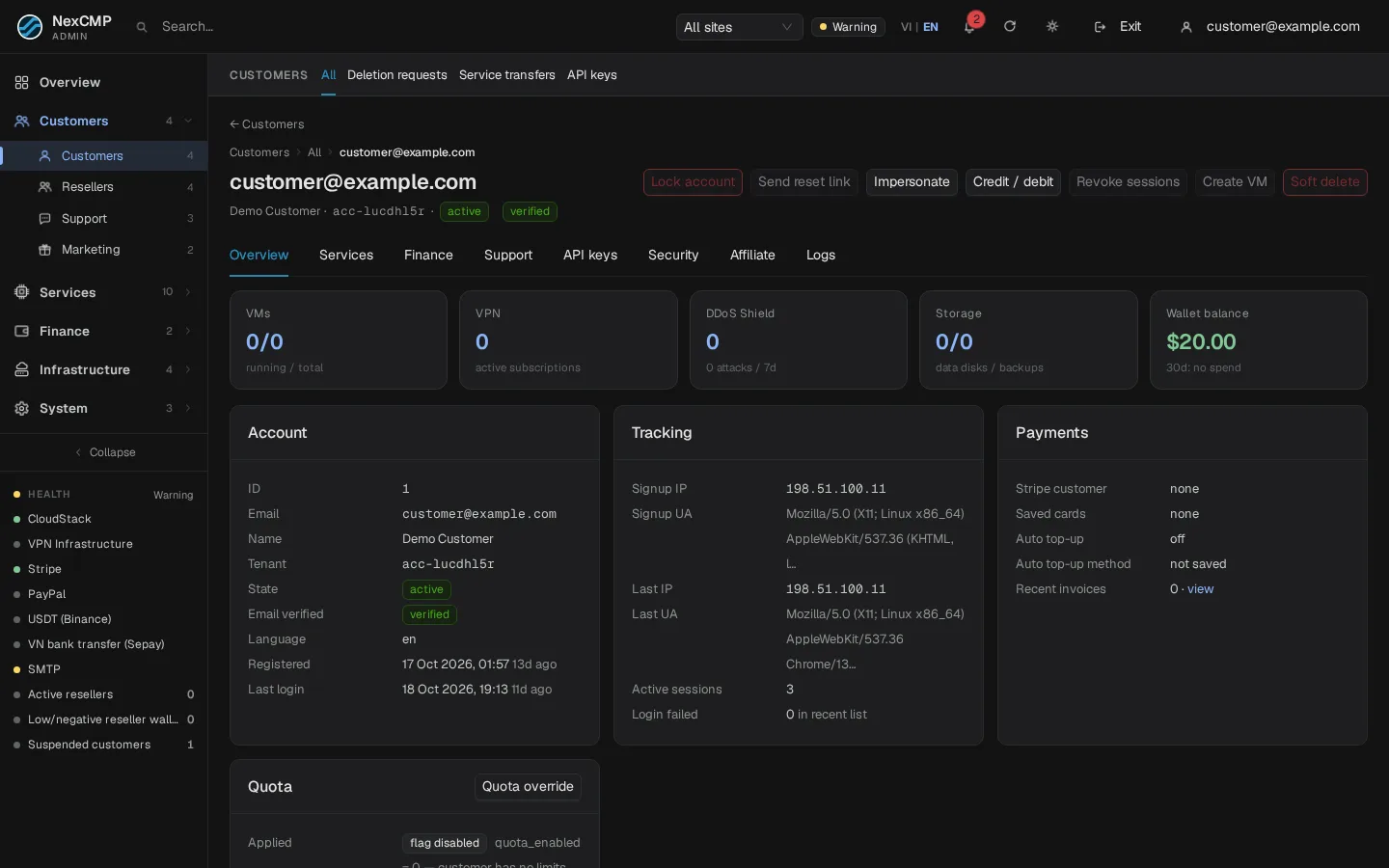
Every override is recorded in the audit log with the administrator, reason and before/after values.
What the customer sees
Client › Quotas (/client/quotas) shows the customer's current tier, the used and total vCPU, RAM, disk and VM count (split between VMs and Kubernetes), the eligible wallet balance, the held resource basis (it does not decrease when they spend), and how much to top up for the next tier. A slider lets them pick a target tier and go straight to the deposit screen. The Service Quotas card lists each service with the quota, the used amount, their tier (L0 to L4), how much more to deposit for the next tier, and a Request increase button that opens a support ticket draft. A Quota policy button explains the rules.
Verify
- Turn on Enable quota and use a fresh test customer with a $0 balance.
- Try to create a VM bigger than your cheapest plan. The request is refused with
quota_exceededand the message "Exceeds the resources of tier ... Top up $X more to unlock tier ...". - Top up the amount shown. The tier changes at once and the same request succeeds.
- Buy VPN IPs above the L0 limit: HTTP 403
quota_exceededwith"scope":"service"and a link to/client/quotas. - In the customer's Quota card, Source shows tier; set an override and see it change to override.
Limits & notes
- Off means off. With
quota_enabledoff the old rulenew_account_max_vms(Services › Virtual Machines › Policy › Sales) limits new accounts to 2 VMs until their deposits reach $10. When the quota is on, that rule no longer applies. - Admin-created VMs are not blocked.
- Errors fail closed. If the quota state cannot be read, the request is refused with
quota_unavailablerather than allowed. - API, CLI and MCP requests use the same handlers, so the same limits apply.
- Promotion credit does not raise a tier (see Promotions).
- The tier thresholds are cents, not dollars.
Troubleshooting
| Symptom | Cause | Fix |
|---|---|---|
quota_exceeded, reason resources | The new total vCPU/RAM/disk is above the tier | Top up the amount in the message or set an override. |
quota_exceeded, reason vm_30d | More than the 24h-tier VM count and the wallet does not yet cover 30 days of the fleet | Top up the amount shown. |
quota_exceeded, reason vm_max | The absolute VM cap is reached | Raise Max VMs when meeting 30-day threshold or use an override. |
quota_exceeded, scope: service | A per-service limit is reached | Raise the table value or override that key for the customer. |
quota_unavailable | The quota state could not be verified | Retry; check the server log if it persists. |
| "quota_max_vms_30d must be >= quota_max_vms_24h" on save | Values reversed | Make the 30-day number at least the 24-hour number. |
| Customer says the tier dropped | It does not drop; compare Held resource basis with the plan cost | Check the plan price list: a plan price increase can move the thresholds. |