Branding
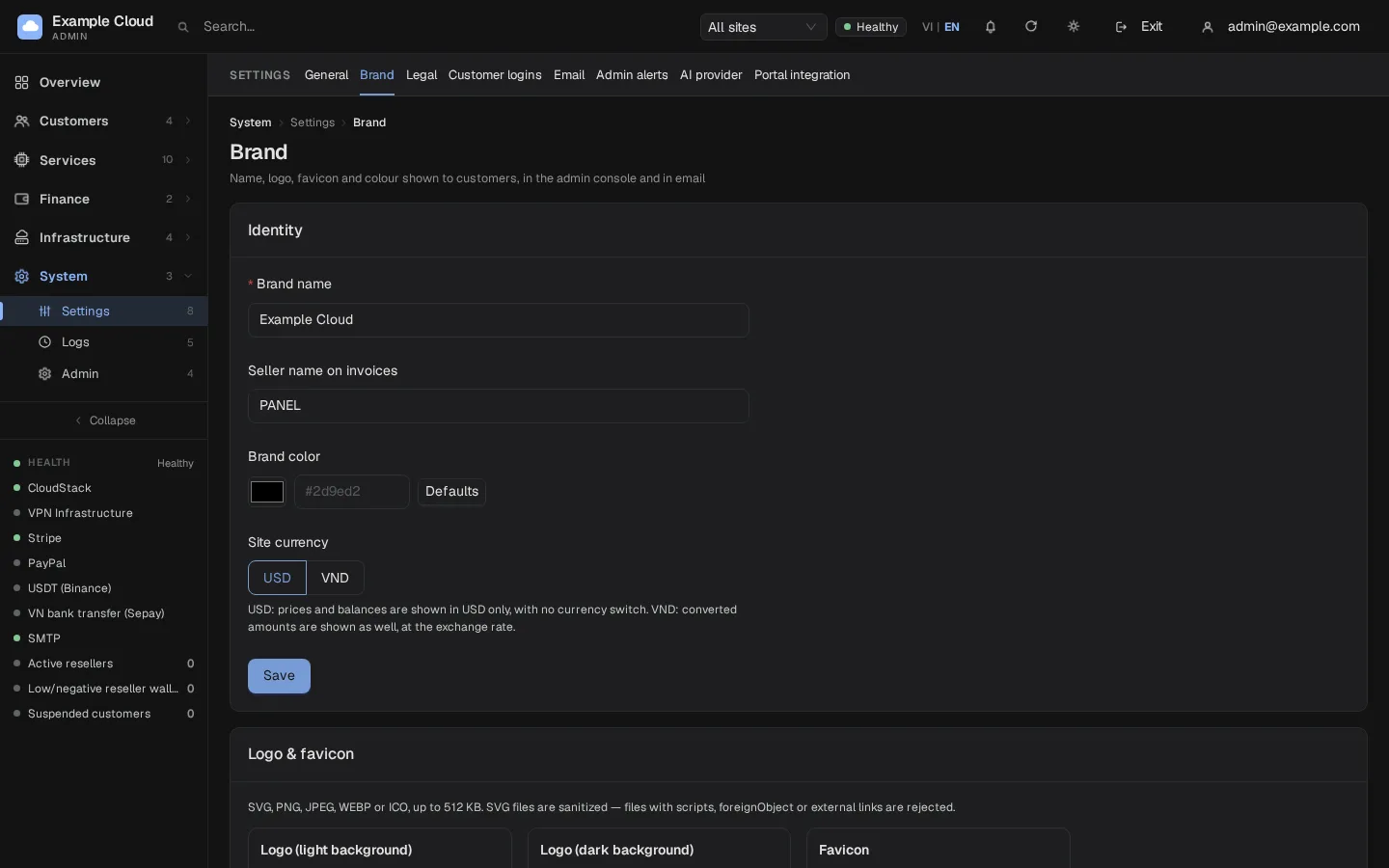
Where in the admin: System › Settings › Brand (
/settings/branding). Related: System › Settings › General (/settings) for URLs and the seller details printed on invoices.
What it does
NexCMP is white-label: the product carries no vendor name, and everything your customers see is your brand. Brand settings apply to the login and sign-up pages, the portal, the admin console and e-mails.
Requirements
| Item | Requirement |
|---|---|
| Role | An administrator. |
| Files | Logos: SVG, PNG, JPEG, WEBP or ICO, up to 512 KB each. |
| Dependencies | None. |
Steps
Open System › Settings › Brand.
In the card Identity fill in:
Field Notes Brand name (required) Up to 60 characters. Shown in the portal, e-mails, invoices and legal pages. Seller name on invoices Up to 120 characters. Empty means the brand name. Brand color A #rrggbbcolour; the small button next to the field resets it to the built-in colour.Site currency USD: prices and balances are shown in USD only, with no currency switch. VND: also shows the converted amount at the stored exchange rate (see Currency and exchange rates). Click Save.
In the card Logo & favicon upload the three images — Logo (light background), Logo (dark background) and Favicon — with Upload (or Replace); Remove deletes one.
Related settings in General
System › Settings › General has two tabs that complete the picture:
| Tab | Fields |
|---|---|
| Branding & URLs | Brand name (e-mail, invoices), default language (English or Vietnamese), Customer app URL, Console URL, Admin URL (reseller impersonation link) and Partner console URL (invite links, reseller e-mails). The setup wizard fills these with https://<domain>, https://<domain>/admin and https://<domain>/console. |
| Seller & invoicing | Legal entity name, tax ID, address, contact e-mail and the invoice number prefix. See Invoices and ledger. |
The From name of e-mails is set in System › Settings › Email (SMTP and e-mails).
Uploaded files are checked
- Raster images are recognised from their content (not from the file name) and measured.
- SVG files are rebuilt from a safe list of shapes. A file containing scripts,
foreignObject, event attributes, external links,url(...)pointing outside, a DOCTYPE or entities is refused (svg_unsafe). - A file that is too large is refused with
asset_too_large, a wrong type withasset_type, bad dimensions withasset_dimensions. - Files are served from your own domain with strict security headers.
Verify
- Open the portal login page in a private window: the logo, name and colour appear.
- Check the browser tab for the favicon (browsers cache favicons; reload with the cache cleared if you still see the old one).
- Trigger a test e-mail (for example Send reset link for a test customer) and check the brand name in the subject and footer.
Limits & notes
- The logo for the dark background is used when the customer or admin switches to the dark theme.
- Resellers have their own brand; they upload PNG, JPEG, WEBP or ICO up to 256 KB (no SVG). See Resellers.
- A change to the brand colour or logo shows on the next page load; e-mails already sent are not changed.
Troubleshooting
| Symptom | Cause | Fix |
|---|---|---|
Upload refused: svg_unsafe | The SVG has scripts, links or external references | Export a plain SVG (no script, no external images) or use PNG. |
asset_too_large | File over 512 KB | Compress or resize the image. |
asset_type | Not SVG, PNG, JPEG, WEBP or ICO | Convert the file. |
invalid_argument: primary | The colour is not #rrggbb | Use a six-digit hex value. |
| Old logo still visible | Browser cache | Hard-reload; favicons can take longer. |
| Prices show only in USD | Site currency is USD | Switch to VND and make sure an exchange rate is stored. |