Configuration as code
Where in the admin: System › Settings › Import/Export (
/agent/config). On the server: the commandsnexcmp config export,planandapply, andnexcmp admin <tool>.
What it does
Your panel configuration (branding, general settings, email, Telegram alerts, modules, currency, payment gateways, limits, zones, plans, the AI provider and the legal pages) can be saved as one YAML file. You can edit the file yourself, ask an AI assistant to edit it, keep it in version control, and apply it to the same or another panel. Before anything changes you always see a list of differences. Secrets are never written to the file.
Use it to clone a setup to a second installation, to review changes before they go live, to restore settings after a mistake, or to let an AI propose a whole configuration that you read as one document.
Requirements
| Item | Requirement |
|---|---|
| NexCMP | 1.4.0 or newer. |
| Command line | You are root on the panel server (use sudo). The command asks the panel for a temporary key (15 minutes, all scopes) by itself. To use a narrower key instead, set NEXCMP_KEY to an admin API key and keep it through sudo, for example sudo --preserve-env=NEXCMP_KEY nexcmp config plan -f nexcmp.yaml. |
| Admin page | Signed in to the admin. The page is read-only on a demo panel. |
| Secrets | Values supplied at apply time (see Secrets); never inside the file. |
Export, edit, preview, apply
Export the current configuration:
bashsudo nexcmp config export -o nexcmp.yamlWithout
-othe YAML is printed to the screen.Edit
nexcmp.yaml(see the example below). Keepversion: 1on top.Preview what would change. This changes nothing:
bashsudo nexcmp config plan -f nexcmp.yamlEach line shows section, item, field and
old → new. Lines marked$belong to billing sections (see Billing sections). If the panel already matches the file you see "No changes".Apply. Without
--yesthe command is a dry run and only prints the same list:bashsudo nexcmp config apply -f nexcmp.yaml --yesRead the result:
applied,pending(waiting for your confirmation),skippedanderrors.
| Option | Meaning |
|---|---|
-f <file> | The YAML file (required for plan and apply). |
--yes | Really apply. Without it apply is a dry run. |
--confirm-billing | Also apply the billing sections (payments, currency, plans). Without it they are skipped. |
--section <name> | Apply only this section. Repeat the option for several. |
-o <file> | With export: write the YAML to a file. |
The exit code is 0 when everything was applied or nothing changed, 1 when an error was returned, 2 for a usage or key error.
Secrets
The file holds references instead of secrets, such as password: secret://smtp_password. At apply time the value comes from an environment variable named NEXCMP_SECRET_ plus the reference name in capitals:
bash
sudo -i
read -rs NEXCMP_SECRET_SMTP_PASSWORD && export NEXCMP_SECRET_SMTP_PASSWORD
read -rs NEXCMP_SECRET_STRIPE_SECRET_KEY && export NEXCMP_SECRET_STRIPE_SECRET_KEY
nexcmp config apply -f nexcmp.yaml --yes --confirm-billing
If a reference has no value, the secret already saved in the panel is kept. A secret that was never saved and is not supplied stays empty.
| Reference name | Where it goes |
|---|---|
smtp_password | email.smtp.password |
telegram_bot_token | telegram.bot_token |
stripe_secret_key, stripe_webhook_secret | payments.stripe |
paypal_client_secret | payments.paypal.client_secret |
binance_api_key, binance_api_secret | payments.crypto |
sepay_api_token, sepay_webhook_secret | payments.bank |
ai_provider_key | ai_provider.api_key |
Example file
yaml
# NexCMP configuration. Preview: nexcmp config plan -f nexcmp.yaml
version: 1

branding:
  name: Example Cloud
  primary: "#1677ff"
  currency: usd
  seller_name: Example Cloud LLC

settings:
  brand_name: Example Cloud
  support_email: support@example.com
  default_lang: en
  invoice_prefix: EX
  company_name: Example Cloud LLC
  company_address: "1 Example Street, New York, NY"
  min_topup_cents: 500

email:
  smtp:
    host: smtp.example.com
    port: 587
    security: starttls
    username: mailer@example.com
    password: secret://smtp_password
    from_email: no-reply@example.com
    from_name: Example Cloud
    reply_to: support@example.com

telegram:
  enabled: true
  chat_id: "123456789"
  bot_token: secret://telegram_bot_token

modules:
  s3: true
  k8s: false

currency:
  site_currency: usd
  manual_rate_vnd: 0        # 0 = automatic

payments:
  stripe:
    mode: test
    publishable_key: pk_test_XXXX
    secret_key: secret://stripe_secret_key
    webhook_secret: secret://stripe_webhook_secret
  bank:
    bank_code: BANK
    account_number: "0000000000"
    account_name: EXAMPLE CLOUD LLC
    prefix: EX
    api_token: secret://sepay_api_token
  channels:
    pay_card_enabled: true

quotas:
  quota_enabled: true
  quota_max_vms_24h: 5
  quota_max_vms_30d: 30

zones:
  - slug: new-york
    name: New York
    country: US
    city: New York
    enabled: true
    is_default: true

plans:
  - slug: vps-1c-1g
    name: 1 vCPU, 1 GB RAM, 25 GB
    cpu: 1
    ram_mb: 1024
    disk_gb: 25
    hourly_usd: 0.0112
    cs_offering_id: OFFERING_ID
    enabled: true
    visible: true

ai_provider:
  enabled: true
  name: Example AI
  base_url: https://api.example.com/v1
  model: example-model
  fallback_models: [example-model-mini]
  reasoning_effort: low
  api_key: secret://ai_provider_key

legal:
  terms:
    en: |
      # Terms of service
      Your terms in simple markdown (no HTML).
  privacy:
    en: |
      # Privacy policy
      Your policy in simple markdown (no HTML).
A file may contain any subset of the sections. A section you leave out is not touched. A file larger than 1 MB, a missing version: 1, a different version number or an unknown section is rejected before anything runs.
Sections
| Section | What it controls | Notes |
|---|---|---|
branding | Brand name (up to 60 characters), primary colour, display currency (usd or vnd), seller name. | Logos are not part of the file; use the branding page. |
settings | A fixed list of general settings: brand_name, support_email, support_telegram_url, default_lang, require_email_verified, min_topup_cents, max_topup_cents, invoice_prefix, company_name, company_address, company_tax_id, auto_destroy_days, low_balance_cents. | Other keys are ignored. |
email.smtp | SMTP host, port, security (starttls, tls, none), user, password, sender name and address, reply-to. | SMTP and e-mail templates. Changing host, port or security needs the password again. |
telegram | Alert channel on or off, chat id, bot token. | Telegram notifications. |
modules | Optional modules on or off (key: true/false). | Only keys the panel lets you switch. See Modules. |
currency | Display currency and a manual USD to VND rate (0 automatic, otherwise 15000 to 50000). | Billing section. See Currency and exchange rates. |
payments | stripe, paypal, crypto, bank credentials and channels switches (pay_card_enabled, pay_wallets_enabled, pay_alipay_enabled, pay_paypal_enabled, pay_usdt_enabled, pay_sepay_enabled). | Billing section. See Payment channels. |
quotas | quota_* limits. | See Quotas. |
zones | Zones by slug (required: slug, name, country; optional city, enabled, is_default). | New zones are created. A zone that already exists is not changed by the file. See Zones. |
plans | Plans by slug (required: slug, name, cpu, ram_mb, disk_gb, hourly_usd; optional cs_offering_id, backend_id, zone_id, enabled, visible, sort, description). | Billing section. New plans are created, existing ones are updated by slug. Prices are USD per hour. See Plans. |
ai_provider | The panel AI provider used by customer AI Chat and AI Agent. | AI provider. |
legal | Terms and privacy text per language (en, vi). | Legal pages. |
The order of application is the order above: infrastructure-like items before plans.
Rules to remember
- Idempotent. Applying the same file twice changes nothing the second time.
planshows "No changes". - No deletions. The file never removes a zone, plan or setting. Removing an entry from the file leaves the panel as it is.
- Normal safety rules still apply. From the command line each change is sent through the same checks as an API change: scopes and IP rules. A change that needs confirmation (a site-wide switch, for example) is reported under
pendingwith a preview instead of being applied, unless you pass--confirm-billing, which confirms them all. - AI clients cannot unlock billing. When
config_applyis called by an MCP client,confirm_billingis ignored; money changes wait for you. - Check before you apply. The JSON Schema describes every field. Point your editor at it, or give it to an AI so it writes valid YAML:
https://cloud.example.com/v1/admin/agent/config/schema.json(publicly readable).
Billing sections
payments, currency and plans change prices or money paths. nexcmp config apply --yes skips them unless you add --confirm-billing; they are then listed under skipped ("billing section - pass confirm_billing"). The flag is your confirmation: with it, every billing change in the file (and any other change that would ask for confirmation) is applied without a second prompt. Run plan first and read each line marked $.
When the same file is applied by an AI (the config_apply tool in an MCP client or AI Chat) the flag is ignored, and money changes wait for your approval instead.
Use the Import/Export page
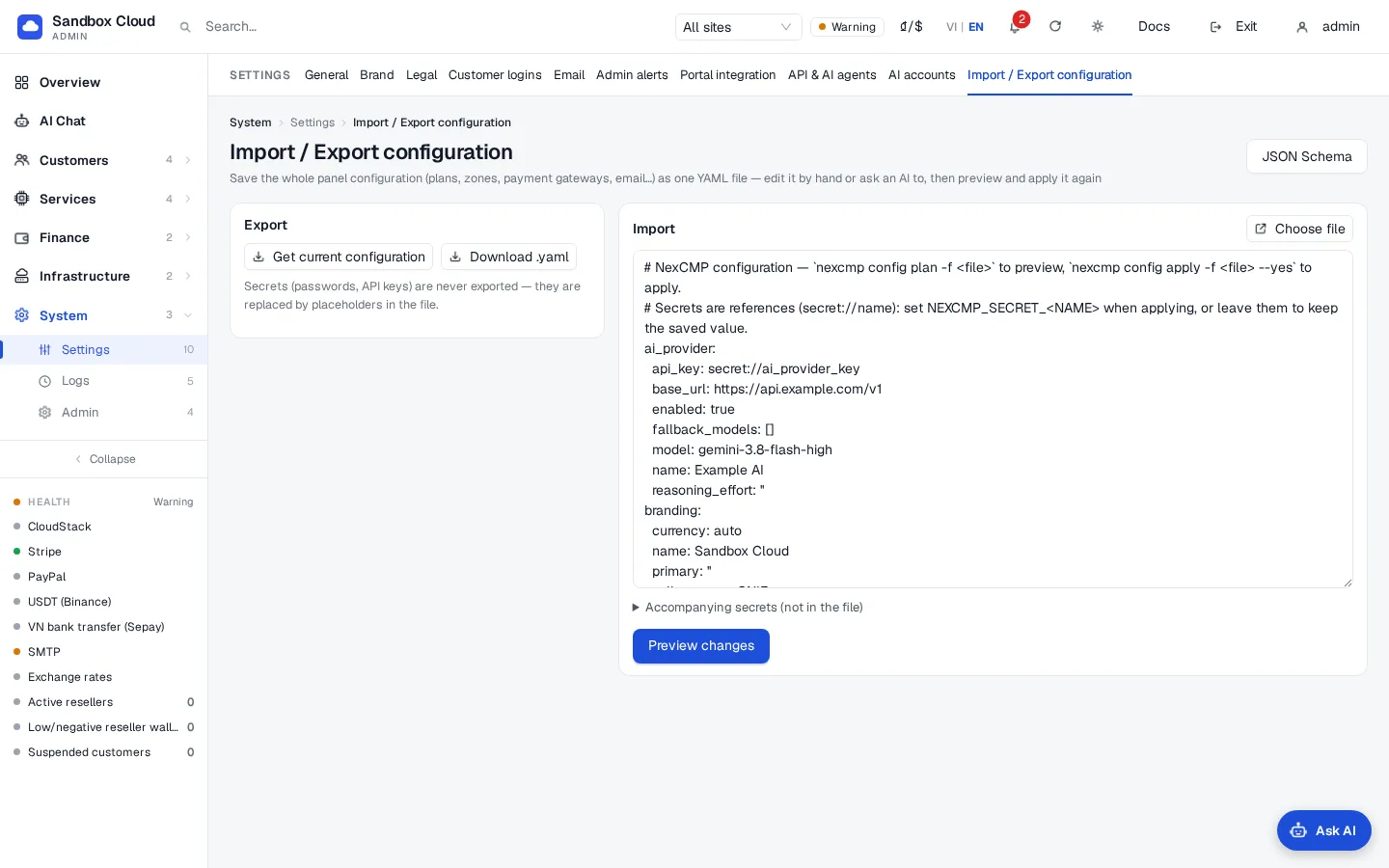
- Open System › Settings › Import/Export.
- Under Export click Get current configuration, then Download .yaml to save
nexcmp.yaml. Secrets appear as placeholders. - Under Import choose a file, drag it into the box, or paste the YAML.
- Optional: open Secrets that come with it (not in the file) and add a name and value for each reference, for example
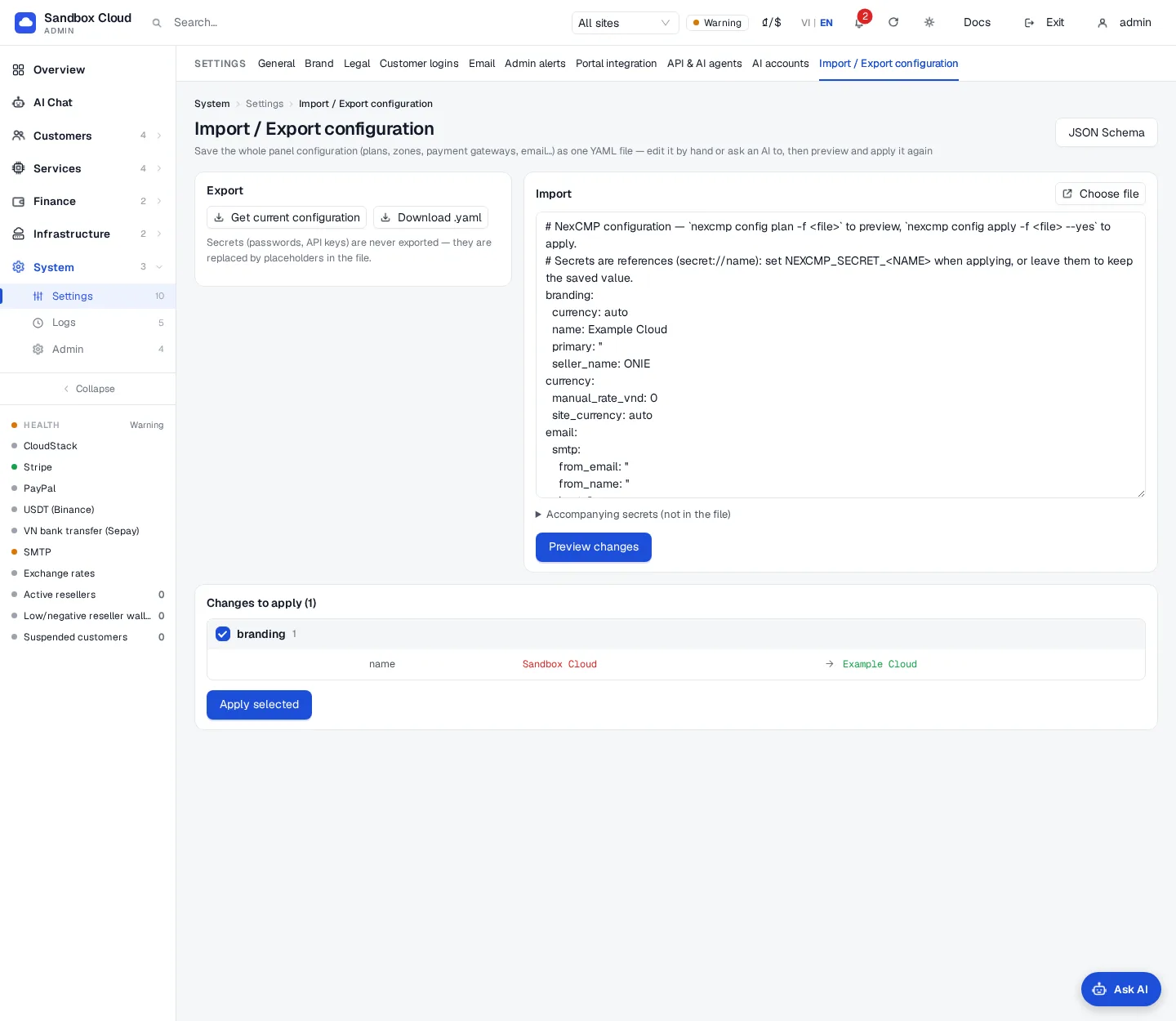
smtp_password. - Click Preview changes. The table groups the changes by section; money-related sections carry a "Money-related" tag. Untick sections you do not want.
- If money-related sections are listed, tick Also apply money-related changes (prices, payment gateways, balances). Without the tick they are skipped.
- Click Apply selected. The result shows what was applied, skipped or failed. A change that is returned as waiting for confirmation appears as a confirmation card; press Confirm on it.
The JSON Schema button at the top right opens the schema.
Run any tool from the command line
nexcmp admin runs the same tools as the AI assistants (the tool list) and prints JSON:
bash
sudo nexcmp admin tools                       # name, scope and title of every tool
sudo nexcmp admin system_health
sudo nexcmp admin customers_search q=customer@example.com
sudo nexcmp admin settings_update --json '{"values":{"support_email":"support@example.com"}}'
Arguments are key=value pairs (values are read as JSON when they parse, otherwise as text) or one --json '{...}' object. If the action needs confirmation, the command prints the preview and stops with exit code 3 and "Nothing changed". Read the preview, then run the same command again with --yes to apply it. Run as root the command gets a 15-minute key with all scopes, so the confirmation step is your safeguard; with NEXCMP_KEY the key's own scopes apply.
Verify
sudo nexcmp config plan -f nexcmp.yamlright after anapply --yesprints "No changes".- In the admin, the pages you changed show the new values, and Logs › Admin actions lists the changes.
- Applying the same file again changes nothing.
Limits & notes
- The file covers the settings above, not customers, servers, invoices or infrastructure sources (CloudStack and Proxmox connections). Connect those with AI Chat or the admin pages.
- Zones and plans are matched by
slug. Do not rename a slug in the file: it would be created as a new item. - A plan that customers already use cannot change its size; create a new plan instead.
- Keep exported files private even though they contain no secrets: they list your prices, addresses and account names.
Troubleshooting
| Symptom | Cause | Fix |
|---|---|---|
missing version: 1 | The file does not start with version: 1 | Add it. |
unsupported version 2 | The file has another version number | This panel reads version 1 only. |
unknown section 'x' (known: ...) | A misspelled or unsupported top-level key | Use the sections above. |
YAML error: ... | Invalid YAML (indentation, tabs) | Fix the line the message names. |
config is larger than 1 MB | File too big | Split it and use --section. |
no API key: set NEXCMP_KEY=ak_... or run as root on the server | The command found no key | Run with sudo, or export NEXCMP_KEY and keep it through sudo. |
panel not reachable | The panel service is not running on the default port | Check sudo nexcmp status. |
Billing lines under skipped | Billing sections need --confirm-billing | Add the flag and review the $ lines first. |
Items under pending | The change needs confirmation | Open API & AI agents, or the Import/Export result, and press Confirm on the card. |
| A secret was not updated | No NEXCMP_SECRET_<NAME> value was set, so the saved secret was kept | Export the variable and apply again. |
Entry under errors with HTTP 403 insufficient_scope | The key lacks the scope of that section | Use a key with the scope, or run as root. |
Entry under errors with HTTP 403 demo_read_only | Demo panel | Apply on a real installation. |