PayPal
Where in the admin: Finance › Payment channels › PayPal (
/payments/paypal). The on/off switch and fees are in Finance › Payment channels › Fees & limits (/payments/fees).
What it does
Lets customers top up their USD wallet with their PayPal balance, bank account or card held at PayPal. Customers can also let NexCMP remember their PayPal account for automatic top-up. Use it alongside Stripe for customers who prefer PayPal.
Requirements
| Item | Requirement |
|---|---|
| PayPal account | A PayPal Business account that can receive USD. |
| REST app | One REST app in the PayPal Developer Dashboard (Apps & Credentials) providing a Client ID and a Client secret. Use the Sandbox tab for testing, Live for production. |
| Network | HTTPS reachable from the Internet (PayPal calls the webhook) and outbound access to api-m.paypal.com (live) or api-m.sandbox.paypal.com (sandbox), port 443. |
| Permissions | The REST app needs the refund and webhooks capabilities. The Check dialog shows whether both scopes are present. |
| Dependencies | None. |
Prepare the infrastructure
- Sign in to developer.paypal.com with your Business account and open Apps & Credentials.
- Choose Sandbox (testing) or Live, then Create App. Name it for example "NexCMP".
- Copy the Client ID and Secret of the app.
- For testing, use Testing Tools › Sandbox Accounts to find or create a Personal (buyer) sandbox account.
- You do not need to create the webhook yourself; NexCMP creates it with the Create webhook button.
Connect in NexCMP
- Open Finance › Payment channels › PayPal (
/payments/paypal). - In API keys, choose Mode:
live(real money,api-m.paypal.com) orsandbox(api-m.sandbox.paypal.com). - Paste the Client ID (at least 20 characters) and the Client secret.
- Click Check. It tests the credentials you typed (saving is not required) and reports the connection, App ID, mode, whether the refund and webhooks scopes are present and how long the token lives.
- Click Save.
- In the Webhook card confirm the URL is
https://<your-domain>/v1/billing/paypal/webhook(it must behttps), then click Create webhook and confirm. NexCMP asks PayPal to create or update the webhook with 11 events and stores the returned Webhook ID. The button uses the saved keys — save first if you just edited them. - Click Check again: the Webhook row should say "exists, 11 events".
- Open Fees & limits, turn PayPal on, set PayPal fee % (default 4.4) and PayPal fixed fee (cents) (default 30) to your tariff and click Save channels & fees.
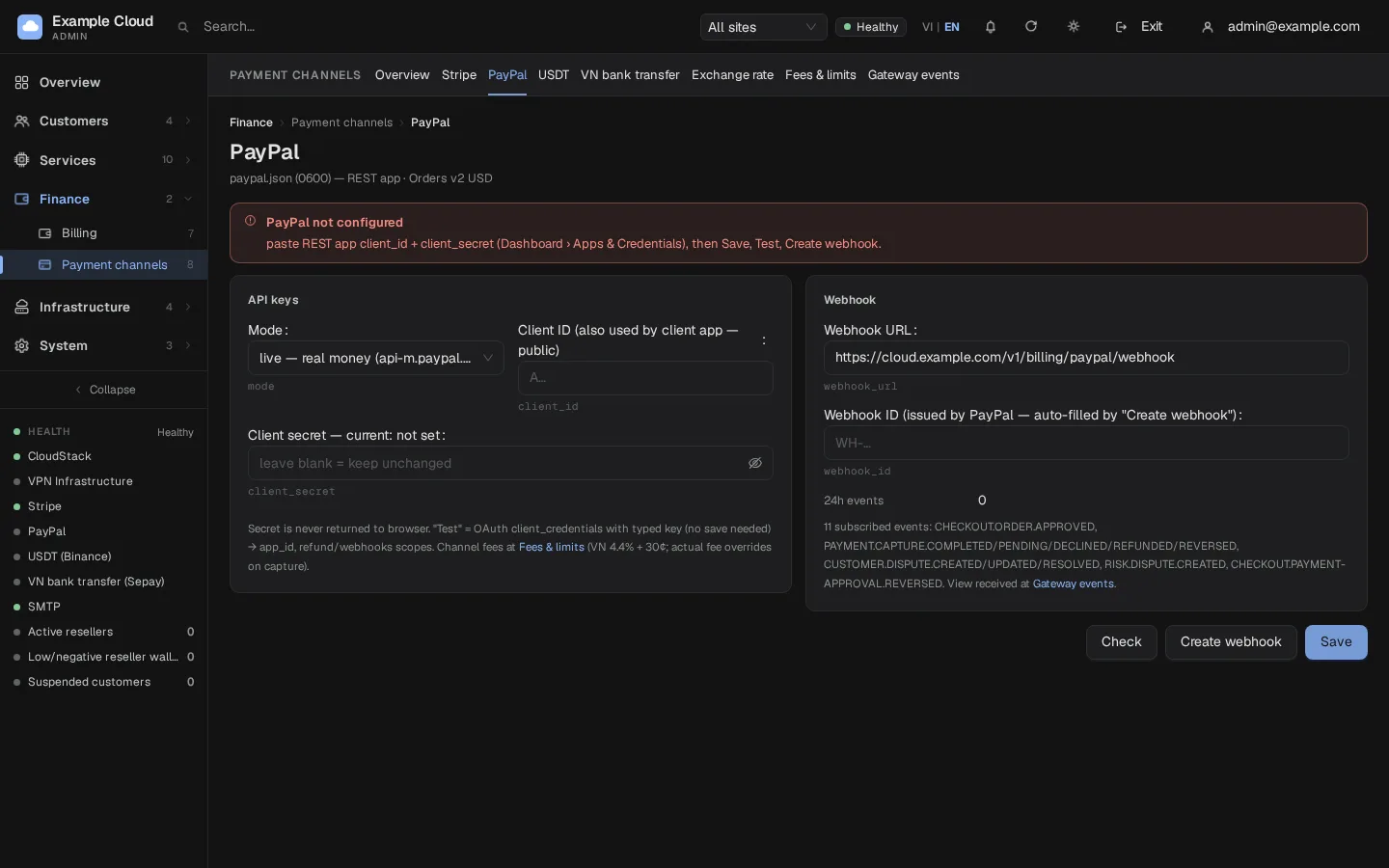
Webhook events
NexCMP registers these 11 events: CHECKOUT.ORDER.APPROVED, PAYMENT.CAPTURE.COMPLETED, PAYMENT.CAPTURE.PENDING, PAYMENT.CAPTURE.DECLINED, PAYMENT.CAPTURE.REFUNDED, PAYMENT.CAPTURE.REVERSED, CUSTOMER.DISPUTE.CREATED, CUSTOMER.DISPUTE.UPDATED, CUSTOMER.DISPUTE.RESOLVED, RISK.DISPUTE.CREATED, CHECKOUT.PAYMENT-APPROVAL.REVERSED.
Each webhook is verified by calling PayPal's signature-verification API, stored once and processed idempotently. NexCMP never trusts the amount in the webhook body: before it credits a capture it fetches the capture from PayPal.
Verify
- Keep Mode on
sandbox. In the portal, open Billing › Deposit, choose PayPal, click Continue on PayPal (or the PayPal button) and log in with the sandbox buyer account. - Approve the payment. You return to the portal, the balance rises and the payment appears under Finance › Billing › Top-ups as Completed.
- Open Payment channels › Gateway events › PayPal & USDT: the
PAYMENT.CAPTURE.COMPLETEDevent is listed. - When everything works, switch Mode to
live, enter the live credentials, Save, then Create webhook again (sandbox and live webhooks are separate).
Limits & notes
- How a payment completes. The order is created in USD; after the customer approves it, the server captures it (idempotent request ID) and credits the wallet exactly once. The webhook and a reconciliation job that runs every 10 minutes are safety nets if the customer closes the browser.
- Pending and abandoned orders. An order can stay open for 12 hours. A customer can have at most 5 pending orders (the server answers
too_many_pending, HTTP 429). An order still not captured after 24 hours is marked failed. - No webhook configured. The panel answers HTTP 503 to every PayPal webhook until a Webhook ID is saved. Captures made through the portal and the 10-minute reconciliation still credit the wallet, but nothing that PayPal reports by webhook (disputes, reversals, late captures) is applied — click Create webhook.
- Saved PayPal account. When the customer chooses to save PayPal (or completes the first deposit, which turns on automatic top-up) PayPal stores the payment token in its vault. NexCMP keeps only an identifier and the PayPal e-mail. See Saved payment methods.
- Refunds and disputes are handled like Stripe: refund requests are approved under Finance › Payouts › Card refunds; a dispute blocks the customer's account and stops their prepaid services until you resolve it.
- Fees. PayPal's fee is not read back; the percentage and fixed fee you configure determine what the customer sees and what is credited. The real tariff depends on your country (the form hints 4.4 % for Vietnam and 3.49 % for the US).
Troubleshooting
| Symptom | Cause | Fix |
|---|---|---|
| "Client ID too short" | Less than 20 characters pasted | Copy the full Client ID. |
| "Webhook URL must be https" | URL typed with http:// | Use your public https:// domain. |
| Check reports a connection error | Wrong mode (live keys in sandbox or the reverse), wrong secret, no outbound access | Match Mode to the key type; test curl -I https://api-m.paypal.com from the server. |
| Scope refund / webhooks shows "no" | The REST app lacks the features | Enable the features on the app in the PayPal Developer Dashboard. |
| Banner "PayPal key set, NO webhook" | Webhook ID missing | Click Create webhook. |
| "Webhook not found" in Check | Webhook was deleted at PayPal or belongs to another app | Click Create webhook again. |
| Customer is told PayPal declined the payment | PayPal rejected that funding source | Ask the customer to choose another payment source. |
| Customer sees "Too many pending requests" | 5 open orders | Wait for them to expire or finish them. |
| PayPal button missing | PayPal off in Fees & limits or not configured | Turn it on and save credentials. |