Architecture
Where in the admin: this is a reference page. The services described here are visible with
sudo nexcmp status; connections are configured under Infrastructure and System › Settings.
The picture
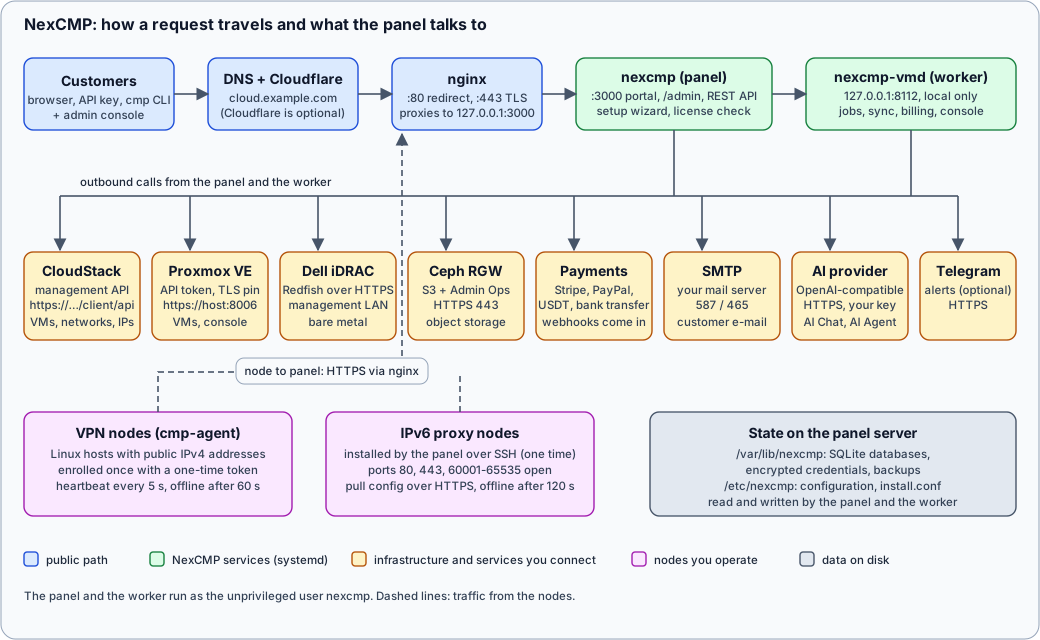
The same diagram in words
- A customer or administrator opens
https://cloud.example.com(the portal),https://cloud.example.com/admin(the admin console) or calls the REST API. DNS points the name at your server, or at Cloudflare, which proxies to it. - nginx on the panel server listens on ports 80 (redirect and certificate renewal) and 443 (TLS) and forwards every request to the panel on
127.0.0.1:3000. After the setup wizard the panel listens on the loopback interface only. - The panel (
nexcmp.service) serves the customer portal, the admin console, the REST API, the setup wizard and the downloads that nodes need (the agent binary, the install script, thecmpcommand-line tool). It also checks your license once a day. - The worker (
nexcmp-vmd.service) listens on127.0.0.1:8112, which is local only. It runs everything that takes time or must happen on a schedule: provisioning jobs, synchronisation with CloudStack and Proxmox VE, billing ticks, bandwidth collection and the browser console connections. - From these two processes NexCMP calls outward: CloudStack (management API), Proxmox VE (API on port 8006, certificate pinned), Dell iDRAC (Redfish over HTTPS on the management network), Ceph RGW (S3 and Admin Ops over HTTPS), payment gateways (Stripe, PayPal, USDT and bank-transfer providers, which also call your webhook URLs), your SMTP server, an AI provider with an OpenAI-compatible API, and optionally Telegram.
- VPN nodes run
cmp-agent. Each node enrolls once with a one-time token, then sends a heartbeat every 5 seconds over HTTPS to the panel and receives its configuration in the reply. IPv6 proxy nodes are installed once by the panel over SSH, then pull their configuration from the panel. - State lives in SQLite databases and a few files in
/var/lib/nexcmp. Credentials for CloudStack, Proxmox, S3, iDRAC and the AI provider are stored encrypted (AES-256-GCM) with master key files in the same area.
Services and processes
| Process | Runs as | Listens on | Does |
|---|---|---|---|
nginx | root (workers www-data) | 80, 443 | TLS, redirect, proxy to the panel |
nexcmp | nexcmp | 3000 (all interfaces during first install, then 127.0.0.1) | Portal, admin console, API, wizard, downloads |
nexcmp-vmd | nexcmp | 127.0.0.1:8112 | Jobs, sync, billing, bandwidth, console |
nexcmp-update | root | none | Applies updates the admin console requests (a path unit waits for the request) |
cmp-agent (on VPN nodes) | root | the VPN listener ports | Reports to the panel, runs proxy listeners on public IPv4s |
The panel and the worker run as an ordinary user without any Linux capabilities, with a read-only file system except /var/lib/nexcmp and /var/log/nexcmp. They need no root, no Docker, no separate database and no Redis.
Files and where they are
| Path | Content |
|---|---|
/opt/nexcmp | The program: releases, bin/, shared files such as the template builder. Owned by root, read-only to the service. |
/etc/nexcmp | Installer settings (install.conf), port and bind (nexcmp.env). |
/var/lib/nexcmp | SQLite databases, uploaded branding, the agent download folder, license state, the master key files. Back this up. |
/var/log/nexcmp | Logs. |
See Backup and restore. The master key files must be backed up together with the databases, or a restored database cannot decrypt its stored credentials.
Who connects to whom
| Direction | Path | Port | Notes |
|---|---|---|---|
| Customer to panel | Internet, DNS, optional Cloudflare, nginx | 443 | See DNS and Cloudflare. |
| Panel to license server | nexcmp.com | 443 | Activation, a daily check and updates. |
| Panel to CloudStack | API | 443 or 8080 | The VM console, bandwidth and Kubernetes features use the same endpoint. |
| Panel to Proxmox VE | API and WebSocket console | 8006 | Certificate pinned by SHA-256. |
| Panel to iDRAC | Redfish | 443, VNC 5901 | Management network only. |
| iDRAC to ISO server | HTTP | your port | The iDRAC pulls the ISO. |
| Panel to Ceph RGW | Admin Ops | 443 | |
| Panel to SMTP | SMTP | 587 or 465 | |
| Panel to AI provider | HTTPS | 443 | Only when the AI module is on. |
| Payment gateway to panel | Webhook | 443 | Stripe and PayPal call back. |
| Node to panel | cmp-agent | 443 | Enroll, heartbeat, upgrade. |
| Panel to IPv6 proxy node | SSH | the port you enter | One-time install only. |
Why it matters
- A panel that can be reached is a panel that can be attacked. Keep port 3000 closed once the setup wizard is done. The installer already does this when TLS is active.
- The worker must be running for anything to be created or billed.
sudo nexcmp statusshows both services and the health check. - Plan outbound firewalls. If the panel server's outbound traffic is filtered, allow the destinations in the table above.
- Management traffic stays off the public path. Connections to CloudStack, Proxmox VE, iDRAC and Ceph go straight from the panel server to those systems, never through nginx or Cloudflare.