Report a bug
Where in the admin: Top bar › Report a bug (next to Docs; shown to the main administrator only).
Found a defect in NexCMP? Press Report a bug, describe the problem and send it. The report reaches the NexCMP team as a ticket on your license account in one step — you do not sign in anywhere else, and you do not copy log files by hand. Every plan can use it: NexCMP Free covers bug fixes, and so does NexCMP Source.
Bug reports are not support requests
NexCMP Free has no technical support, so use this form for defects in the software. Setup help and migrations are part of NexCMP Source.
Requirements
| Item | What you need |
|---|---|
| Version | NexCMP 1.5.2 or later |
| Who can send | The main administrator account. Staff accounts (read-only), reseller consoles, customers and the read-only demo cannot send |
| License | An activated license (Free or Source) that is not suspended |
| Network | The server must reach https://nexcmp.com over HTTPS (the same address it uses for license checks and updates) |
Send a report
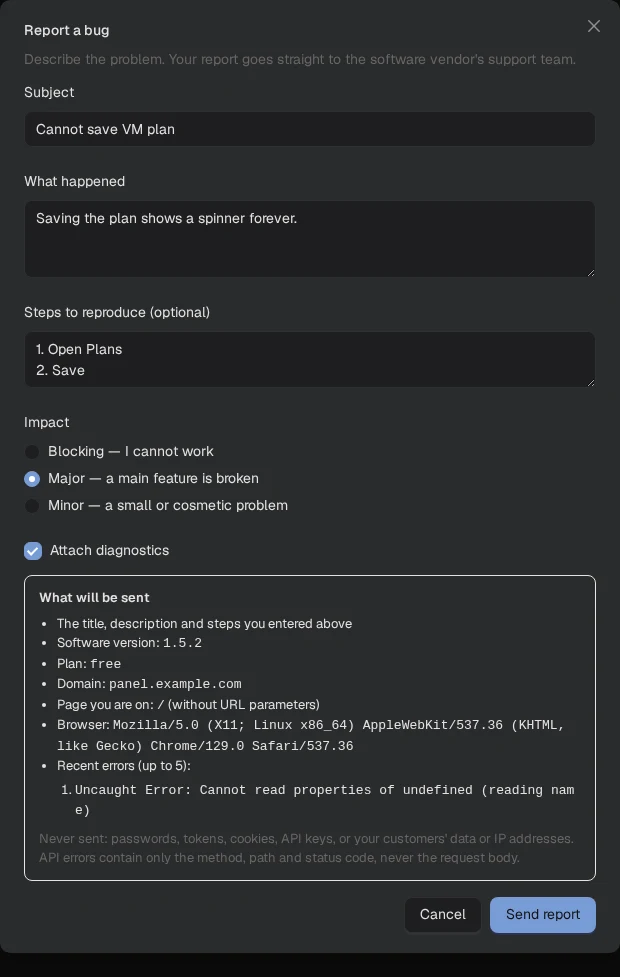
- Click Report a bug in the top bar. On a phone, open the menu and choose Report a bug.
- Enter a short Subject.
- Under What happened, describe what you did, what you saw and what you expected.
- Optionally list the Steps to reproduce.
- Choose the Impact: Blocking (you cannot work), Major (a main feature is broken) or Minor (a small or cosmetic problem).
- Leave Attach diagnostics on (recommended) and read the What will be sent box.
- Click Send report.
In 1.6.1 the form body scrolls while the action buttons stay visible, including on a phone. Password values following password: or password= are masked without removing the rest of the report. Review your text before sending and omit customer data and credentials.
When the report is accepted, the dialog shows the ticket number and a link. Replies, if the team sends one, go to the email address of your license account at nexcmp.com, and the ticket is also listed under Support when you sign in there as the license owner.
What is sent
The What will be sent box shows exactly this before you click Send:
| Sent | Details |
|---|---|
| Your text | Title, description, steps and impact |
| Version, plan, domain | Your NexCMP version, Free or Source, and the domain of the installation |
| Current page | The page you are on in the admin, without anything after ? or # |
| Browser | Your browser's user-agent text (name, version and operating system), cut to 200 characters |
| Recent errors | Up to the last 5 errors in this browser tab. A script error is the message only; for a failed request only the method, the path and the status code |
You can switch off Attach diagnostics; then only your own text and the version, plan and domain are sent.
What is never sent
- Passwords, tokens, cookies and API keys. Anything that looks like one in your text or in an error message is masked (shown as
***or[redacted]) on your server before anything is sent. - The content of requests and responses — failed requests are recorded as method, path and status only.
- Your customers' data (names, emails, orders, invoices) and their IP addresses.
- Your browser's IP address and any file from your server. As with every license check, the license server sees the IP address your server connects from.
The ticket is tied to your installation by the license token the server already holds, so the version, domain and installation are set by the server and cannot be changed from the browser.
Limits
| Limit | Value |
|---|---|
| Subject | 150 characters |
| Description plus steps | 8 KB together |
| Reports | 5 per hour and 20 per day for the whole installation |
Sending the same report twice (for example after a network error) does not create a second ticket.
Troubleshooting
| Message | Cause | Fix |
|---|---|---|
| Activate your license first | The installation has no activated license | Open License & updates and activate, then send again |
| Could not reach the license server | The server cannot reach nexcmp.com | Check outbound HTTPS and DNS from the server, then press Send report again — your text is kept |
| Too many bug reports from this installation | You reached 5 per hour or 20 per day | Wait and try again; add new findings to the open ticket instead |
| This license is suspended | The license is suspended or refunded | See License and purchase |
| This installation was revoked | The installation was revoked in the license portal | Activate it again from License & updates |
| The license token could not be refreshed | The server could not renew its license token | Open License & updates, press Refresh, then send again |
| No Report a bug button | You are signed in with a staff, reseller or customer account, or on the read-only demo | Sign in as the main administrator |
For the AI assistant and API keys
The assistant in the admin and admin API keys cannot send bug reports on your behalf: the button needs a person signed in as the main administrator.