Plans and pricing
Where in the admin: Services › Virtual Machines › Plans & pricing (
/vm/catalog), with the tabs Plan, Custom plan, Cycle and Offering CloudStack. Templates are on the separate page Services › Virtual Machines › Template (/vm/templates).
What it does
A plan is a size customers can buy: vCPU, RAM, root disk and a price, in a zone, from one source (CloudStack or a Proxmox VE cluster). The customer chooses a plan, an operating system and a billing cycle (hourly, monthly or a longer prepaid term). Plans are sold in the customer portal, through the API and in resellers' sites.
Requirements
| Item | Requirement |
|---|---|
| Source | CloudStack connected (a plan points at a CloudStack service offering) or a Proxmox VE cluster attached to the zone. See CloudStack and Proxmox VE. |
| Zone | A zone that sells virtual machines. See Zones. |
| Templates | At least one enabled, ready template. See OS templates. |
| Exchange rate | Only if you enter prices in VND. See Currency and exchange rates. |
| Permissions | An administrator; every price change asks for a reason. |
Prepare the infrastructure
- CloudStack: create the service offerings you want to sell (public, or shared with the NexCMP domain). A plan points at one offering. The Offering CloudStack tab lists the offerings and disk offerings live from CloudStack (cached for 60 seconds). When the plans table is empty, the worker creates six plans from your real offerings automatically.
- Proxmox VE: nothing in Proxmox; a plan carries its own CPU, RAM and disk. The disk must not be smaller than the template's disk.
Connect in NexCMP
How prices are stored
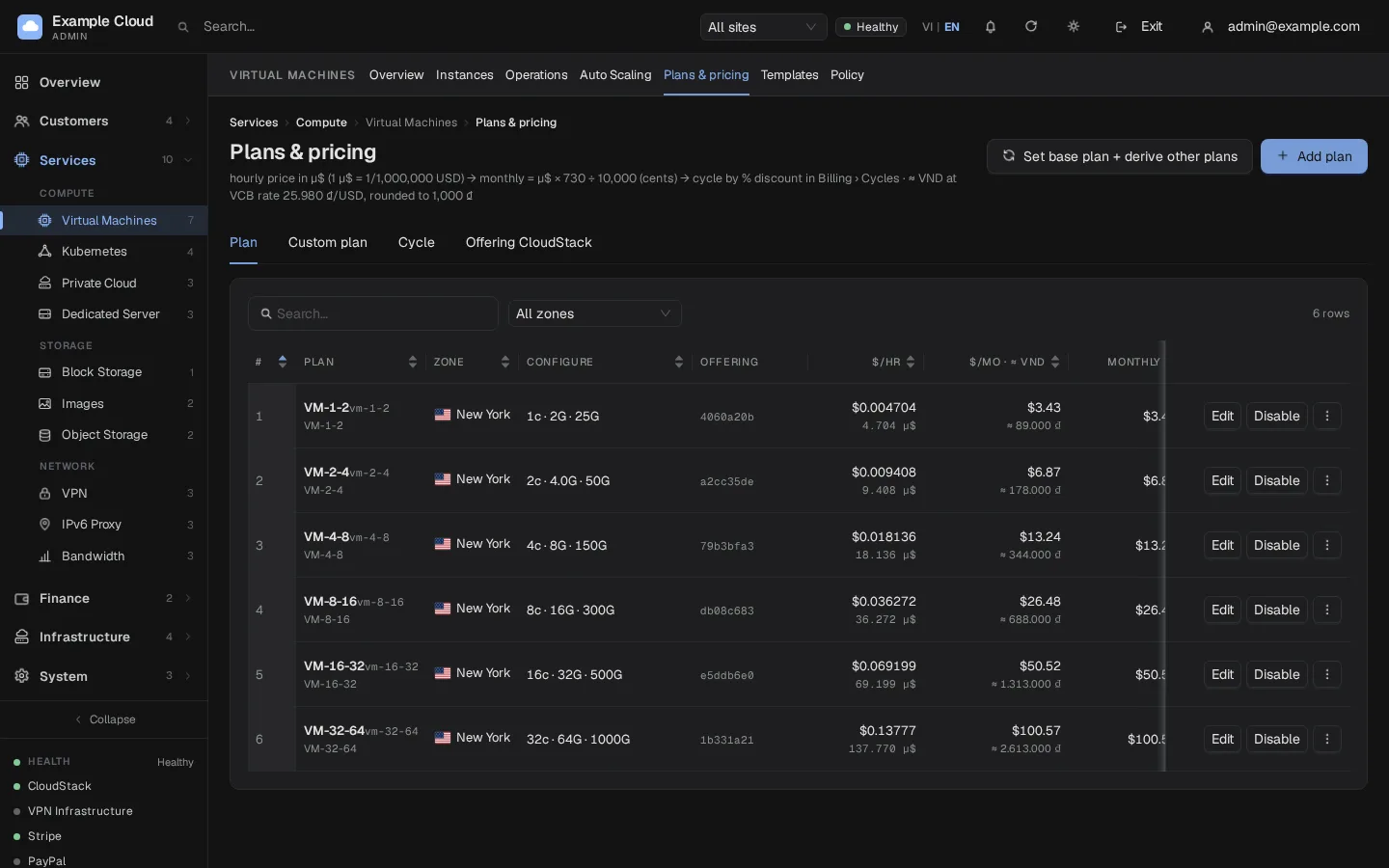
NexCMP stores every price as micro-dollars per hour (µ$/hour; 1 µ$ is 1/1,000,000 USD). You can type the price in the unit you prefer and the form converts it:
| Unit | Notes |
|---|---|
| USD / hour (6 decimals) | Stored as is. |
| USD / month | Divided by the hours-per-month setting (730). |
| VND / month | Converted once at the current exchange rate, then stored in µ$/hour. Appears only when a rate exists. |
The form shows the result: µ$/hour, USD/hour, the monthly price and every billing cycle. Monthly price = hourly price × 730; a longer cycle is monthly price × months × (1 − discount).
Add a plan
Open Services › Virtual Machines › Plans & pricing and click Add plan.
Fill in the form:
Field Example value Plan name VM-2-4Slug empty: made from the name Zone your default zone Infrastructure source empty for CloudStack, or a Proxmox cluster Service offering CloudStack (live) pick one (shown only for CloudStack) CPU (core), RAM (MB), Root disk (GB) 2,4096,40Disk offering optional, for a custom root size Enter price by / Price USD / month,12Short description 2 vCPU, 4 GB RAM, 40 GB NVMeOrder 10Active On: customers can buy Visibility Visible in catalog Price change reason initial priceClick OK. The plan appears in the table with its hourly and monthly price and a cell for every enabled cycle.
Billing cycles
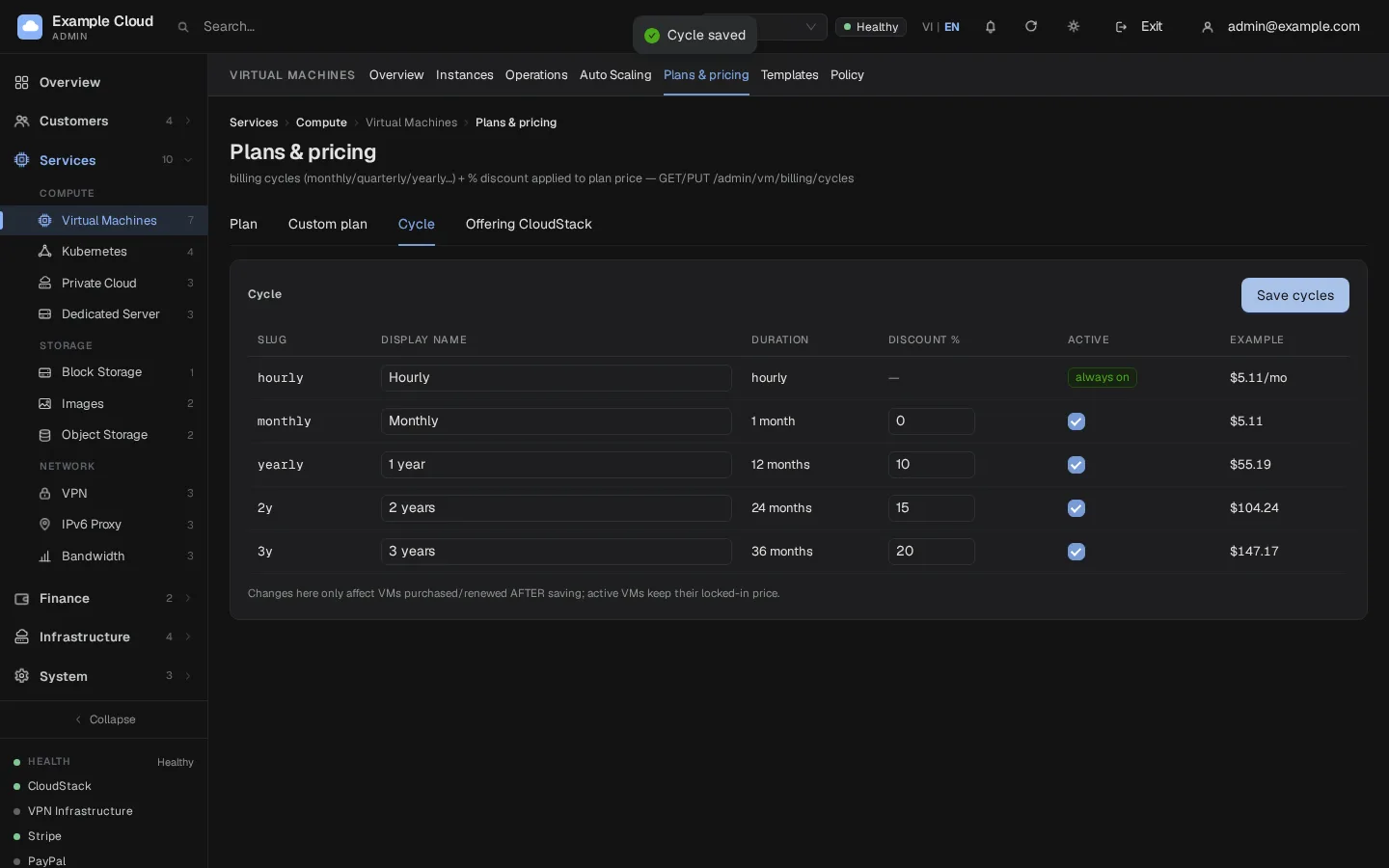
Open the Cycle tab to set which cycles customers can choose and their discounts.
| Cycle | Default | Notes |
|---|---|---|
| Hourly | always on | Charged hour by hour. |
| Monthly | on, 0% | |
| 1 year | on, 10% | |
| 2 years | on, 15% | |
| 3 years | on, 20% |
You can rename a cycle, change its discount (0 to 90%) and switch it on or off. A change applies to VMs bought or renewed after you save; running VMs keep their locked price.
Set a base plan and derive the others
Set base plan + derive other plans reprices the whole table from one price. Choose the base plan and its price, then either keep the current price ratios between plans or compute from component prices (µ$/hour per vCPU, per GB RAM and per GB NVMe, with an optional bundle discount of 0 to 50%). A preview table shows old and new prices before anything is written. Click Apply, and give a reason.
When you apply new prices: running hourly VMs get a lower price from the next billing hour, and prepaid VMs get it at renewal. If a price goes up, running VMs keep their old price.
Custom plans
The Custom plan tab lets customers choose their own vCPU, RAM and NVMe size. Set the hourly unit price for one vCPU, one GB of RAM and one GB of NVMe (leave empty to derive from a percentage discount), the minimum, maximum and step for each, and which billing cycles apply. A custom plan should cost more than a fixed plan of the same size, otherwise customers would skip the fixed plan; the page flags rows where custom is cheaper. Turn on Enable custom plans for customers to sell them; off shows "Coming soon" in the portal. Each custom VM gets its own hidden plan row; those rows cannot be edited or deleted while the VM exists.
Change, hide, clone, delete
| Action | What it does |
|---|---|
| Edit | Changes name, description, order, price, active state and visibility. |
| On/Off | Off: customers cannot buy; running VMs are unaffected. |
| Hide / Show | A hidden plan is not in the catalog but existing VMs keep it and an administrator can assign it. |
| Clone | Creates a new plan in the same zone with a new source, size or price, optionally hiding the old one. To sell the same configuration from CloudStack and Proxmox, clone it and choose the other source. |
| Move up/down | Changes the order. |
| Delete | Removes the plan from sale and from the table. VMs that already use it keep it. |
Plans in use are locked
Once a plan has VMs, its zone, offering, CPU, RAM, disk and source are locked so running VMs are not changed silently. Use Clone to create the new configuration; the old plan keeps its VMs.
Verify
- The plan appears in the table with the expected hourly and monthly price.
- In the customer portal, start an order: the zone offers the plan and the cycle prices match the Cycle tab.
- Place a test order, check the wallet charge against the price shown, and delete the VM.
Limits and notes
- A plan belongs to one zone and one source.
- Prices are stored in µ$/hour; the VND price shown is derived and rounded by the VND rounding step (see currency page). The wallet is always in USD.
- Resellers get a wholesale and retail price derived from the list price; changing a price for an existing plan does not copy custom reseller prices to a clone whose configuration you changed.
- Min, max and step limits of custom plans are checked against CloudStack's own limits; a maximum disk above CloudStack's
storage.max.volume.sizemakes deploys fail and refund.
Troubleshooting
| Symptom | Cause | Fix |
|---|---|---|
| "Plan name required" / "Service offering required" | Missing field | Fill the name; for CloudStack choose an offering. |
| "CPU/RAM/disk must be > 0" | A size is empty or zero | Enter all three. |
| "Invalid price (µ$/hr must be 1 … 100,000,000)" | The price is out of range | Check the unit and the amount. |
| "Price change requires a reason" | Reason empty when editing | Type a reason (3 characters or more). |
| "Offering "X" is 4c/8192 but plan specifies 2c/4096 - CloudStack will provision by offering. Save?" | The plan's numbers differ from the offering's | Make them match, or confirm to keep CloudStack's size. |
| "Failed to fetch offerings from CloudStack" | The connection is down or the key lacks permission | See CloudStack. |
| "Template is not ready on CloudStack - deployment will fail. Enable anyway?" | You enabled an unfinished template | Wait for the template to be ready. |
| Plan cannot be edited ("has VMs - locked") | VMs use the plan | Clone it. |
| The plan does not show for customers | Off, hidden, or the zone is not ready | Check Active, Visibility and the zone tag. See Zones. |
| "Select at least 1 billing cycle" | No cycle ticked for custom plans | Tick at least one. |
| "Bundle discount must be 0–50%" | Out of range | Use 0 to 50. |
| VND price option missing | No exchange rate yet | Update the rate first. |