Resellers (white-label)
Where in the admin: Customers › Resellers › List (
/resellers), Domains & SSL (/resellers/domains), Permissions & wholesale (/resellers/entitlements), Defaults (/resellers/settings). Reseller slots: System › Admin › License & updates (/license).
What it does
A reseller gets a branded copy of the customer portal on their own domain, with their own customers, wallet, prices and (optionally) payment channels. They buy from you at a wholesale price and sell at their own price. Their customers never see your brand, and the reseller domain can never open your admin console. The reseller runs their business from the partner console at https://partner.<your-domain>.
Requirements
| Item | Requirement |
|---|---|
| License | One reseller domain slot on your license for each custom reseller domain. The license page shows used/max slots and a link to buy more. Without a free slot, adding a domain fails with "Out of license reseller domain slots". |
| DNS | Each reseller domain must be pointed at your server (see below). |
| Web server and TLS | The host name must reach the NexCMP panel through your reverse proxy with a valid certificate for that name. |
| SMTP configured for the invitation and notification e-mails. | |
| Master switch | Reseller settings › General › rs_enabled is on by default. |
Prepare the infrastructure
Decide the public address of the server: its IPv4 address and, if you prefer CNAMEs, a host name that points at it (for example
sites.cloud.example.com).Open Customers › Resellers › Defaults (
/resellers/settings), group Domains & SSL, and set:Key Meaning rs_server_ipv4The public IPv4 that resellers' A records must point to. rs_cname_targetThe host name resellers' CNAME records must point to. rs_master_hostsHost names that belong to your own main site (they cannot be given to resellers). rs_platform_domainOptional parent domain for platform sub-domains (for example partners.cloud.example.comto give resellersacme.partners.cloud.example.com). Empty disables the option.rs_sites_stale_minutesMinutes before the certificate service is considered stale (default 15). rs_ssl_fail_hoursHours of failed attempts before an error is raised (default 48). Check these values before sending instructions
rs_server_ipv4,rs_cname_targetandrs_master_hostsship with example values. Replace them with your own server and domain before you give DNS instructions to a reseller, otherwise the instructions on screen point to the wrong place.Click Save (a reason is requested).
Make sure your reverse proxy forwards the reseller host names to the NexCMP panel and serves a certificate for each of them. The installer configures nginx and Let's Encrypt only for the main domain (and
admin.andpartner.names that resolve). If you use Cloudflare, proxy the host name and use the Full SSL mode.
Connect in NexCMP
Create the reseller
Open Customers › Resellers › List and click New reseller. The wizard has 8 steps and provisions everything at the end; each step can be retried safely.
Step Fill in Reseller Legal or trading name, slug (4–31 characters a–z, 0–9 or -, starting with a letter; it is also the invoice prefix), contact name, e-mail and phone, default language, billing details of the reseller (as a buyer of wallet top-ups).Console account Username, account e-mail, full name; Send a one-time invite link by e-mail (valid 72 hours, recommended) or show a temporary password once. Brand Brand name, short name, taglines, primary colours, support e-mail and phone, the seller name printed on customer invoices, logos (light and dark background), square mark and favicon: PNG, JPEG, WEBP or ICO up to 256 KB, no SVG. Domains The customer domain(s) with also www, which one is primary, a test domain (sslip.io) and the dry-run option, or a platform sub-domain. The wizard shows DNS OK / DNS not ready and the records to create. Pricing & wallet Wholesale discount (%), retail floor (% of list), default markup (%), credit limit, initial balance, low-balance alert, limits on customers, VMs and domains, site features (customer sign-up, DDoS protection, support tickets, custom plan, resize, Auto Scaling). Payment channels Who collects customer payments (see below) and optional own PayPal and own VN bank transfer. Email Sender name and Reply-To. The From address stays the platform address until DKIM is set up for the reseller domain. Review Check everything and click Provision everything, or Save draft (provision later). Provisioning continues in the background (every 30 seconds). Open the reseller to see the progress and use Continue provisioning or Retry if a step failed.
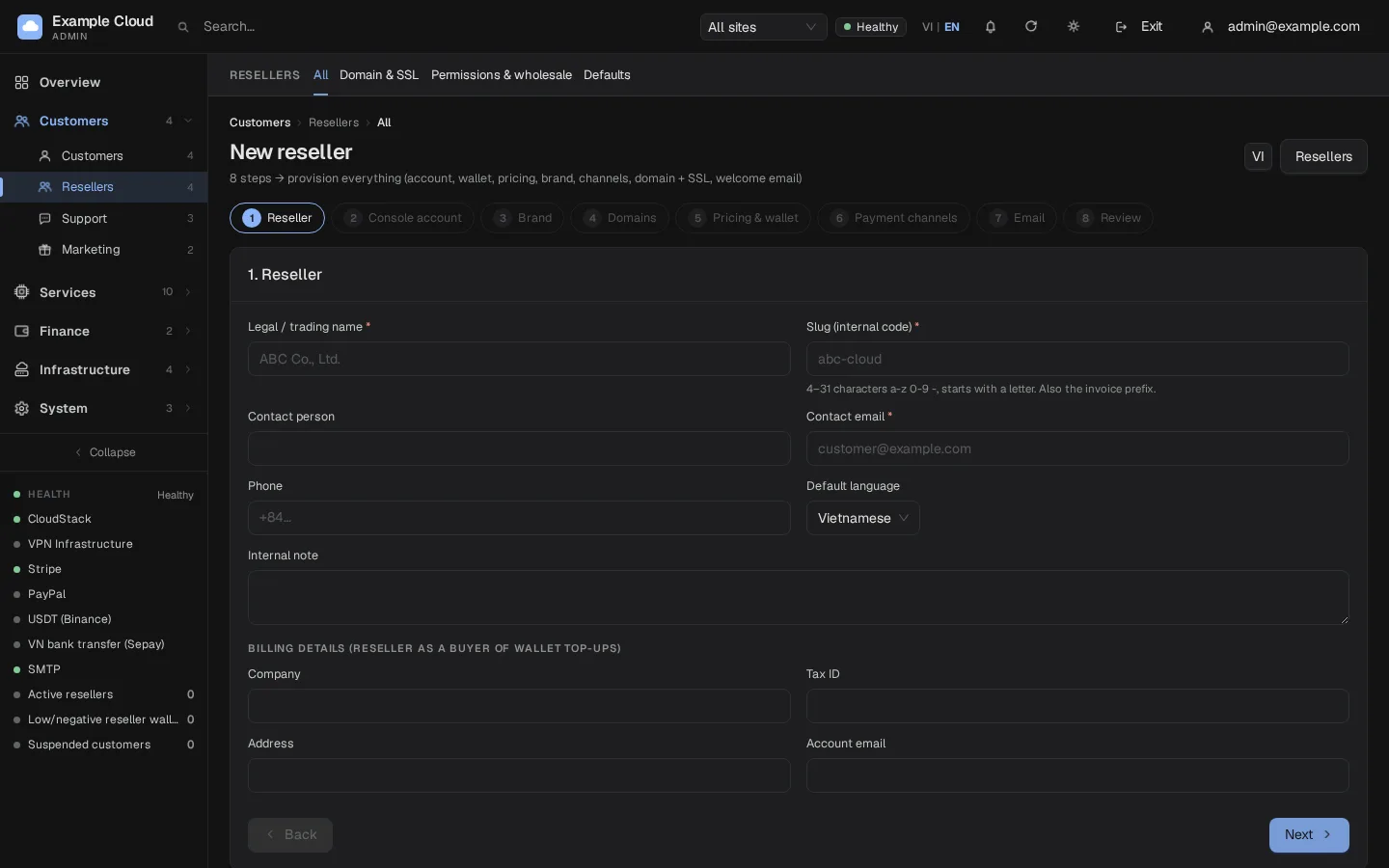
Point DNS (the reseller does this)
The reseller (or you) creates the records shown on the Domains & SSL tab:
| Record | Name | Value |
|---|---|---|
| TXT (ownership, first time only) | _site-verify.<domain> | sv=<token> shown on screen |
A (apex domain such as shop.example.net) | the domain | your rs_server_ipv4 |
CNAME (sub-domain such as cloud.example.net) | the domain | your rs_cname_target (or an A record to rs_server_ipv4) |
| CNAME (optional) | www.<domain> | your rs_cname_target |
Also:
- Remove any AAAA (IPv6) record unless your server answers on that IPv6 address.
- Turn the CDN proxy off (grey cloud) while the domain is being verified.
- If the domain has CAA records, allow
letsencrypt.org.
The token in the TXT record is different for every domain; copy it from the screen. The system re-checks DNS every 5 minutes for the first 48 hours, then hourly, and releases a name whose TXT record is still missing after 72 hours.
Domain states
On Customers › Resellers › Domains & SSL (all resellers) and in a reseller's Domains & SSL tab:
| State | Meaning |
|---|---|
pending_verify | Waiting for the TXT record. |
pending_dns / verifying | Waiting for A or CNAME to point to you. |
issuing | Certificate being issued. |
active | Serving the reseller's site. |
cert_expiring | Certificate close to expiry; renewal expected. |
dns_lost | DNS stopped pointing to you; after 30 days the domain is removed. |
error | See the error code; Retry after fixing. |
removing / removed | Being taken away; the license slot is returned. |
Row actions: Check now, Retry, Make primary, Test mode (for a test domain), Remove.
Permissions & wholesale
Customers › Resellers › Permissions & wholesale (/resellers/entitlements) is a matrix: one row per reseller, with the wholesale discount and markup and one switch per service (for example DDoS Shield and VPN). A switch is editable when the platform-wide feature is on; otherwise the cell is read-only and links to the setting. The Top-up codes sub-tab sets how many codes each reseller may issue per month (see Promotions).
Pricing rules:
- Wholesale price = list price x (1 - discount), and can be overridden per plan and per billing cycle in the reseller's Wholesale pricing tab.
- The reseller sets retail prices and cannot go below the floor (percentage of list).
- The reseller's wallet pays the wholesale price when their customers buy. The wallet has a credit limit, a grace period and an overdraft cap (see Defaults).
Defaults
Customers › Resellers › Defaults (/resellers/settings) are the rs_* keys that apply to every reseller. Each change asks for a reason and is audited.
| Group | Key | Default | Meaning |
|---|---|---|---|
| General | rs_enabled | 1 | Reseller programme on. |
rs_platform_collect_enabled | 0 | Allows the platform to collect customer payments for resellers. Enable only after legal review. | |
rs_totp_required | 1 | Reseller console accounts must use two-factor authentication. | |
rs_agreement_version | 1 | Version of the reseller agreement they must accept. | |
| Default pricing | rs_default_discount_bp | 2000 (20 %) | Wholesale discount for new resellers (basis points, 0 to 9000). |
rs_default_markup_bp | 2500 (25 %) | Default markup (0 to 50000). | |
rs_default_floor_bp | 9000 (90 %) | Retail floor (0 to 20000). | |
rs_default_max_domains | 3 | Domains allowed per reseller. | |
| Wallet and payouts | rs_grace_hours | 72 | Grace before services of customers are affected by an empty reseller wallet. |
rs_overdraft_cap_cents | 5000 | Overdraft allowed on the wallet. | |
rs_retention_days | 14 | Days before the VMs of a closed reseller are destroyed. | |
rs_payout_hold_days | 30 | Days a commission is held before it can be withdrawn. | |
rs_payout_min_cents | 5000 | Smallest withdrawal. | |
rs_topup_min_cents | 2000 | Smallest wallet top-up by a reseller. | |
| Payments and mail | rs_webhook_base | empty | Public base URL for reseller gateway webhooks (empty = use the site URL). |
rs_mail_from | empty | From address for reseller e-mails. | |
rs_invoice_show_processor | 1 | Show the payment processor on invoices. | |
rs_gw_stripe_enabled, rs_gw_usdt_enabled | 1 | Whether resellers may configure their own Stripe or USDT. |
Who collects customer payments
| Mode | Meaning |
|---|---|
| Reseller collects (own channels) — default | The reseller connects their own Stripe, PayPal, USDT or bank account. Their webhooks are https://<reseller-domain>/v1/billing/<gateway>/webhook/r/<id>. Saved cards and auto top-up are not available for these sites. |
| Platform collects | Your channels are shown on the reseller site. Locked until rs_platform_collect_enabled = 1. |
| Mixed | A combination chosen per channel. |
What the reseller sees
The partner console at https://partner.<your-domain> has Overview, Reports, Customers, VMs, Tickets, Orders, Payments, Prices, Brand, Landing & legal, Domains & SSL, Email, Wallet and Payment channels. Console accounts have the role reseller (full) or staff (read-only). To look at it yourself, open the reseller and click Sign in to partner console: you enter for 60 minutes, every write is logged with your name in both the admin log and the reseller log, and money operations need a second confirmation.
Verify
- After provisioning, the reseller's list row shows active and a green Provisioning column.
- Open the reseller's domain in a browser: the reseller's own login page appears with their brand.
https://<reseller-domain>/adminanswers 404. - Sign up a test customer on that domain: the customer appears under Customers › List with the reseller in the Site column.
- The license page shows one more used slot.
Limits & notes
- One license slot per custom or test domain; platform sub-domains do not use a slot.
- Suspending a reseller keeps data; Close reseller returns all domain slots, and VM destruction is allowed only after the retention period.
- Reseller customers appear in your customer list and can be impersonated like any other (the link opens on the reseller's domain).
- Resellers cannot see or change your payment channels, quotas defaults or other resellers.
Troubleshooting
| Symptom | Cause | Fix |
|---|---|---|
| "Out of license reseller domain slots" | All slots used | Free a slot (remove a domain) or buy more on the license page. |
Domain stuck in pending_verify | TXT record missing | Create the TXT record exactly as shown; use Check now. |
Domain stuck in pending_dns | A/CNAME not pointing to you, an AAAA record, or the CDN proxy is on | Fix DNS, turn the proxy off, then Check now. |
error state | See the code on the row (for example CAA blocking Let's Encrypt, rate limit) | Fix and click Retry. |
| Browser says the host is unknown or "421" | The host name is not on the license, or not routed to the panel | Add the domain through the reseller (consumes a slot) and fix the reverse proxy. |
| Instructions show a wrong IP or host | rs_server_ipv4 / rs_cname_target still have the sample values | Set them in Defaults. |
| Reseller cannot enable platform collection | Locked | Set rs_platform_collect_enabled after legal review. |