Log in as a customer
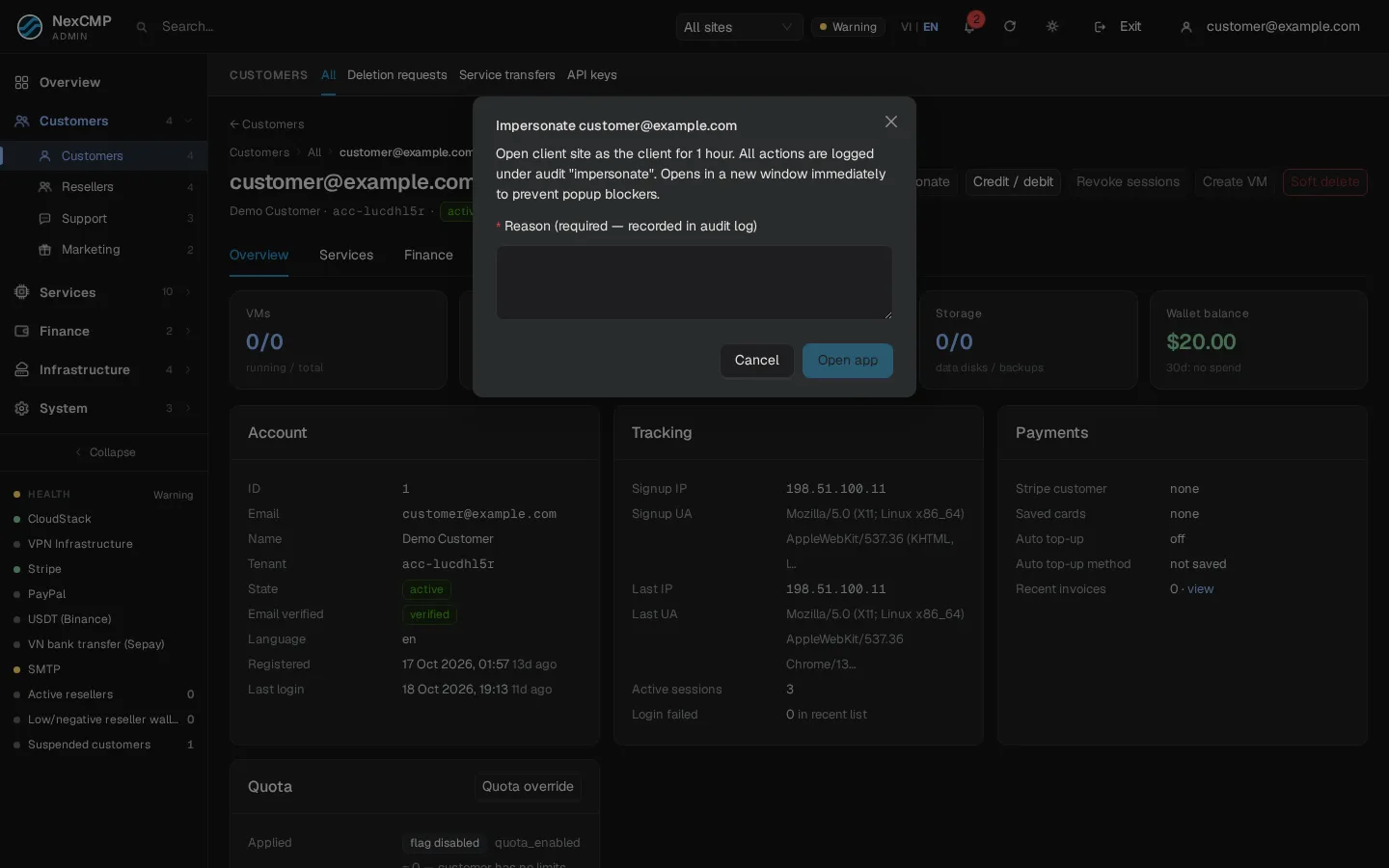
Where in the admin: Customers › Customers › List › a customer › header button Impersonate (
/customers/<id>).
What it does
Impersonate (login-as) lets a support administrator see the portal exactly as one customer sees it, to reproduce a problem or help with an order. The session lasts one hour and is clearly separated from a normal session: anything that could give lasting access to the account is blocked, and every use is logged.
Requirements
| Item | Requirement |
|---|---|
| Role | An administrator signed in to the admin console. |
| Customer | The account must be active. A locked or deleted account answers "account is not active" (HTTP 409). |
| Reason | A reason is mandatory; it is written to the audit log. |
| Browser | Allow pop-ups for the admin address: the portal opens in a new window. |
Steps
- Open Customers › List and click the customer.
- Click Impersonate. A dialog explains that the customer's site opens as the customer for one hour and that every action is audited.
- Type the reason (for example "Ticket 1234 — cannot create VM") and click Open app.
- A new window opens on the customer's site and shows the dashboard with
?impersonated=1. If the browser blocked the window, allow pop-ups and click again.
For a customer of a reseller, the window opens on the reseller's own domain, because the link only works on the customer's own site.
How it works
- The admin action creates a single-use token valid for one hour and writes
customer.login_as(administrator, IP, reason, site) to the audit log. - The new window opens
https://<site>/v1/portal/impersonate/<token>. A first request only shows a small page and does not consume the token (so browser prefetching cannot burn it); the page then confirms with a POST. - The POST consumes the token. A second use, or use after one hour, answers "The impersonation link has expired or was already used".
- NexCMP creates a customer session that lasts one hour (a normal session lasts 30 days), records a sign-in entry with the method
impersonate, and logscustomer.login_as.used. - The token works only on the customer's own site; on another host it answers 404.
What is blocked in an impersonated session
Anything that gives access beyond the hour, or changes the customer's own security, returns HTTP 403 impersonate_forbidden:
| Blocked | Why |
|---|---|
| Changing the password, TOTP, linking or unlinking Google/GitHub, editing passkeys | Customer's own credentials |
| Deleting the account | Irreversible |
| Creating or editing API keys | Long-lived access |
| Approving a CLI, desktop or MCP login (device link) | Long-lived access |
| Creating Kubernetes access, S3 keys, SSH keys, root passwords, console share links, VPN or proxy credentials | Secrets that outlive the session |
| Redeeming top-up codes | Money campaigns |
| Withdrawing or changing the payout of affiliate commission | Money leaves the system |
| Editing AI keys, budgets or alert e-mails | Customer configuration |
Everything else works: you can read the pages, create or manage VMs, place orders and so on. Actions run with the customer's identity and spend the customer's money; the audit entries above are what show that an administrator was behind the session.
Verify
- Impersonate a test customer. The portal opens and shows that customer's data.
- Try to change the password: you get "forbidden" (impersonation).
- In System › Logs › Admin actions, find
customer.login_aswith your name, the reason and the site, followed bycustomer.login_as.used. - Close the window, reopen the same link: "link expired or already used".
Limits & notes
- The one-hour limit is fixed (3600 seconds). To continue, impersonate again.
- Prefer reading and reproducing; avoid actions that spend money unless the customer asked you to.
- Revoke the session early with Revoke sessions on the customer page (this signs the customer out too).
- Resellers have their own Sign in to partner console impersonation (60 minutes) from Resellers; see Resellers.
Troubleshooting
| Symptom | Cause | Fix |
|---|---|---|
| "Account is not active" | Account locked or deleted | Unlock it first, or look at the customer page instead. |
| Browser blocks the window | Pop-up blocker | Allow pop-ups for the admin address and try again. |
| "Link expired or already used" | One-hour limit or reuse | Impersonate again. |
| Opens "Not found" | The link was used on the wrong host | Use the window the dialog opened; do not paste the link elsewhere. |
| An action says "forbidden" | Blocked in impersonated sessions | Ask the customer to do it, or use the admin screens. |