Auto top-up
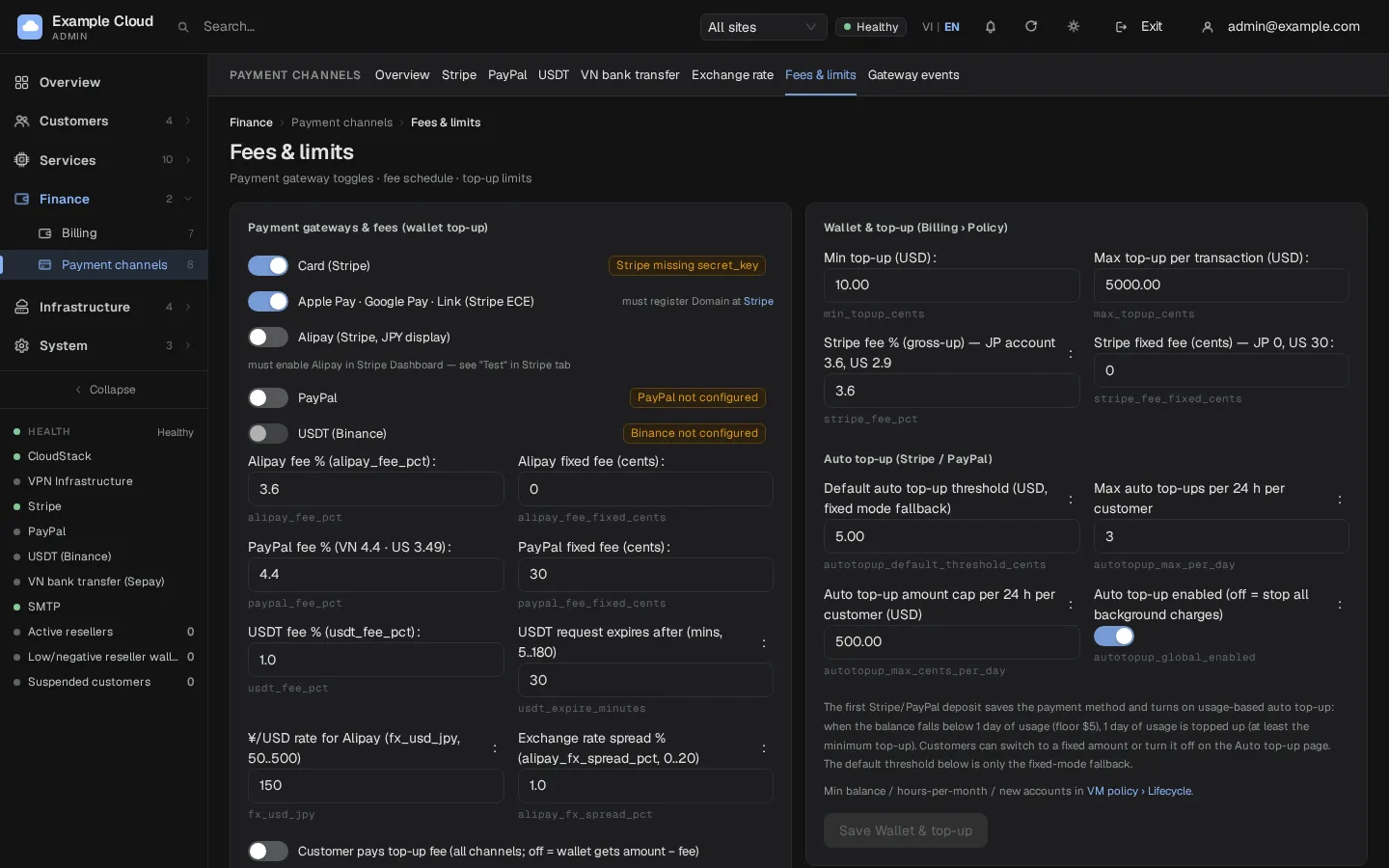
Where in the admin: Finance › Payment channels › Fees & limits (
/payments/fees), card Wallet & top-up (Billing › Policy), section Auto top-up (Stripe / PayPal). Where in the portal: Billing › Settings (/billing?settings=1).
What it does
When a customer's wallet balance falls too low, NexCMP charges their saved payment method and credits the wallet, so running services are not suspended for lack of funds. A background job checks all enabled customers every 5 minutes.
Requirements
| Item | Requirement |
|---|---|
| Channel | Stripe and/or PayPal configured. |
| Saved method | The customer has a saved card or PayPal account. |
| Site | Main site, or a reseller site whose Stripe/PayPal channel is collected by the platform. |
| Global switch | Auto top-up enabled is on (default on). |
How it works
After a customer's first Stripe or PayPal top-up the server saves the payment method and turns automatic top-up on in By usage mode — only if that customer never set auto top-up themselves. There is no extra tick box on the deposit screen; the server records the time, IP address and method as evidence. If the customer turns auto top-up off later, it is never switched on again by itself.
| Mode | Trigger (when the balance is below ...) | Amount charged |
|---|---|---|
| By usage (default after the first top-up) | the cost of the next 24 hours of running services (hourly VMs plus prepaid renewals due in 24 hours), but never below $5 | the 24-hour cost rounded up to a whole dollar, at least the minimum top-up, at most the maximum top-up and the daily cap |
| Fixed amount | the customer's own threshold ($1 to $500) | the customer's own amount (from the minimum top-up to $1,000, and larger than the threshold) |
With no running service in By usage mode, nothing is charged.
The balance compared with the threshold is the real money in the wallet. Service credits from promotion codes are kept separately and do not count (see Promotions).
The fee is handled like a normal top-up: with Customer pays top-up fee on, the card is charged amount plus fee and the wallet gets the full amount; with it off, the wallet gets the amount minus the fee.
Configure the global limits
Open Finance › Payment channels › Fees & limits (
/payments/fees).In Auto top-up (Stripe / PayPal) set:
Setting Default Range Meaning Auto top-up enabled On on or off Off stops every background charge immediately. Default auto top-up threshold (USD, fixed mode fallback) $5.00 $0 to $10,000 Used only as the starting threshold in fixed mode. Max auto top-ups per 24 h per customer 3 1 to 50 Counts successful and pending attempts. Auto top-up amount cap per 24 h per customer (USD) $500.00 $0 to $1,000,000 Total of automatic charges in a rolling day. Click Save Wallet & top-up.
What the customer sees
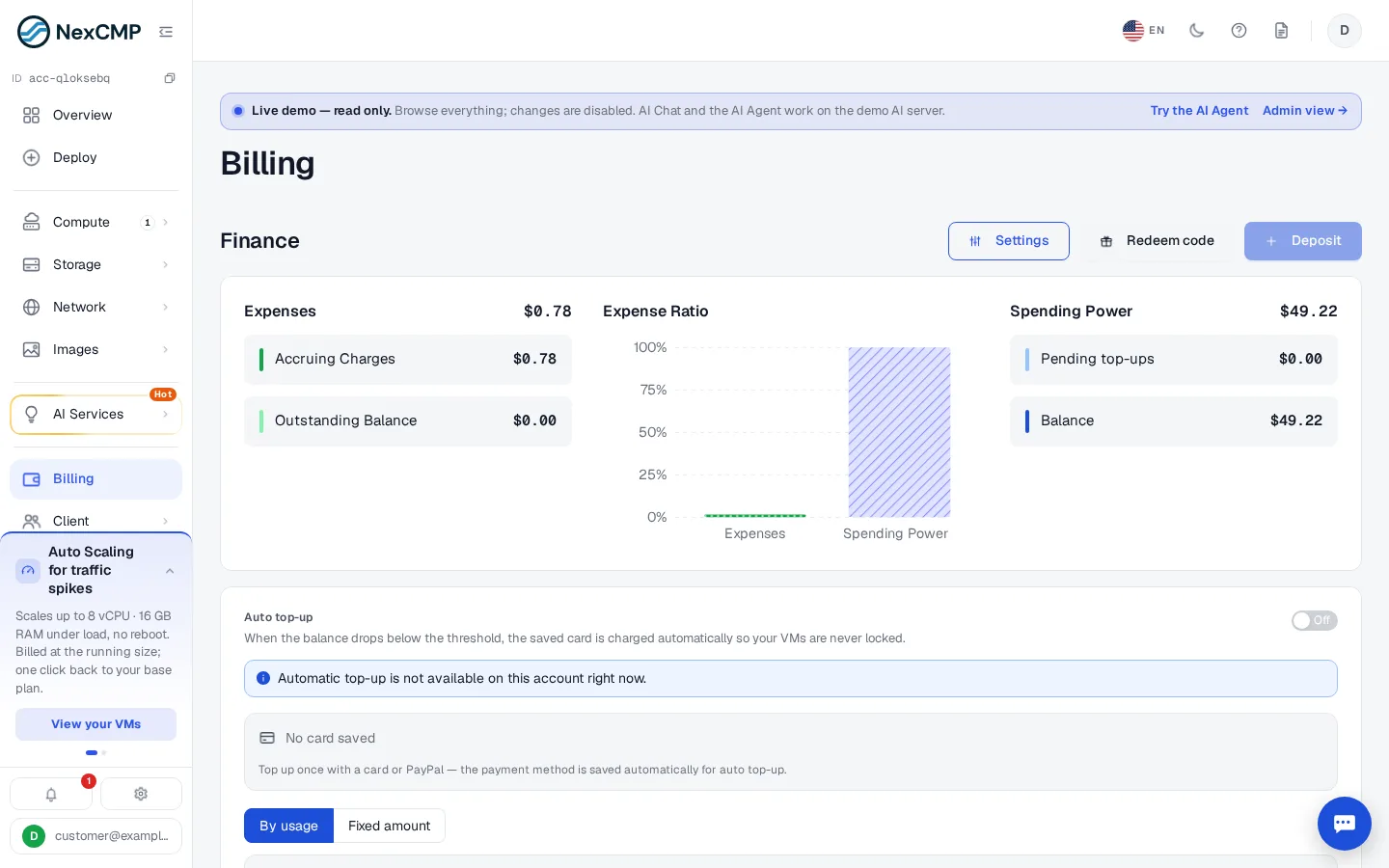
- In the portal the customer opens Billing and clicks Settings.
- The panel shows the saved method(s), the on/off switch, the mode (By usage or Fixed amount), the estimated current usage and the next charge, and the Recent automatic top-ups.
- Switching to Fixed amount lets them enter the threshold and the amount. Turning the switch off stops charges.
Verify
- As a test customer, make a first top-up with a test card (Stripe). Open Billing › Settings: auto top-up is on.
- Run a small VM so that there is usage, and reduce the balance below the threshold (for example with Customers › customer › Credit / debit).
- Within about 5 minutes a charge is made. In the customer's Overview › Payment card, Auto top-up history shows the attempt with status Done, and a Top-up received notification is sent.
Limits & notes
- One charge per drop. After a charge the job waits until the balance has risen back above the threshold or the waiting time ends: 1 hour after a success, 24 hours after a pending charge, 30 minutes after a system error.
- Daily limits. When either daily limit is reached, no charge is made and a Daily limit reached line is written (at most once every 6 hours).
- Failures. A declined card, expired card or insufficient funds counts as a card failure. The job retries after 1 hour, then 6 hours, then 24 hours. After 3 consecutive card failures auto top-up is switched off and the customer is notified (Auto top-up failed). A payment that needs the customer's confirmation (for example 3-D Secure) is not counted as a failure; the customer is told to confirm it.
- No double charges. Each charge is claimed atomically per drop below the threshold and uses an idempotency key at the gateway.
- Removing the card turns auto top-up off.
- Resellers. If a reseller uses its own payment channel, the customer cannot enable auto top-up (HTTP 403
feature_disabled).
Troubleshooting
| Symptom | Cause | Fix |
|---|---|---|
| Customer cannot switch it on: "Top up once with a card or PayPal" | No saved method | Make one card or PayPal top-up first. |
Error no_card (422) | The chosen gateway has no saved method | Pick the gateway that has one, or save a method. |
Error invalid_argument on amount | Fixed mode outside the allowed ranges | Threshold $1–$500, amount between the minimum top-up and $1,000, amount greater than the threshold. |
| Nothing is charged although the balance is low | Global switch off, no running service in By usage mode, daily limit reached, or the previous charge is still waiting | Check the switch, the history and the limits. |
| "N consecutive failed attempts — auto top-up switches off after 3" | Card keeps failing | Customer replaces the card with a new deposit. |
| Status Needs your confirmation | The bank requires 3-D Secure | The customer completes a normal top-up once. |