Datacenter proxy platform
Open Source IPv4 datacenter proxy panel and billing
NexCMP is self-hosted billing and management software that lets you sell datacenter proxies from IPv4 subnets you own. Customers order SOCKS5 and HTTP proxies on dedicated IP addresses in a portal on your domain, pay from a prepaid wallet, and manage their lists in the portal or through the API.
The module is called VPN in the console, but it sells proxies, not tunnels. It is part of NexCMP, costs nothing extra and is switched off until you turn it on. You bring the subnet and the servers; NexCMP does not supply IP addresses or bandwidth.NexCMP Source: full source code for $499, one-time. Use, modify and self-host for your own business. You may sell the services you operate; you may not resell or redistribute the source code or builds. Source license terms


What it is and what you need
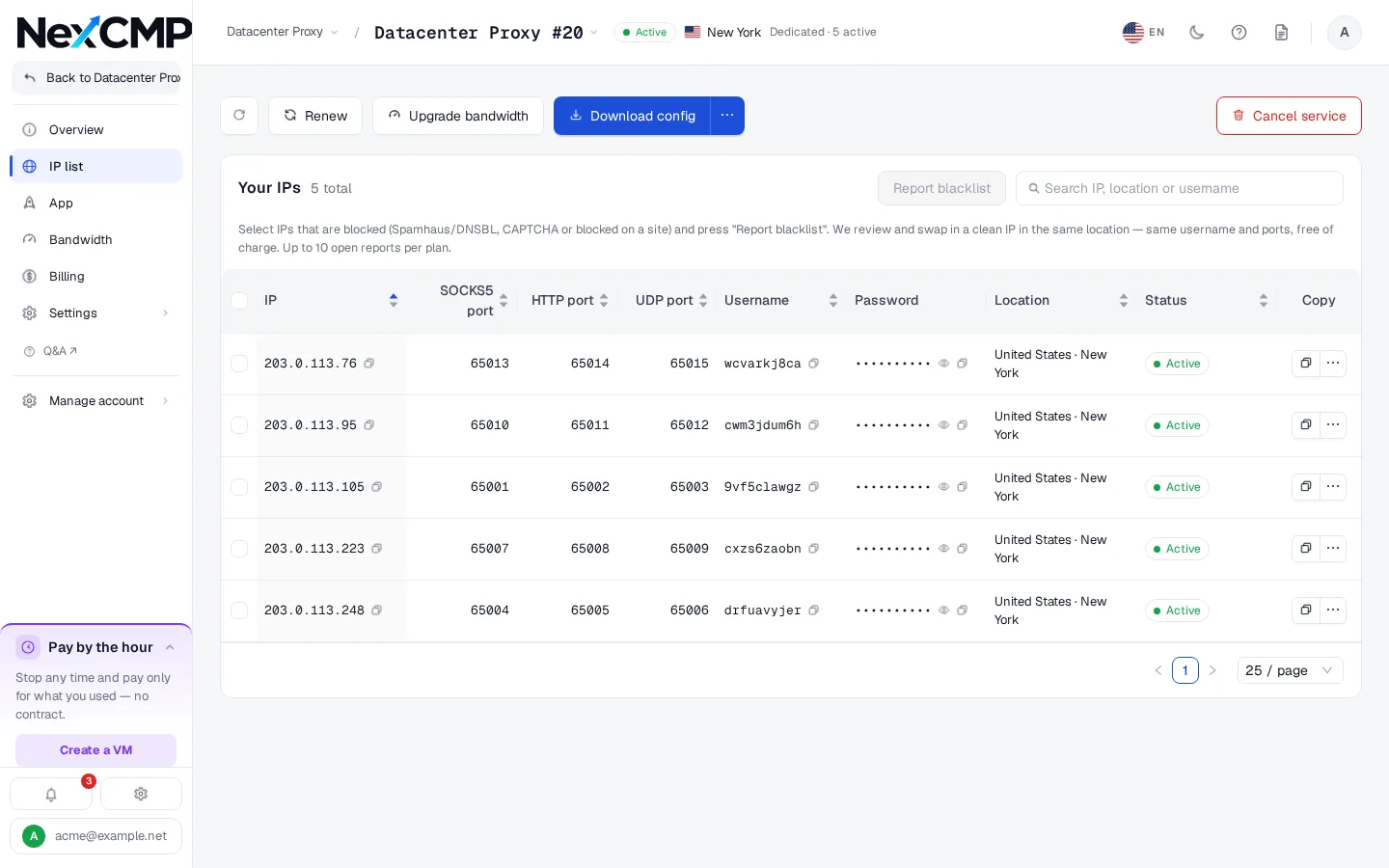
Each plan is a set of IPv4 addresses from your pool. Every address belongs to one customer and has its own username and password. On each address the customer reaches a SOCKS5 port (with UDP associate), an HTTP port and a UDP port, in the range 65001 to 65535. Traffic leaves from the address the customer connected to.
You need a public IPv4 subnet you control, Linux x86_64 servers that carry it, and a NexCMP panel. A small agent on each server reports its addresses; the panel allocates them to orders, bills the wallet and hands out the connection details.
This is not a tunnel VPN. There is no WireGuard or OpenVPN, and there are no branded client apps.
How your customers manage a datacenter proxy plan
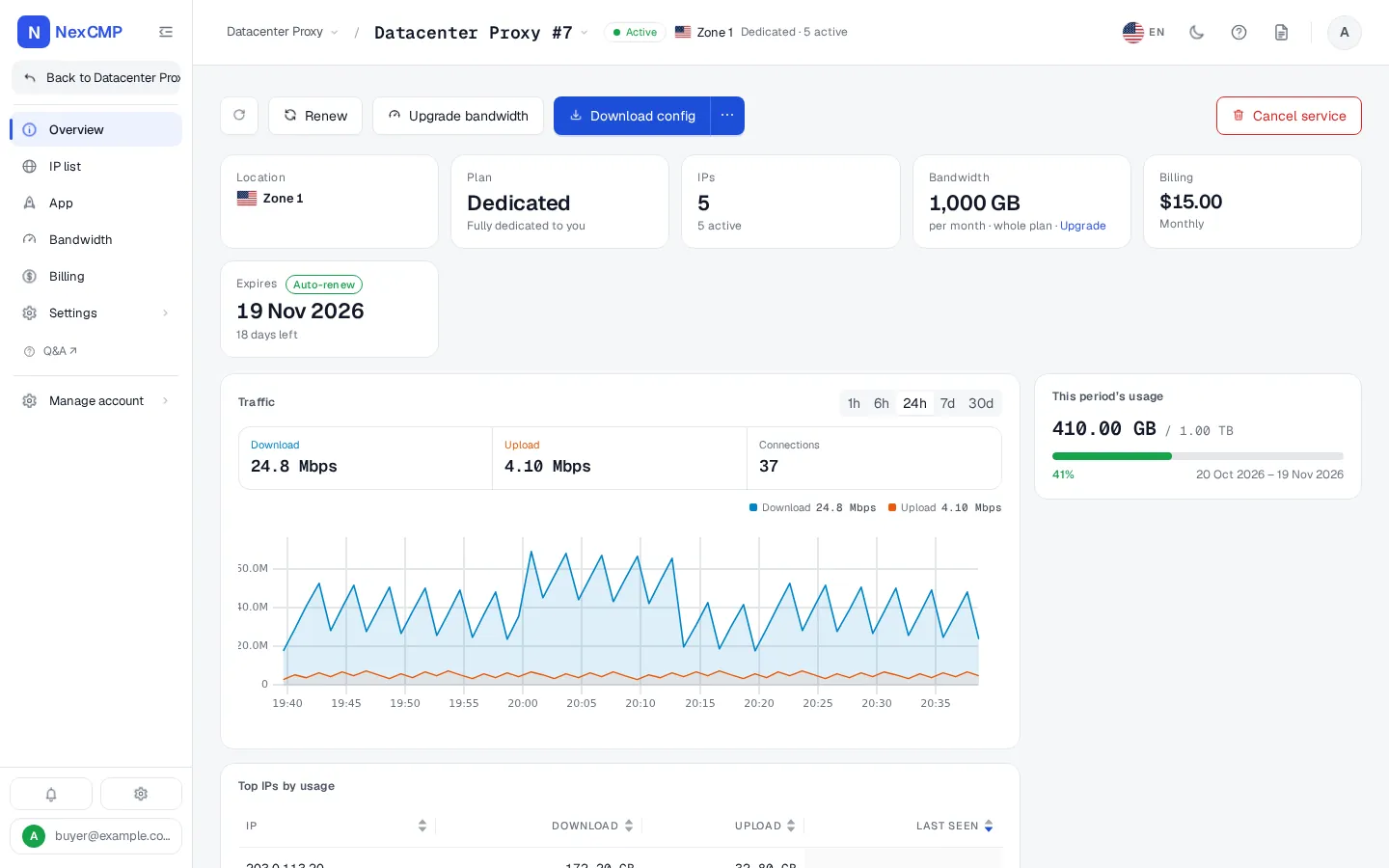
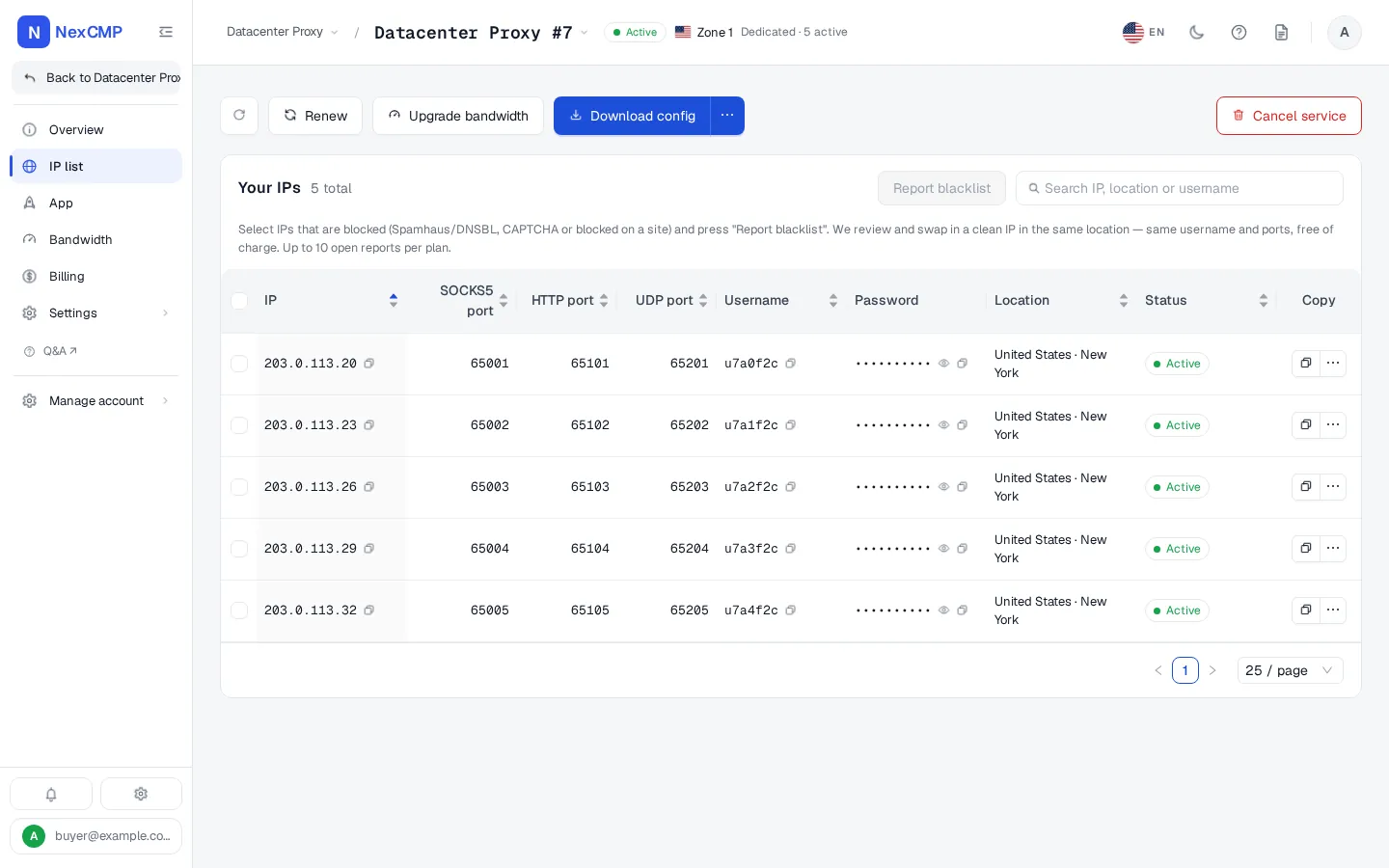
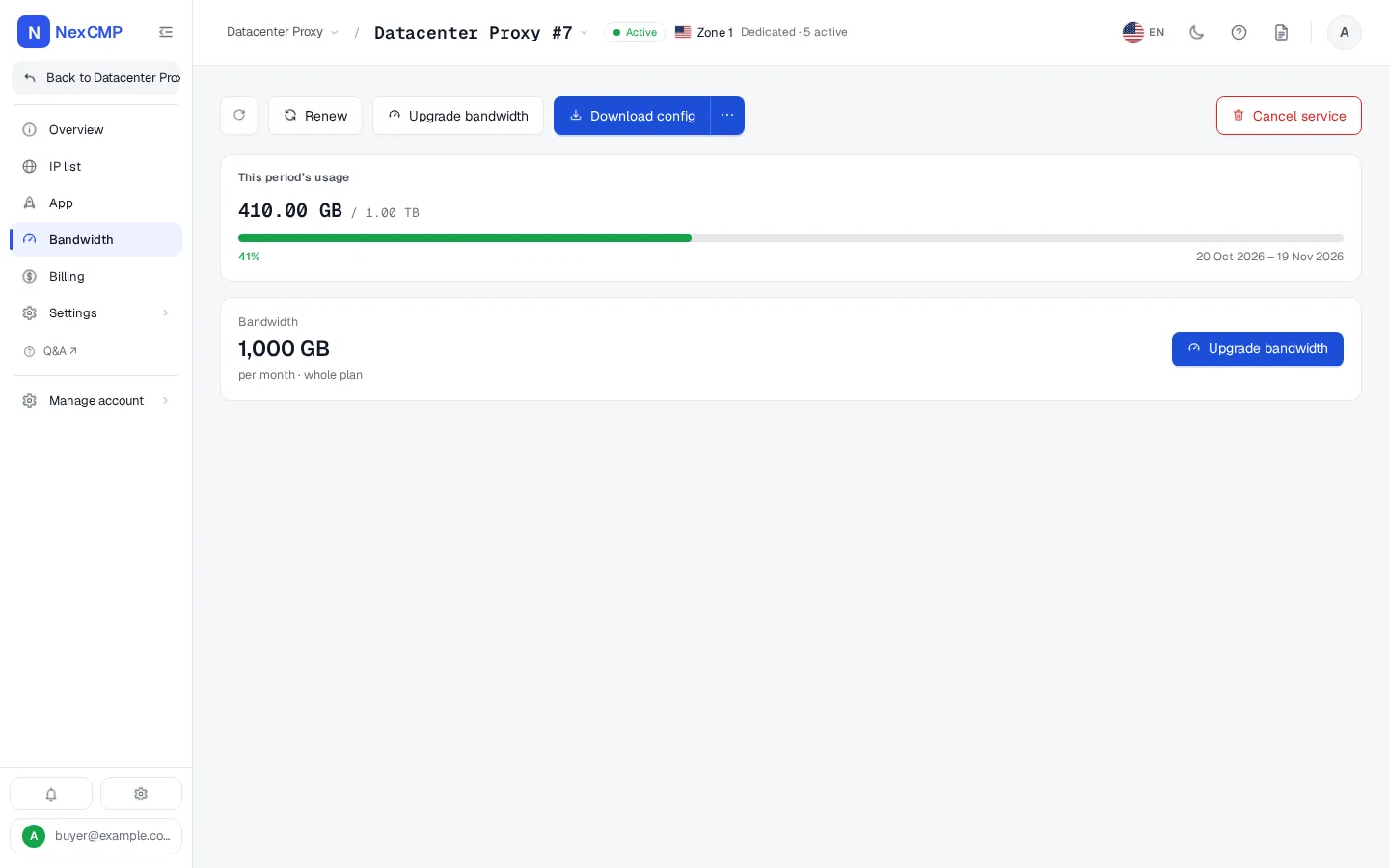
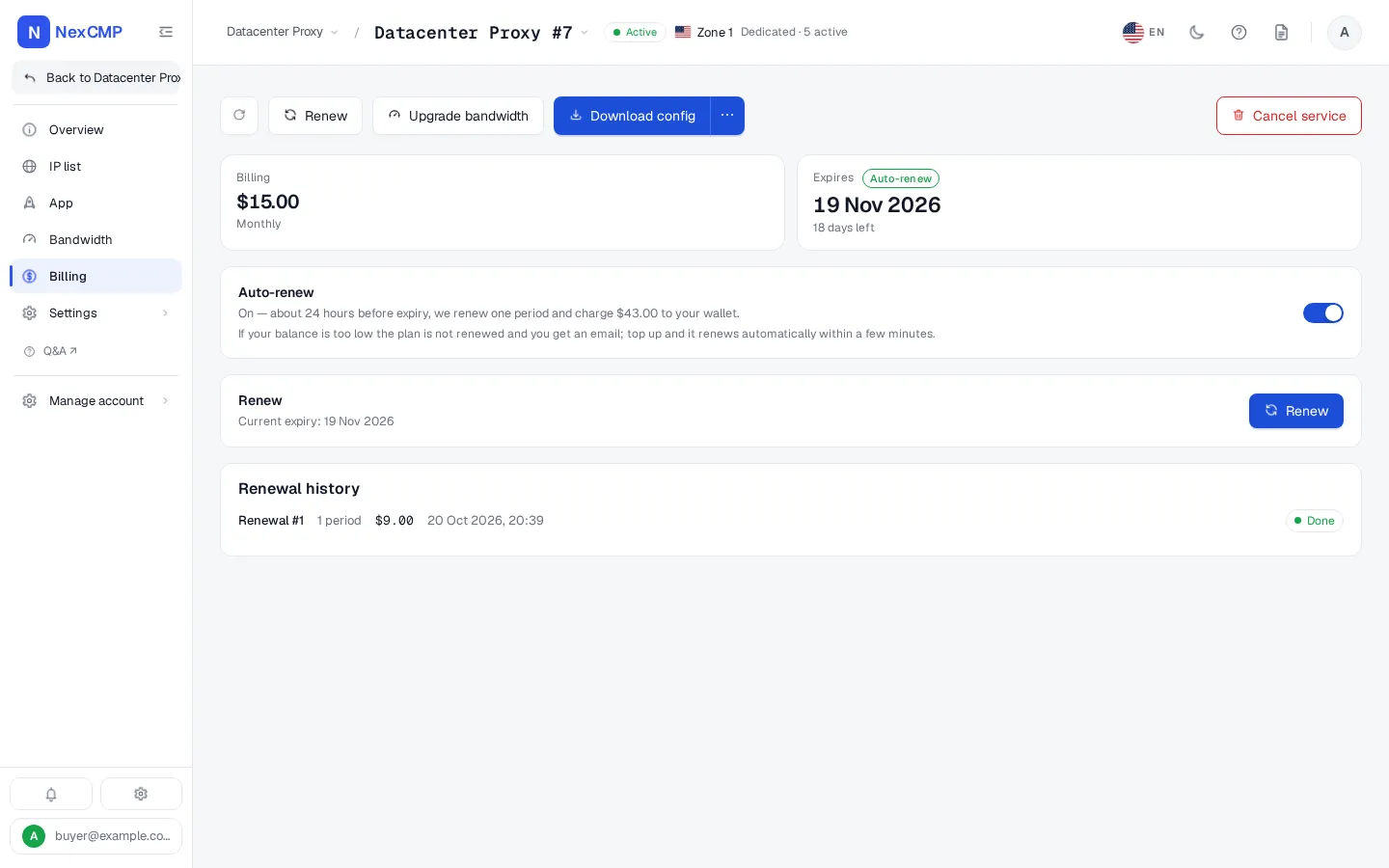
Every screen is a tab of the service page in the customer portal, shown with sample data. Pick a tab, use the arrows or the left and right keys, or open the full-screen viewer.
Overview
IP list
Bandwidth
Billing
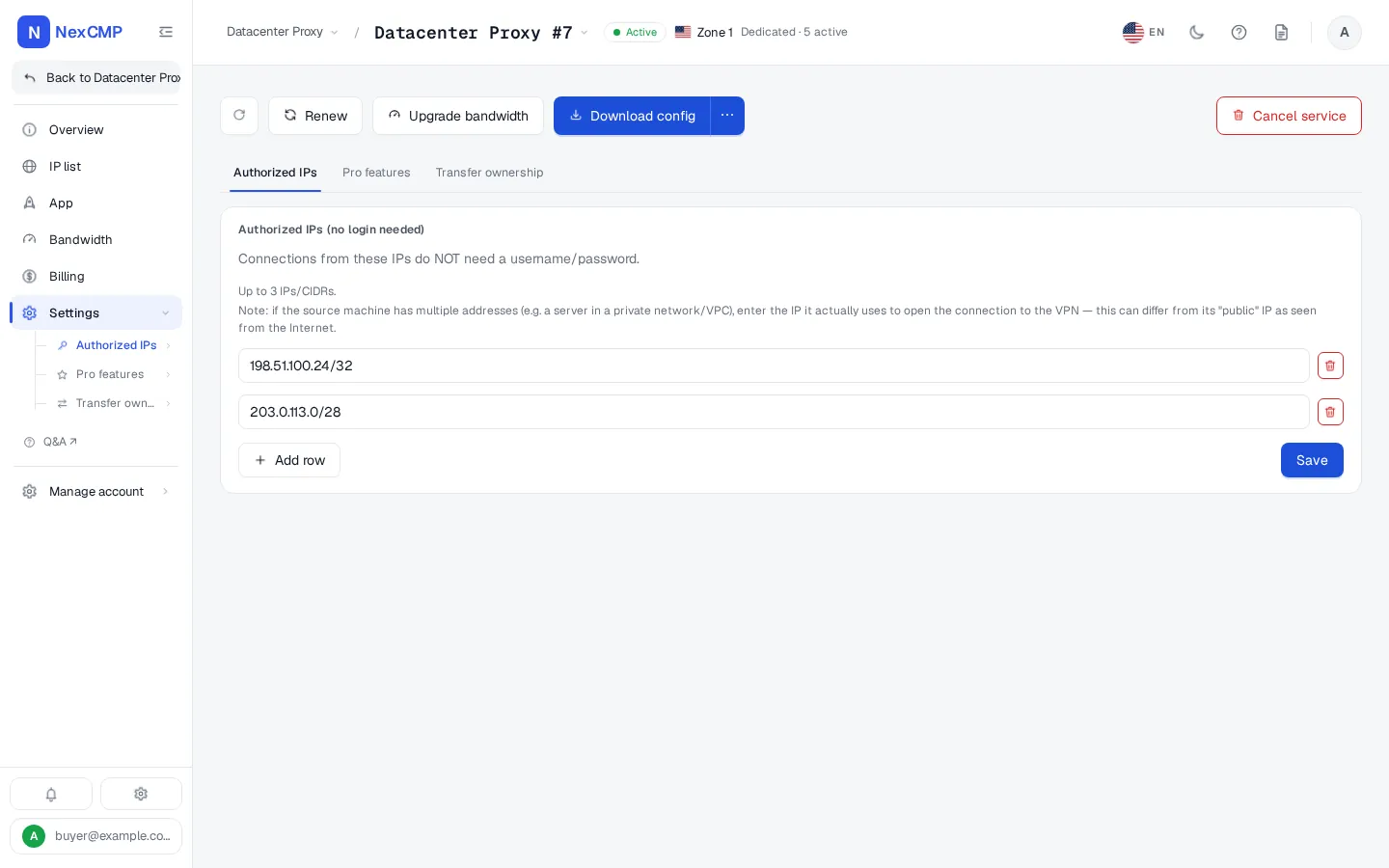
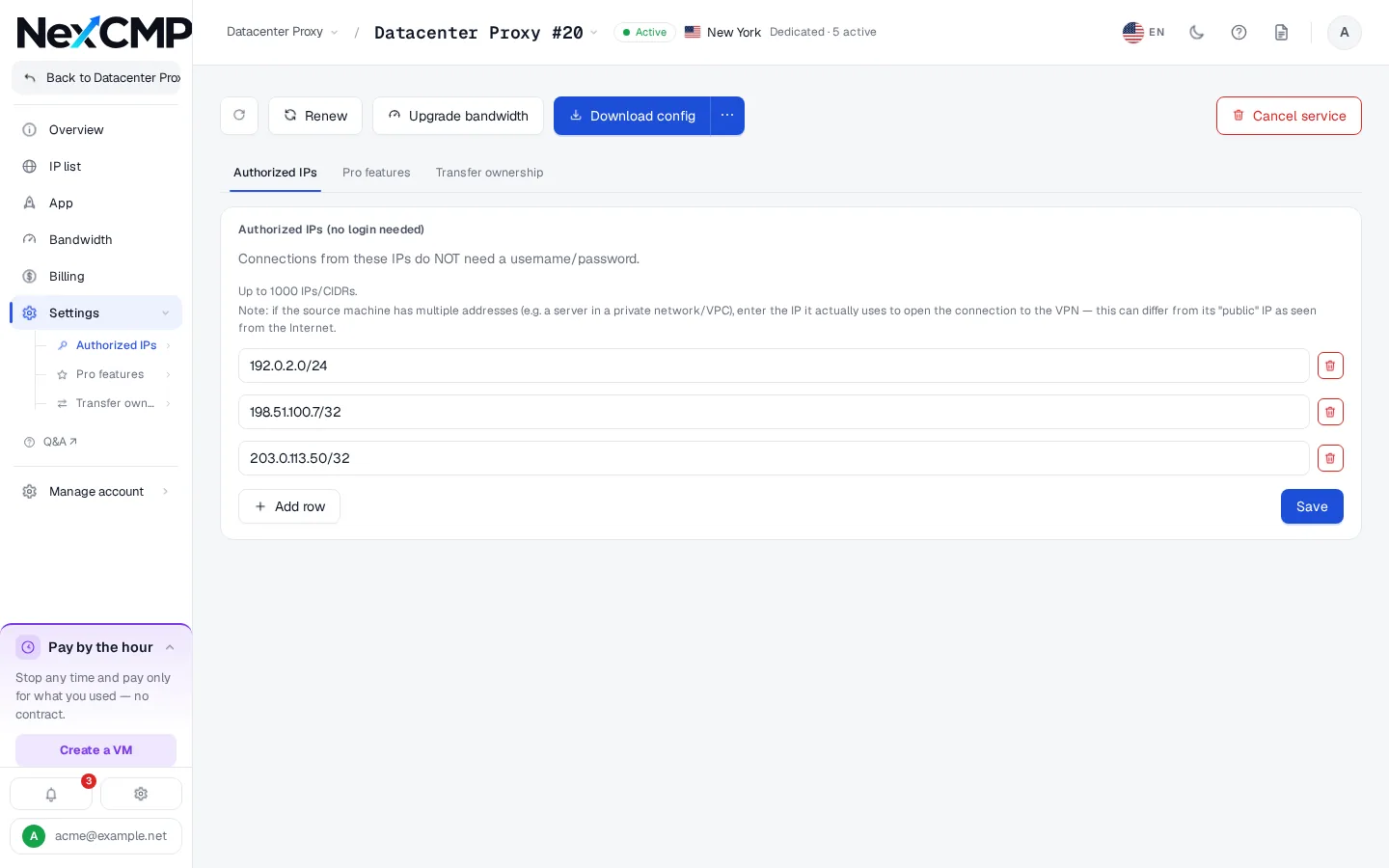
Authorized IPs
How the pieces fit together
Orders and billing go through the panel. Proxy traffic goes straight to the IP on your node.
Node management and setup
All of it is in Admin, Node VPN & Proxy.
Add a server over SSH
Enter the server's public IPv4, SSH port, user and password. The panel connects once, runs the installer with a one-time ticket and gives the node the VPN role.
Or install by hand
Generate a token and run the command on the server. A token install enrolls the machine without the VPN role on purpose: open it in Agents and add the vpn role.
IP pool fills itself
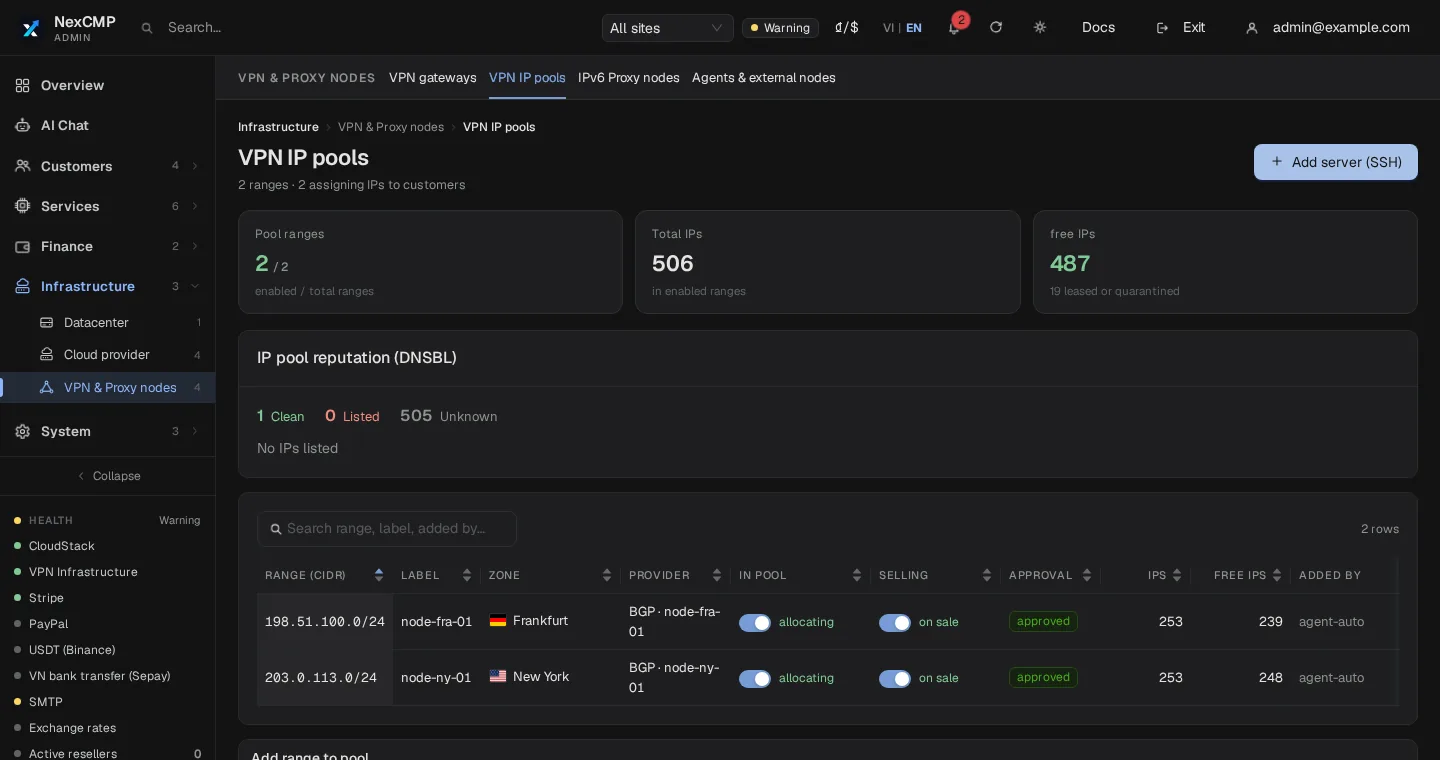
The agent detects the public IPv4 addresses on the server. You can add subnets routed to the node, up to 32. Each range belongs to a node and a zone, and you can mark it sellable or switch it off.
Gateways are never sold
From release 1.4.2 the agent reads the server's real routing table and never puts a gateway address into the pool.
Plans and pricing
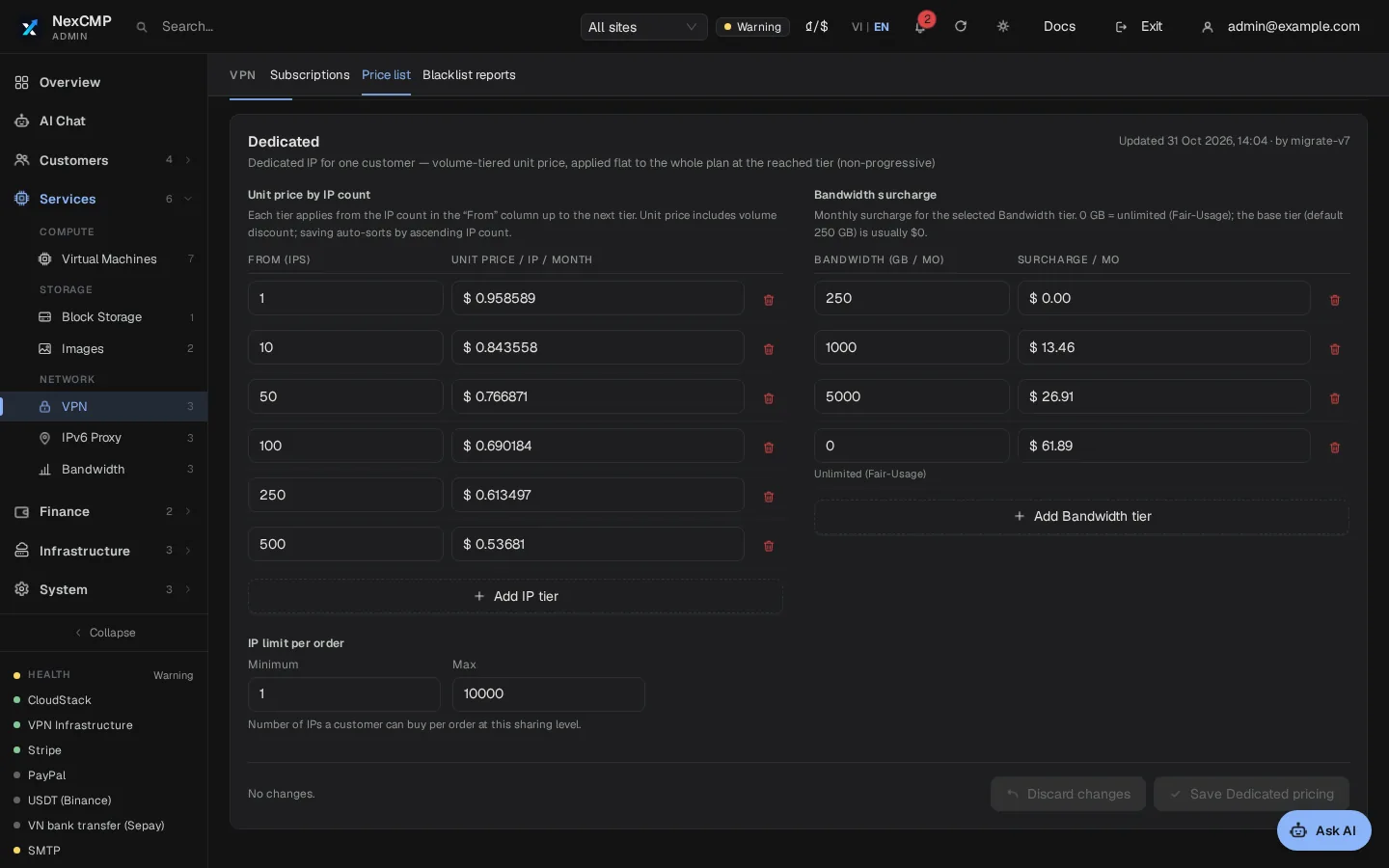
You set every price. The price list is under Admin, Services, VPN, Price list.
Price tiers by number of IPs
A customer orders from 1 to 10,000 IPs per plan. You define the tiers by IP count, such as 1 to 9, 10 to 49 and so on. The tier reached sets the price per IP for the whole plan; it is not applied piecemeal.
Billing cycles
Customers buy by the day, week, month or year. Daily and weekly prices are a share of the monthly price you set, and you set the yearly discount.
Auto-renew
Auto-renew is on by default and charges the wallet for one more period when 24 hours or less remain. If the balance is too low the customer is notified. Customers switch it in the Cost tab.
Expiry and cancel
An expired plan keeps its IPs for a 3-day grace period. Cancelling takes effect at once and does not refund the paid period.
Prices apply to new orders
Changes apply to new orders; plans already sold keep their price. Every change is written to the audit log with old and new values.
Bandwidth and limits
Read this part before you write your own sales page.
Bandwidth tiers are a data allowance
A plan carries a bandwidth tier in GB per period, for the whole plan and not per IP. Customers can move up a tier mid-period and pay the difference for the days left.
Traffic is measured and cut at the limit
From NexCMP 1.5.1 the panel adds up the traffic that the node agent reports and cuts the plan when its GB are used up; it opens again within seconds after a bandwidth upgrade or when the next period starts. Update the node agent to 1.5.1: older agents are still counted but can miss bytes after a network error or a restart, and a node that has not reported usage is shown as Not measured and is never cut. Unlimited plans are never cut.
Need a hard speed cap?
For a speed limit per plan, use the separate IPv6 Proxy module: its plans are limited in Mbps.
Mail port 25 is blocked
Connections to destination port 25 are always blocked. There is no switch to open it.
Quotas per account
The quota key vpn.ips caps how many VPN IPs an account can own at the same time. The panel checks it before any money is taken and refuses the order if it would be exceeded.
Defaults rise by level with the real money a customer has topped up. The shared quota switch is off by default, so nothing is capped until you turn it on. You edit the defaults per level and override one customer, with a reason that goes into the audit log. Customers see their limits on their Quotas page.
IP rotation: IPv4 does not rotate
Datacenter proxies on dedicated IPv4 addresses do not rotate. An address stays with the plan for as long as the plan runs. Rotation in NexCMP exists only for IPv6 proxy plans, which are a different module.
If an address is blacklisted, the customer selects it in the IP list and sends a report with a reason, the blocked site and a note. The panel runs a DNSBL check at once. You, or a reseller for their own customers, approve a replacement or reject the report with a reason the customer sees.
A replacement is a clean IP from the same zone, free of charge; the customer keeps username, password and ports. If no clean IP is available, nothing changes. The old address is set aside for at least 30 days. A plan can have up to 10 open reports.
Authentication: user/pass and IP auth
Both methods work on the SOCKS5 and the HTTP port.
Username and password
Every IP has its own generated username and password, for SOCKS5 and for HTTP Basic proxy authentication.
Authorized IPs
Customers list source addresses allowed to connect without a password: IPv4 from /16 to a single address, IPv6 from /32 to a single address.
Three entries by default
Each plan starts with 3 entries; an add-on raises the limit to 1,000.
Protocols
SOCKS5 with CONNECT and UDP associate (no BIND), an HTTP proxy with CONNECT, and a UDP port, on a fixed set of three ports per IP in 65001 to 65535. There is no TLS-encrypted proxy port.
Export, subscription links and API
The IP list can be copied in seven styles, downloaded, or turned into a QR code for a socks:// link. The config endpoint returns it as socks, http, socks_plain, http_plain, json, clash, singbox or v2rayn.
Each plan also has a public subscription (feed) link built from a token, in v2rayn, shadowrocket, clash or sing-box format. Regenerating it kills the old link. These formats carry plain SOCKS5 proxies; they do not make the service a VPN server.
Customers create API keys with the scopes vpn:read, vpn:detail, vpn:write, vpn:create and vpn:destroy. Purchases need an Idempotency-Key. A public catalog and quote use the catalog:read scope. The OpenAPI file and the cmp command-line tool cover the same calls.
What it looks like
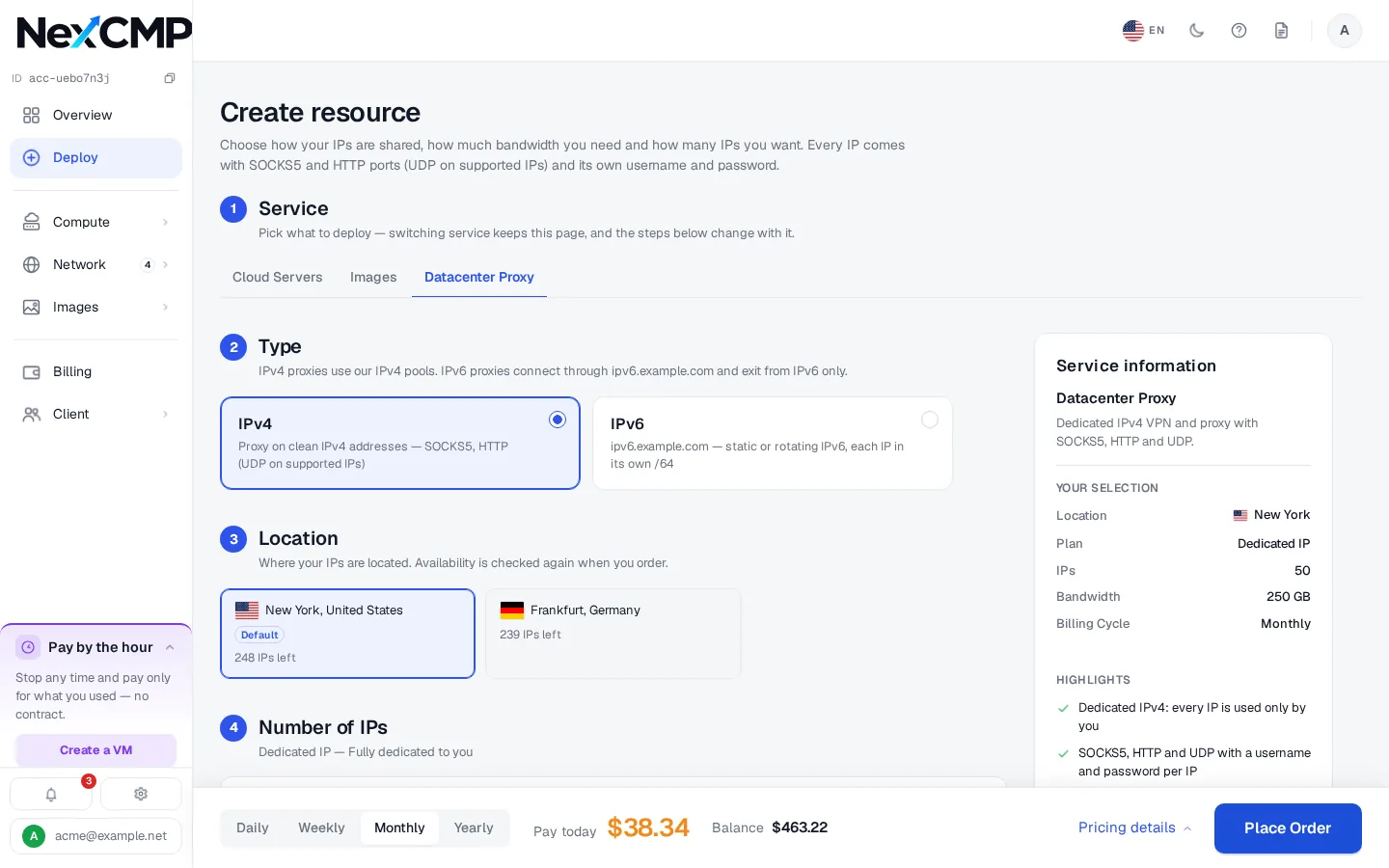
Screens from a demo install. Names, prices and addresses are sample data.
What your customers can do
Each item is in the portal or the API.
Order a plan
Choose zone, number of IPs, bandwidth tier, add-ons and cycle, see the quote and pay from the wallet.
Get the proxy list
Search the IP list, copy it in several styles, download a config, scan a QR code or use the subscription link.
Manage Authorized IPs
Add or remove the source addresses that may connect without a password.
Report a blacklisted IP
Pick the affected addresses and ask for a replacement. They get a notice and an email when you decide.
What you can do as the operator
Each item is in the NexCMP admin console.
Manage nodes and pools
Add nodes by SSH or token, add subnets, set each range's zone, and mark ranges sellable or off.
Edit the price list
Set tiers by IP count, bandwidth tiers, add-ons and cycle prices. Only an admin can change it.
Name the service
Under Settings, Branding, set the display name, for example Datacenter Proxy (up to 40 characters; empty means VPN).
Review blacklist reports
Open IP reports, replace the address or reject with a reason. Resellers do the same for their own customers.
See and revoke plans
List and filter every plan, see its IP history, and revoke one with a reason. Revoking does not refund.
Quotas
Set the default vpn.ips quota per level and override one customer, with a reason. Changes are audited.
Infrastructure requirements
You provide the network and the servers. Full steps: https://nexcmp.com/docs/infrastructure/vpn-proxy-nodes/.
- Your own IPv4: public /32 addresses on the server, or a /16 to /32 subnet routed to the node.
- A Linux x86_64 server with systemd and root access for the install. Only x86_64 agents are built.
- curl or wget on the server, and outbound HTTPS from the node to your panel.
- Inbound TCP and UDP on ports 65001 to 65535 on every IP you sell.
- The VPN module switched on in NexCMP under License & updates.
Fit check
A good fit: you hold your own IPv4 space, run Linux x86_64 servers, and want to sell dedicated SOCKS5 and HTTP proxies with billing, quotas and an API in one place.
Not a fit: you want NexCMP to supply IPs or bandwidth, need WireGuard, OpenVPN or a client app, or need rotating IPv4.
You are responsible for where your IPs come from, for obeying the law, and for an acceptable use policy your customers accept. NexCMP is software only: it provides no IPs or bandwidth, and nothing here is legal advice.
Free and Source
The VPN module is in every NexCMP build at no extra cost. NexCMP Free is $0 for the first year, then $99 per year, for operators with their own ASN and subnet; applications are reviewed by hand. NexCMP Source is $499 one-time. Servers, IPs and payment-gateway fees are yours.
Datacenter proxy platform: frequently asked
Can I sell datacenter proxies from my own subnet?
Which protocols are supported?
Can I limit bandwidth per plan?
How do customers authenticate?
Can I rotate IPv4 addresses?
How do I stop a node's gateway address being sold?
Can I call the service Datacenter Proxy?
Who is responsible for the IPs and how they are used?
Sources
NexCMP documentation for VPN and proxy nodes.
Get NexCMP free
Free, with the VPN proxy module and every other module included. Install it on your server today, or look at the customer portal screens first.

Last updated: