AI modules
AI Chat and AI Agent for your cloud customers
NexCMP is billing and customer-portal software for Apache CloudStack and Proxmox VE, and two AI modules ship in every license: an assistant inside the customer portal, and an agent that carries out tasks on a customer's own VM over SSH. Bring an OpenAI-compatible API key — there is no extra fee from us.
Both modules are included in every license and are off until you add your own AI provider key.
 asks first
 your own key
What do AI Chat and AI Agent do?
AI Chat
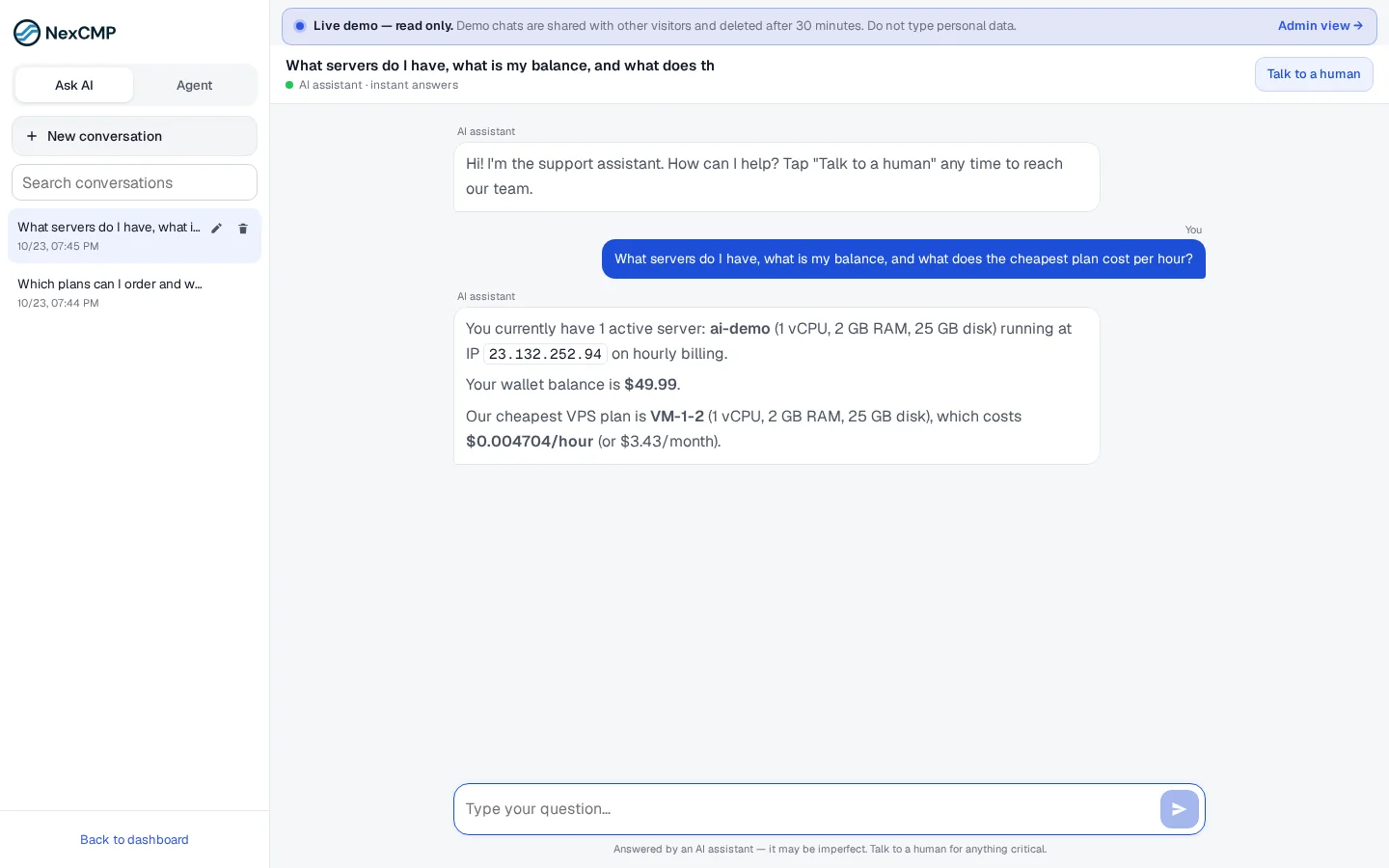
Answers questions about your plans, prices and how-tos, and about the customer's own services — servers, invoices, balance — using the customer's own account data. When a person is needed, the customer hands the conversation over to your support team.
AI Agent
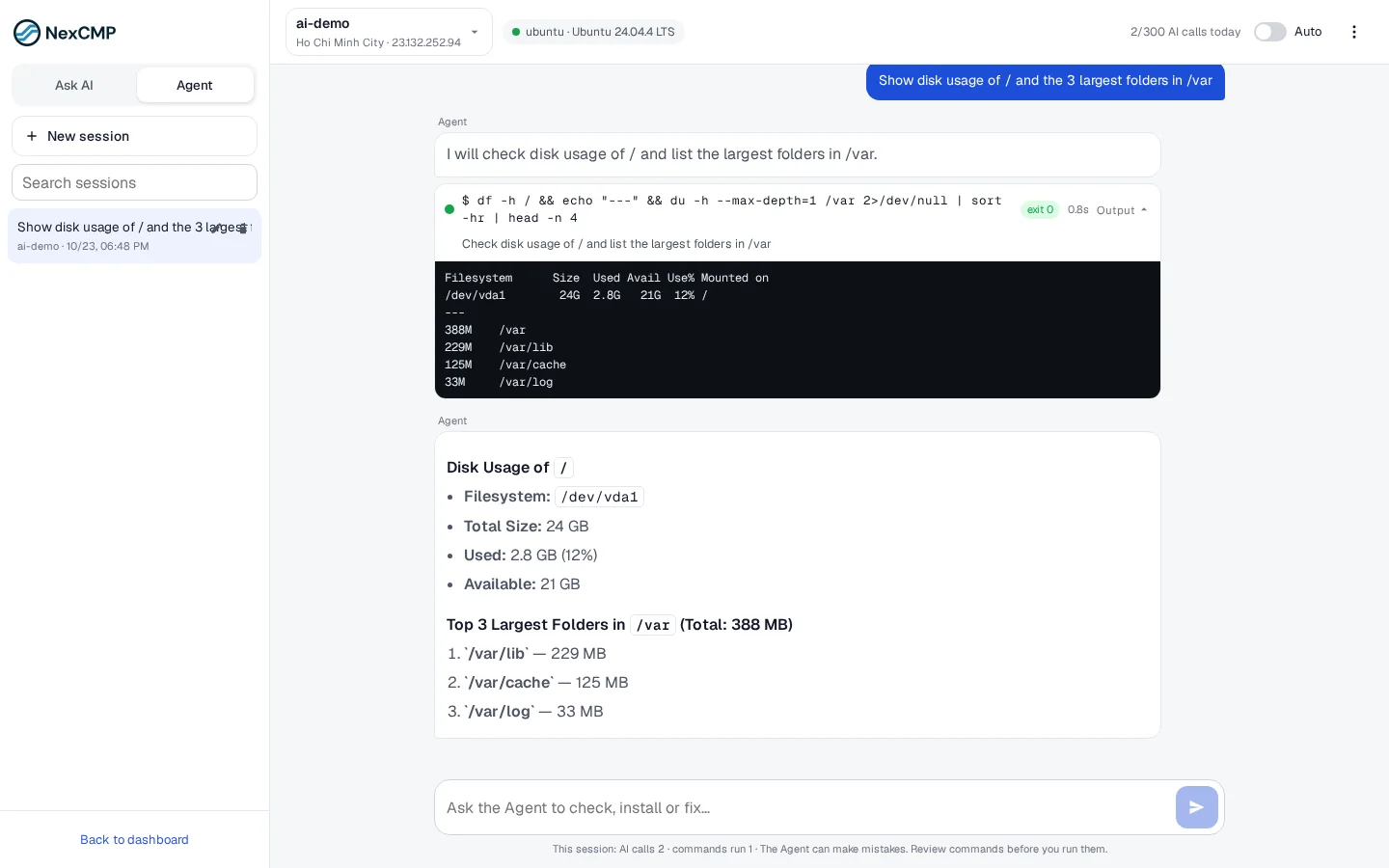
The customer picks one of their VMs and describes a task in plain language — check disk space, install a package, read a log. The agent runs the commands over SSH from your panel and shows every command with its output.
How a customer uses them
Two entries in the customer portal menu, no extra sign-up.
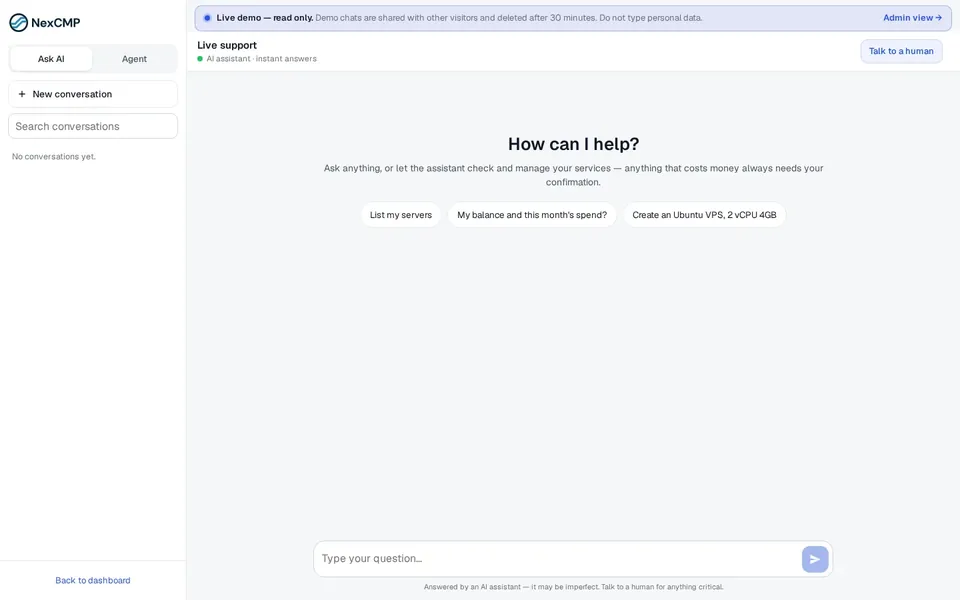
Ask AI Chat
Open AI Chat from the menu and ask about plans, prices or the account's own servers, invoices and balance.
Give AI Agent a task
Open AI Agent, choose a VM and ask for something like “show disk usage and the five largest folders”. Each command and its output appear as the agent works.
Anything that costs money waits
AI Chat asks the customer to confirm before it does anything that costs money, and the customer can hand the conversation over to your support team at any time.
Screenshots from the customer portal
What guard rails are built in?
Your provider, your key
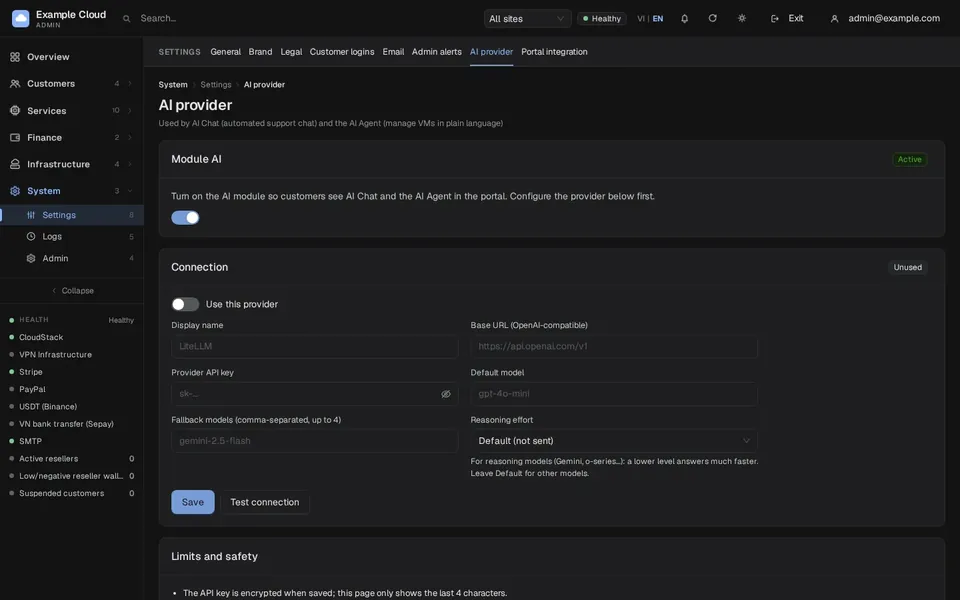
Set an OpenAI-compatible endpoint, key and model in Admin › Settings › AI provider. The key is stored encrypted and never shown again; Test connection checks it.
Only the customer's own VMs
AI Agent works only on VMs that belong to the signed-in customer's account, with the login saved for that VM.
Every command is visible
The agent shows each command it runs and the output it got, so the customer can follow what it does.
A switch in the admin console
AI is a module like the others: off by default, on in License › Modules when your key is ready, off again whenever you want.
AI Chat and AI Agent at a glance
Both run on the AI provider you configure. NexCMP does not ship a model.
Who can use it
- AI Chat
- Signed-in customers only. A visitor who is not signed in is asked to sign in.
- AI Agent
- Signed-in customers, on their own running Linux VMs only.
What it does
- AI Chat
- Answers questions and looks up the customer's own balance, services and payments. It can act for the customer after a Confirm click.
- AI Agent
- Carries out a task described in plain language by running commands over SSH from the panel server.
What needs a click
- AI Chat
- Anything that changes something or costs money shows a confirmation card, and nothing happens until the customer confirms.
- AI Agent
- In Confirm mode every command waits for Run. In Auto mode only commands on a strict read-only list run by themselves.
When it cannot help
- AI Chat
- Talk to a human sends the chat to your staff on Telegram and, if nobody answers in time, turns it into a support ticket.
- AI Agent
- The customer reviews each command and its output before anything that changes the server runs.
Limits
- AI Chat
- 20 messages per minute per IP address and 40 messages per conversation.
- AI Agent
- At most 10 steps per turn and 2 runs at the same time per customer.
What it needs
- AI Chat
- The AI module on, and a provider whose model supports tool (function) calling.
- AI Agent
- The same, plus openssh-client on the panel server and a network route from the panel to the VM's SSH port.
How do I set it up on my install?
On NexCMP 1.2.0 or later, add your AI provider in Admin › Settings, switch on the AI module, and AI Chat and AI Agent appear in your customer portal. The step-by-step guide walks through it with screenshots.
Want to sell AI model access to your own customers instead? That is a different product, the AI Models add-on.
Questions
Is AI included in the license?
Which AI models work?
Can the agent reach other customers' servers?
Does AI Agent run commands without asking?
Can AI Chat change a customer's services?
What happens when AI Chat cannot help?
How do I keep AI costs under control?
Where is my AI provider key stored?
Documentation
Setup steps, limits and troubleshooting for both modules are in the NexCMP docs.
Get NexCMP
Free for the first year with every module — AI included — or upgrade to Source for $499 one-time.
Last updated: