Example prompts
Where in the admin: AI Chat (
/agent) or the floating Ask AI button on any admin page. The same prompts work in any AI client connected over MCP.
What it does
These prompts show how to ask. Each one lists what the assistant does behind the scenes, the scopes it needs (for an external client or a key) and where you are asked to approve. Replace the example values with your own.
Never type a secret into the chat text
For passwords, API keys and tokens use the Secret field next to the AI Chat input (details). The AI only sees a placeholder that stands for the secret, not the value. With an external AI client the secret passes through that client, so prefer entering it in the admin.
Check where you are
text
Check my setup progress and tell me the next three things to do, in order.The assistant calls setup_checklist and system_health (scope admin:read) and answers from the real state. See Setup progress checklist.
First setup
text
Help me finish the initial setup. Go through the checklist, explain each open step
in one sentence, ask me for what you need, and show me every change before it is applied.
This is the same as the MCP prompt initial-setup. It needs admin:read plus the scopes of the steps you accept. Expect a confirmation card for each change in AI Chat.
Add a Proxmox VE cluster
text
I want to sell servers from my Proxmox VE cluster at https://pve.example.com:8006.
Add it, test the connection, create a zone called "New York" in the US, attach the cluster
to it, and then propose starter plans.
What happens:
- The assistant asks for the API token id (
user@realm!tokenid) and its secret. Put the secret in the Secret field. Create a limited token first: Proxmox VE. - It calls
proxmox_add,proxmox_test,zone_createandproxmox_attach_zone. - It proposes plans with
plans_from_offeringsand waits for your approval (see the next example).
Scopes: infra:write, secrets:write, catalog:write, admin:read.
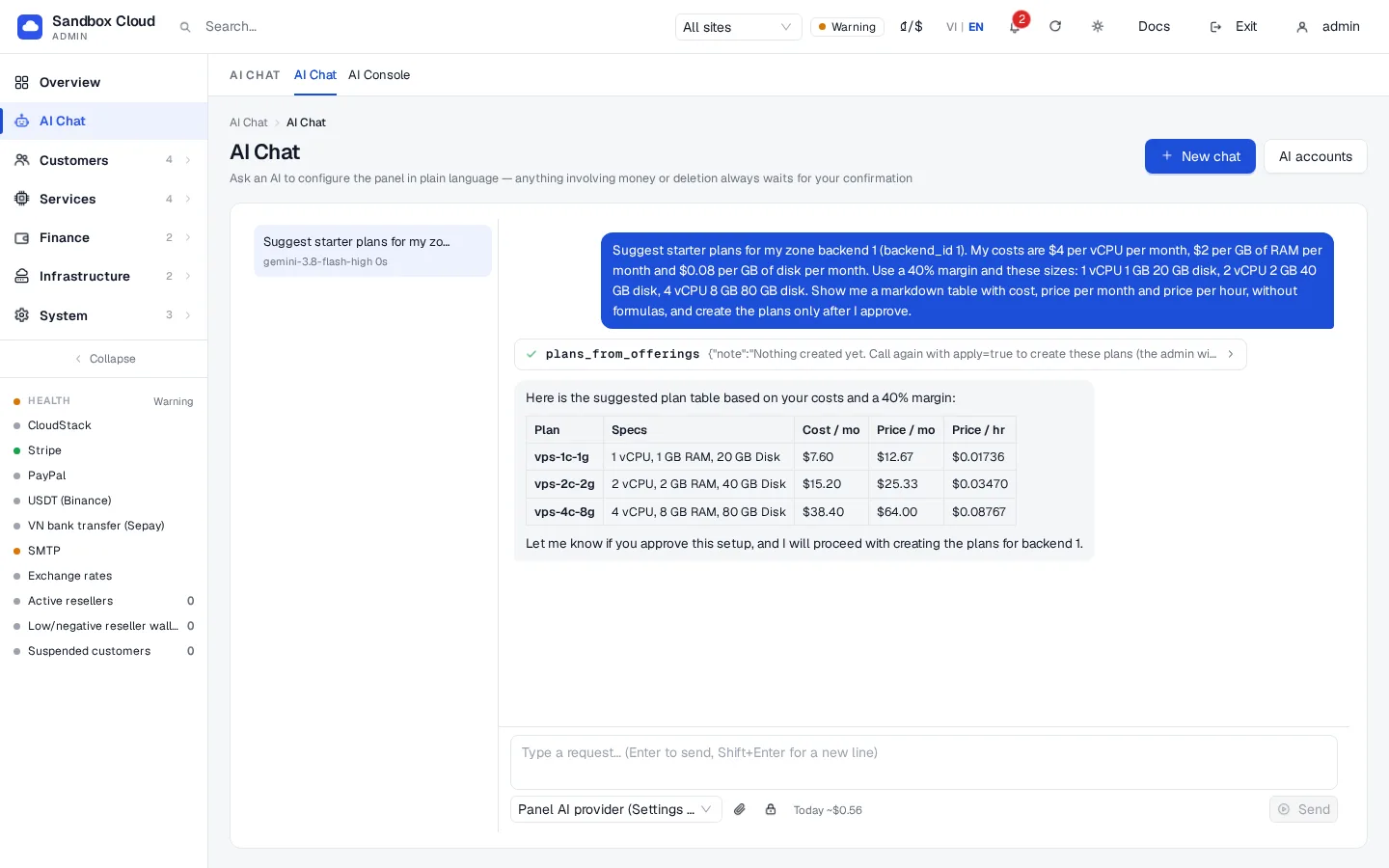
Create a plan table with a 40% margin
text
Suggest a starter plan table from my CloudStack offerings. My costs are $4 per vCPU per month,
$2 per GB of RAM per month and $0.08 per GB of disk per month. Use a 40% margin, show me the
table with cost, price per month and price per hour, and create the plans only after I approve.
The assistant calls plans_from_offerings with margin_pct 40 and your costs. Margin is the share of the selling price that is profit: at 40%, a plan that costs you $60 sells for $100. The first call only returns a preview. When you approve, it calls the tool again with apply=true, which creates the plans in one step and asks for one confirmation because prices are involved. For Proxmox it uses backend_id and a default size list (1, 2, 2 and 4 vCPU). Scopes: catalog:write, admin:read. See Plans.
Configure email and send a test message
text
Configure outgoing email with smtp.example.com, port 587, STARTTLS, user "mailer@example.com",
sender name "Example Cloud", sender address "no-reply@example.com". Use my Secret field for the
password "smtp_password". Then send a test email to admin@example.com.
The assistant calls smtp_get, smtp_configure and smtp_test and tells you whether the message was accepted. Scopes: settings:write, secrets:write. See SMTP and e-mail templates.
Set up Stripe
text
Set up Stripe in test mode. My publishable key is pk_test_XXXX. Use the secret key and the
webhook secret from my Secret field (names stripe_secret_key and stripe_webhook_secret).
Then test the credentials and tell me which webhook URL I must add in Stripe.
payment_configure is always a two-step action: you see a preview with the secret values masked and approve it. Then payment_test checks the credentials with Stripe. Scopes: billing:write, secrets:write. Switch to live mode only after a test payment. See Stripe.
Turn on Telegram alerts
text
Add my Telegram chat 123456789 for admin alerts. The bot token is in my Secret field as
telegram_bot_token. Send a test message.
The assistant calls telegram_configure and telegram_test. Scopes: settings:write, secrets:write. See Telegram notifications.
Find a customer and add credit
text
Find the customer with e-mail customer@example.com, show me their balance and servers,
and add $10.00 of credit because of the outage on Monday.
The assistant calls customers_search and customer_get (read only), then customer_adjust_balance with delta_cents 1000 and a reason. This always needs your approval: the confirmation card says "changes a customer balance" and shows the amount and the reason that will go into the audit log. Scopes: admin:read, billing:write.
Export my configuration
text
Export my whole configuration as YAML. Do not include secrets. Then tell me which settings
differ from a typical new installation.
The assistant calls config_export. Secrets are replaced by secret:// references. Save the result as nexcmp.yaml and keep it in version control. See Configuration as code. Scope: admin:read.
Write good prompts
- Give the goal and the facts: names, prices, e-mail addresses. Do not paste secrets.
- Ask for a preview first for anything that costs money or deletes data.
- Ask the assistant to "read the current value before changing it". The built-in instructions already say so.
- If an answer looks wrong, ask "which tool did you call and with what arguments?". The tool cards in AI Chat show both.
Troubleshooting
| Symptom | Cause | Fix |
|---|---|---|
| The assistant says it has no tool for something | The scope for that tool is not granted, or the action is closed to AI | Check Admin API keys, or do it in the admin. |
| It asks you to paste a password | The model ignored the instructions | Refuse; use the Secret field or enter the value in the admin. |
| Nothing changes after "do it" | Changes are waiting for your confirmation | Scroll to the confirmation card and press Confirm. |
| Plans were created at a price you did not expect | The costs or margin in the prompt were wrong | Edit the plans on the Plans page or ask the assistant to re-price them; price changes ask for confirmation. |