Bank transfer (Vietnam)
Where in the admin: Finance › Payment channels › VN bank transfer (
/payments/bank). Exchange rate: Finance › Payment channels › Exchange rates (/payments/fx).
What it does
Lets customers top up the USD wallet by a normal bank transfer in Vietnamese dong. NexCMP shows a VietQR code, the account details and a unique transfer memo; Sepay watches your bank account and calls a webhook when the money arrives, and NexCMP credits the wallet. Use it if you sell to customers in Vietnam.
Shown only in the Vietnamese interface
The VN bank option is offered to a customer only when the portal is displayed in Vietnamese. Customers on any other language never see it.
Requirements
| Item | Requirement |
|---|---|
| Bank account | A Vietnamese bank account (or a Sepay virtual account, VA) connected to a Sepay account at my.sepay.vn. |
| Sepay | A Sepay account with webhook integration enabled. |
| Exchange rate | A USD to VND rate must exist: update it under Exchange rates first. Without a rate the channel answers fx_unavailable and customers cannot start a transfer. |
| Network | Your panel must be reachable by HTTPS so Sepay can call https://<your-domain>/v1/billing/sepay/webhook. |
| Dependencies | Currency and exchange rates. |
Prepare the infrastructure
On the Sepay side:
- In my.sepay.vn connect your bank account (or create a VA) and make sure transactions appear.
- Decide the memo prefix — 2 to 5 capital letters, for example
PAY. NexCMP generates the memo as the prefix followed by 8 random digits (for examplePAY48210937). The prefix must not containORD, and it should not be used by any other system that receives money into the same account. - If your Sepay account uses a payment code structure, register the same prefix there so Sepay recognises the memo.
- Create the webhook later, after the NexCMP page has given you the URL and key (step 7 below).
Connect in NexCMP
Open Finance › Payment channels › Exchange rates and click Update exchange rates if no rate has been stored.
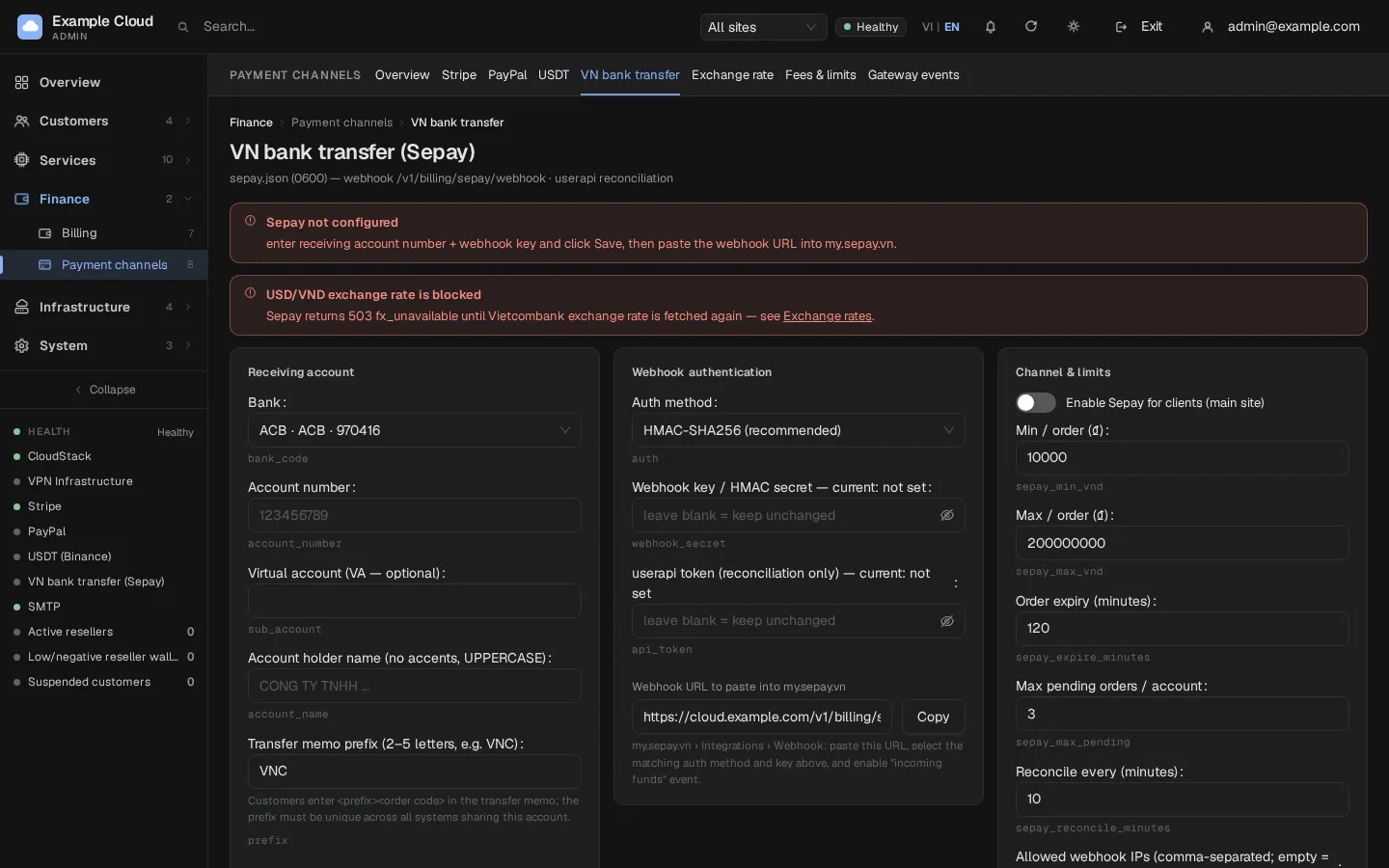
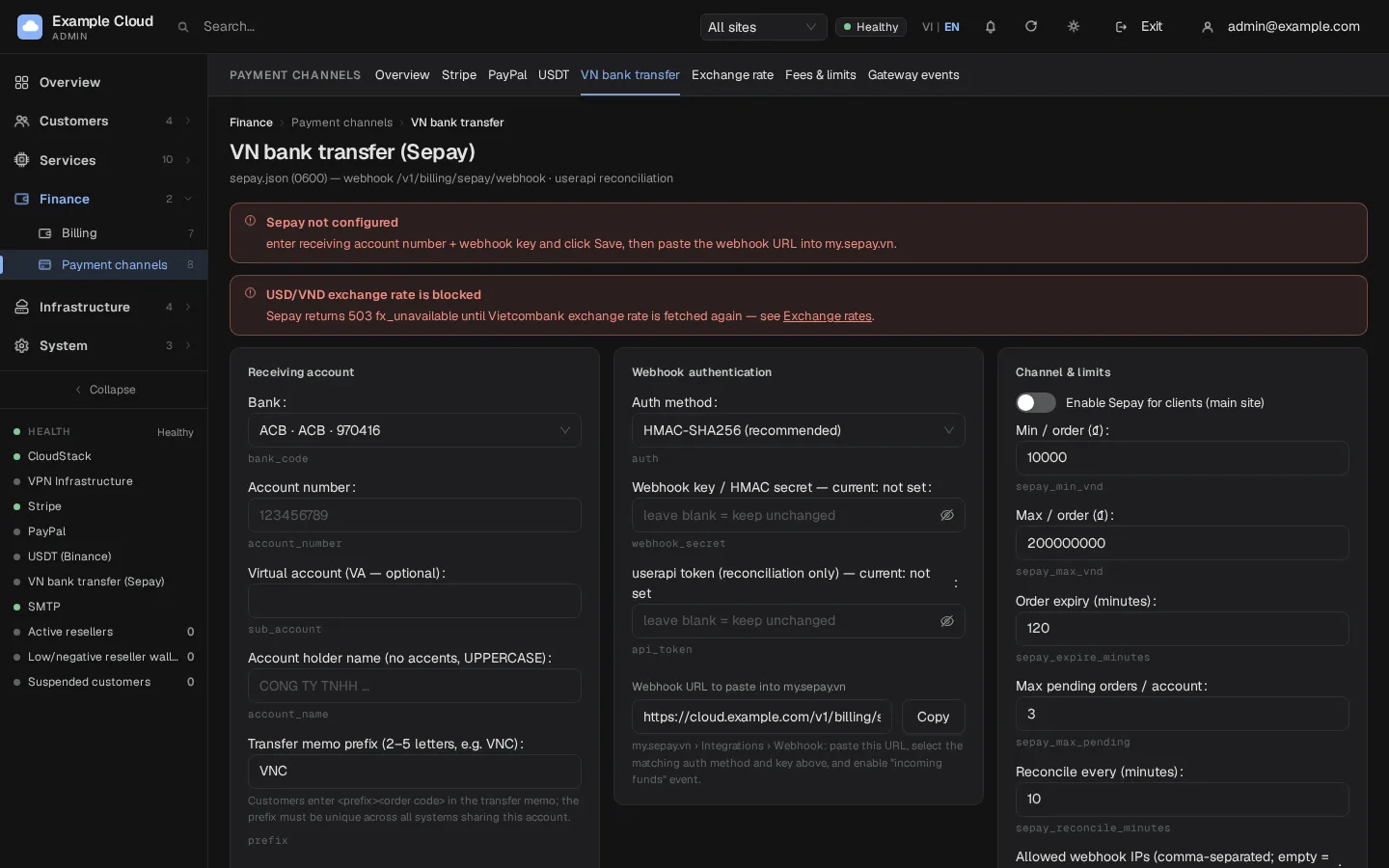
Open Finance › Payment channels › VN bank transfer (
/payments/bank).In Receiving account fill in:
Field Example Rule Bank VCBVietcombankChoose from the list; the BIN fills in automatically. Account number 01234567894–24 digits or capital letters. Virtual account (VA — optional) If set, customers transfer to the VA and the QR shows it. Account holder name NGUYEN VAN ANo accents, UPPERCASE, 2–60 characters. Transfer memo prefix PAY2–5 capital letters, no ORD.In Webhook authentication choose Auth method: HMAC-SHA256 (recommended) or API key, and enter the Webhook key / HMAC secret (8–200 characters). Optionally enter the userapi token from Sepay; it is used only to reconcile transfers whose webhook was lost.
In Channel & limits set the limits (defaults in brackets): Min / order (10,000 VND), Max / order (200,000,000 VND), Order expiry (120 minutes, 15–1440), Max pending orders / account (3, 1–10), Reconcile every (10 minutes) and, optionally, Allowed webhook IPs (comma-separated; empty means the IP is only logged).
Click Save. The red banner "Sepay not configured" disappears once the account, name, prefix and key are valid.
Copy Webhook URL to paste into my.sepay.vn (it reads
https://<your-domain>/v1/billing/sepay/webhook) with Copy. In Sepay open the webhook integration, paste the URL, choose the same authentication type and key, and enable the "money in" event.Click Test connection. Then switch on Enable Sepay for clients (main site) and Save.
Webhook security
| Method | What Sepay must send |
|---|---|
| HMAC-SHA256 | Header X-SePay-Signature: sha256=<hex>, computed over "<X-SePay-Timestamp>.<raw body>"; the timestamp may differ by at most 300 seconds. |
| API key | Header Authorization: Apikey <key>. |
Only the headers are checked (never the body or query string) and the comparison is constant-time. Only incoming transfers (transferType = in) to your configured account or VA are used. Each Sepay transaction is stored once, so a retried webhook never credits twice. NexCMP answers 200 {"success":true} even when it deliberately ignores a transaction, and HTTP 5xx only for temporary errors so Sepay retries.
How the customer pays
- In Billing › Deposit (Vietnamese interface) the customer chooses the VN bank transfer option and an amount, then clicks the create-transfer button.
- NexCMP converts the USD amount at the stored rate (including the margin and rounding step you set in Exchange rates) and rounds the VND amount up to the rounding step.
- The customer sees a QR code (VietQR, generated locally) with the account number, bank, amount and memo.
- After the transfer, Sepay calls the webhook, NexCMP credits
floor(VND received × 100 / rate)cents. The rate is locked when the order is created; if the money arrives after the order expired, the higher of the locked and the current rate is used. - Orders expire after Order expiry; reconciliation runs every Reconcile every minutes as a safety net (needs the userapi token).
Verify
- Create a test order as a customer on the Vietnamese interface. Check that the amount, account and memo are correct.
- Transfer the smallest allowed amount with the exact memo.
- Within a minute the portal shows the deposit as completed and the wallet rises; the State card on the bank page shows the last webhook time.
- Open Finance › Billing › Top-ups and check the payment is listed with the VND amount received.
Limits & notes
- Minimum. The VND minimum a customer sees is the larger of Min / order and the VND value of the minimum top-up.
- Pending orders. A customer can have only Max pending orders / account open orders (default 3).
- Same memo twice. Transferring twice with the same memo creates a second completed payment at the current rate.
- No automatic refund to a bank account.
- Fee. The channel has no fixed fee line in Fees & limits; the rate margin is the only adjustment.
- Resellers can configure their own account; their webhook URL ends with
/v1/billing/sepay/webhook/r/<id>.
Unmatched transfers
Money that reached the account but carries no valid memo appears in Unmatched transactions at the bottom of the page (filter All channel owners or Master). Check the bank reference with the customer, then click Assign and select the account. The wallet is credited at the current rate.
Troubleshooting
| Symptom | Cause | Fix |
|---|---|---|
| Banner "Sepay not configured" | Bank, account, holder name, prefix or key missing or invalid | Complete the Receiving account and Webhook authentication cards. |
Banner "USD/VND rate blocked" (fx_unavailable) | No exchange rate stored | Exchange rates › Update exchange rates. |
prefix: 2–5 capital letters, no ORD | Prefix invalid | Use 2–5 capital letters without ORD. |
account_name error | Accents or lowercase | Use unaccented UPPERCASE letters, digits, space, dot or hyphen. |
webhook_secret: 8–200 characters | Key too short | Use at least 8 printable characters. |
| Customer cannot see the option | Not in Vietnamese interface, switch off, or no rate | Check the language, the switch and the rate. |
| Customer paid but nothing credited | Webhook did not arrive, memo changed, wrong amount | Check Sepay's webhook log; the transfer will be under Unmatched transactions if the memo was wrong. |
| Webhook returns 401 or 403 | Auth method or key mismatch | Use the same method and key in Sepay and NexCMP. |
| Customer sees "Too many pending requests" | Pending order limit reached | They finish or wait for expiry. |