CloudStack
Where in the admin: Infrastructure › Cloud provider › CloudStack › API connection (
/infra/cloudstack?tab=connect). The first connection can also be made in the setup wizard, step 2.
What it does
NexCMP sells virtual machines that run on your Apache CloudStack cloud. It deploys, starts, stops, resizes, snapshots and deletes VMs through the CloudStack API, hands out public IP addresses from the zone, reads usage for billing and bandwidth, and shows capacity and health in the admin console. CloudStack stays the source of truth for the hypervisors; NexCMP is the storefront, billing and portal on top.
Use this page when CloudStack is (or will be) your main VM source. For a second source next to it, see Proxmox VE.
Requirements
| Item | Requirement |
|---|---|
| CloudStack version | 4.23 is the tested release. The VM console needs 4.18 or newer and live CPU/RAM scaling of a running VM needs 4.23 with KVM. |
| Zone type | A zone with at least one guest network for customer VMs and a public IP range with free addresses. |
| Hypervisor | KVM is the tested hypervisor. |
| Account | A dedicated domain and account created for NexCMP. Never use the ROOT administrator key. |
| API reachability | The panel server must reach the management server API URL (https://cloudstack.example.com/client/api) over HTTP(S). The VM console, bandwidth and Kubernetes features use the same endpoint. |
| Optional read-only key | A second, read-only key lets the admin console show hosts, storage, system VMs and public IP ranges. Not needed for selling VMs. |
| Public IP | Free public IPv4 addresses in the zone. The prefix that NexCMP may sell is configured under Sales IP pools. |
| Templates | At least one ready, password-enabled template and one service offering that your account can see. See Templates. |
| Storage | Primary storage for the account's volumes and, if you sell snapshots or images, secondary storage. |
| Depends on | Nothing. Kubernetes, Private Cloud, Images and Bandwidth depend on this page. |
Do not use the ROOT administrator key
Create a dedicated domain and account for NexCMP. The key then reaches only that domain, and a leaked key cannot touch the rest of your cloud. The setup wizard also checks that the network you choose belongs to the zone and to the account that owns the key.
Prepare the infrastructure
The commands use CloudMonkey (cmk) logged in as a CloudStack administrator. Replace the example names and the placeholders in angle brackets.
Create a dedicated account and API key
Create the domain that will hold everything NexCMP owns.
bashcmk create domain name=nexcmpNote the
idin the output; it is used as<domain-id>below.Find the role you want to give the account.
bashcmk list roles type=DomainAdmin filter=id,nameRole When to choose it Domain Admin (recommended) Full feature set: VMs, networks, projects for Kubernetes, VPC, images. Its reach stops at the nexcmpdomain.User VM lifecycle only. A plain user cannot expunge VMs unless the global setting allow.user.expunge.recover.vmis true; NexCMP then stops the VM and CloudStack expunges it afterexpunge.delay.Create the account and its first user. Use a long random password; it is never typed again.
bashcmk create account name=nexcmp-api username=nexcmp-api \ password='CHANGE-ME-LONG-RANDOM' email=ops@example.com \ firstname=NexCMP lastname=API roleid=<role-id> domainid=<domain-id>Generate the API key pair for the new user.
bashcmk list users domainid=<domain-id> username=nexcmp-api filter=id,username cmk generate userkeys id=<user-id>Copy
apikeyandsecretkey. They are the API key and Secret key you enter in NexCMP. NexCMP stores them encrypted and shows only the last four characters afterwards.Make sure the domain has no restrictive resource limits (instances, volumes, public IPs, networks, snapshots, templates, projects).
bashcmk list resourcelimits domainid=<domain-id>
Create the guest network for customer VMs
Customer VMs are deployed into one guest network that belongs to the new account. An isolated network with a virtual router (VR) and the Static NAT, Firewall and Port Forwarding services works well, because NexCMP attaches a public IP to each VM with static NAT.
bash
cmk list networkofferings state=Enabled guestiptype=Isolated filter=id,name
cmk create network name=customers displaytext=customers zoneid=<zone-id> \
  networkofferingid=<offering-id> account=nexcmp-api domainid=<domain-id>
Check the default egress policy of the offering: if it is "deny", customer VMs have no outbound access until firewall egress rules are added.
Make offerings and templates visible
- Service offerings and network offerings must be public or assigned to the
nexcmpdomain, otherwise the account cannot list or use them. - Register or share at least one template (see Templates). NexCMP lists templates that are ready and featured.
Optional: read-only key for infrastructure pages
The tabs Capacity, Host, Storage and System VM and the public IP ranges list use a second key that only needs read access to six commands. Create a limited role instead of reusing a full administrator key:
bash
cmk create role name=nexcmp-readonly type=Admin
# <role-id> is the id printed above
for api in listHosts listCapacity listSystemVms listVlanIpRanges listClusters listStoragePools; do
  cmk create rolepermission roleid=<role-id> rule=$api permission=allow
done
cmk create rolepermission roleid=<role-id> rule='*' permission=deny
Then create an account with that role (in the ROOT domain, because it reads zone-wide data), generate its keys like step 4, and enter them as the RO API key in the next section.
Check the network path
From the panel server:
bash
curl -fsS -o /dev/null -w '%{http_code}\n' https://cloudstack.example.com/client/apiAny HTTP answer (even 4xx) proves the port is reachable. A timeout means a firewall or DNS problem on your side.
Connect in NexCMP
In the setup wizard
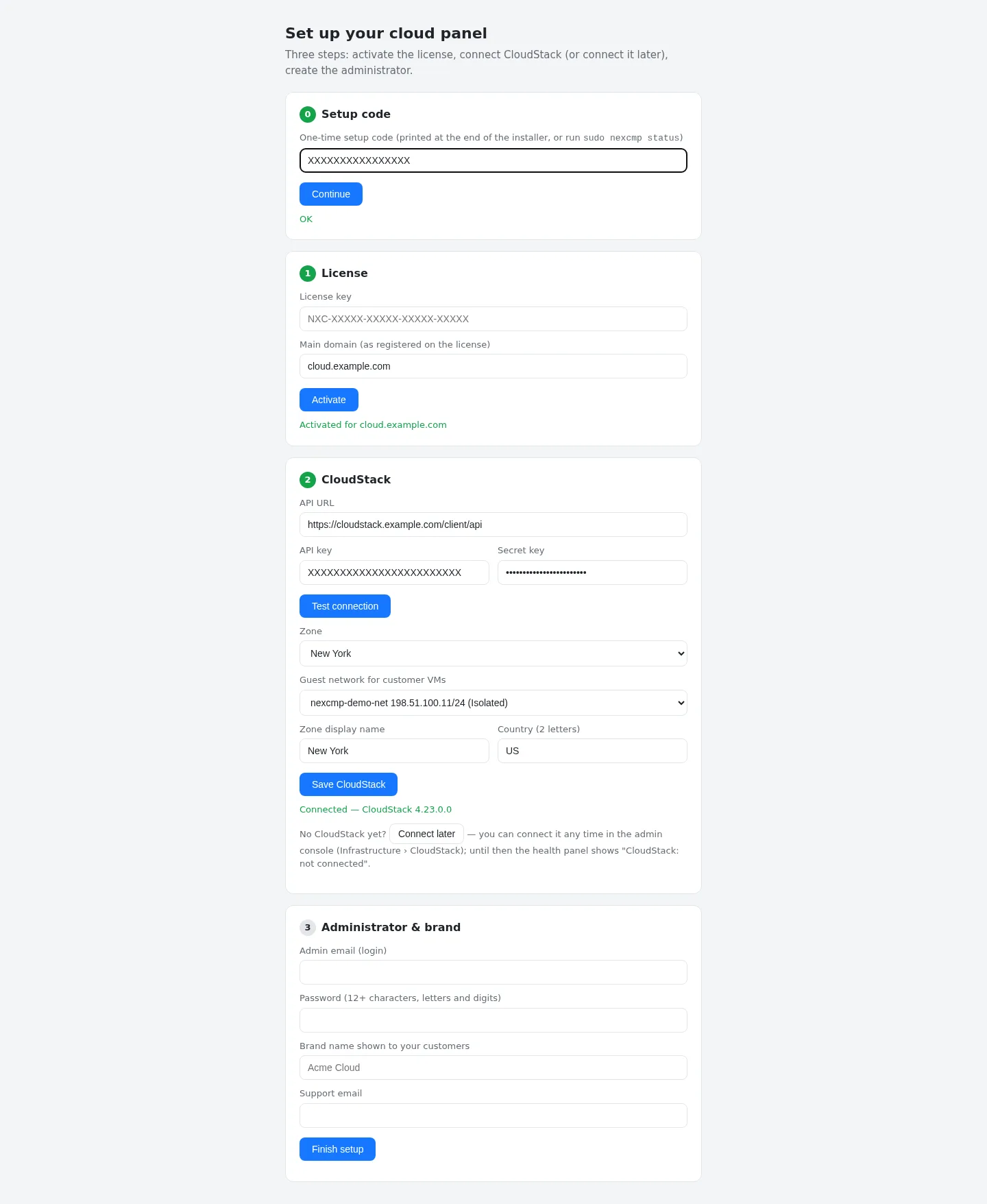
Step 2 of the setup wizard asks for the same values. Test connection lists the zones and networks the key can see; choose the zone and the guest network, a display name for the zone and the country, then click Save CloudStack. The wizard rejects a network that is not in that zone or not visible to the key.
Later, in the admin console
Open Infrastructure › Cloud provider › CloudStack and choose the API connection tab.
Fill in the card Connection:
Field Example value Endpoint API https://cloudstack.example.com/client/apiAPI key (write access) XXXX(leave empty to keep the saved key)Secret key XXXXRO API key / RO secret key optional, from the read-only account Zone ID the UUID of your zone 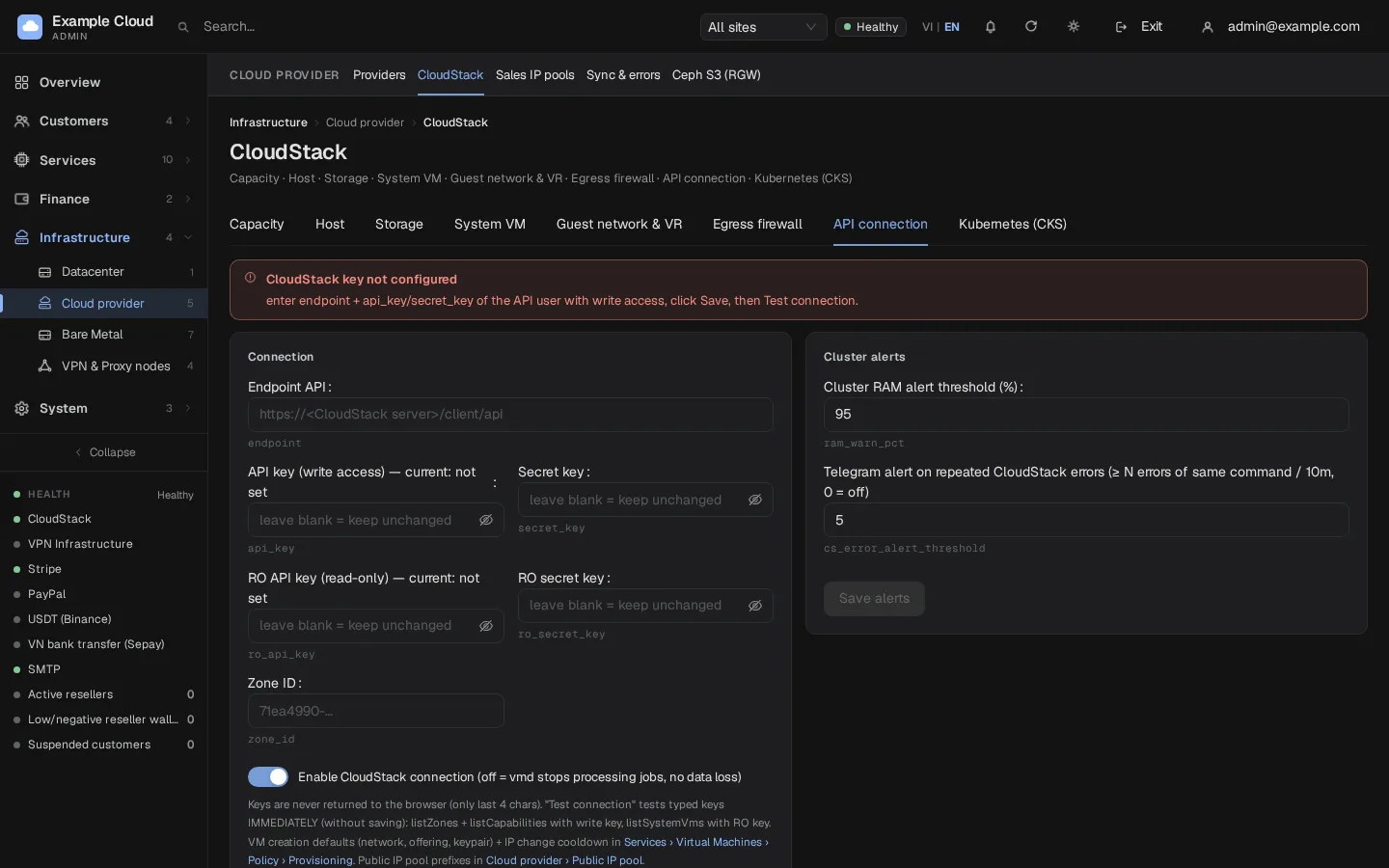
Click Test connection before saving. It tests the keys you typed, without saving them: the write key with
listZonesandlistCapabilities, and the read-only key withlistSystemVms.Click Save connection. Keep Enable CloudStack connection on; switching it off makes the worker stop all CloudStack jobs, without losing data.
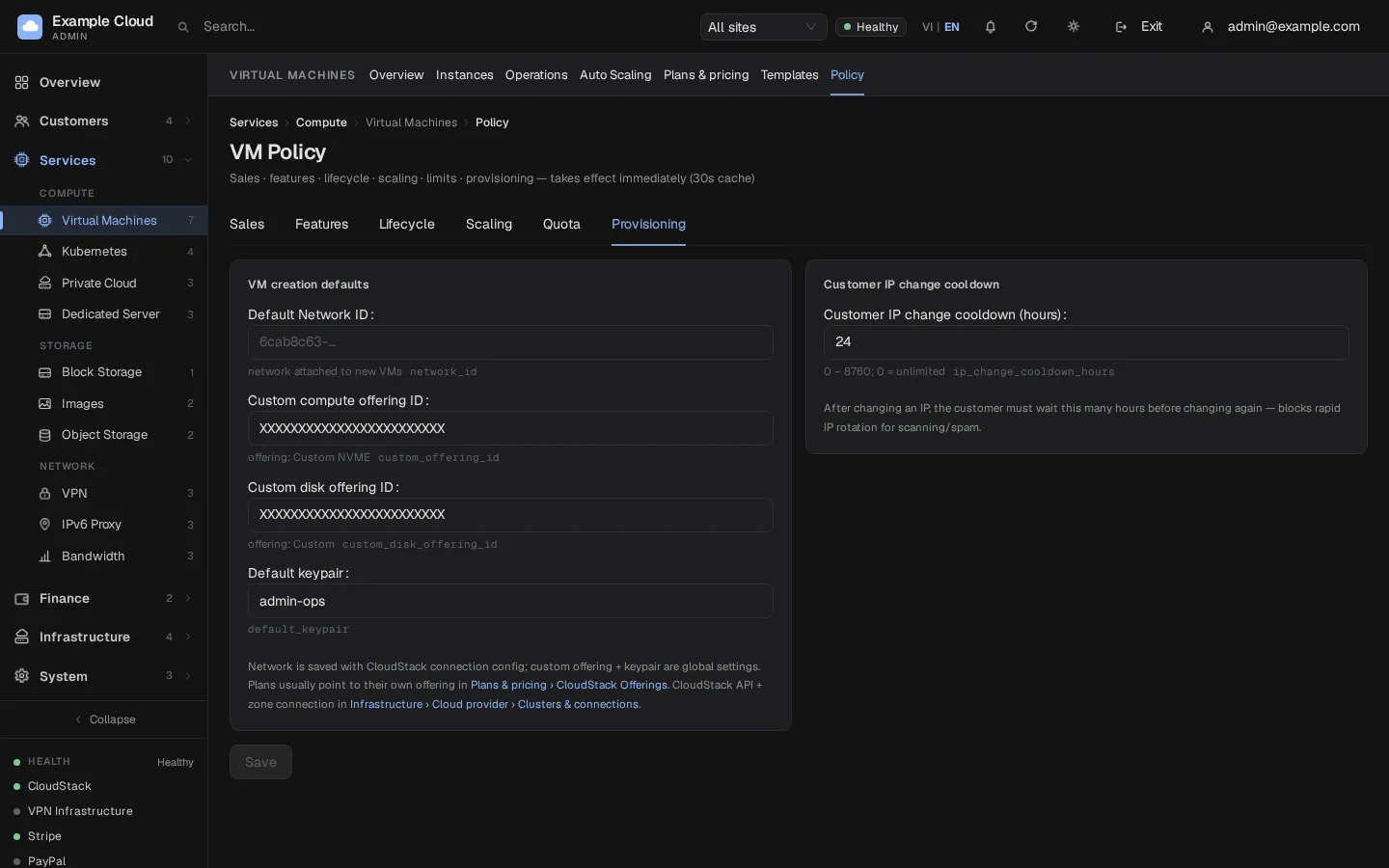
Open Services › Virtual Machines › Policy › Provisioning to set the default guest network, custom offerings and the default key pair for new VMs.
Open Infrastructure › Cloud provider › Sales IP pools and, under Configure sales ranges, set Sellable IP range prefixes (for example
203.0.113.) and Excluded IP prefixes if some addresses in the zone must never be sold. Leave the prefix empty to allow every free address.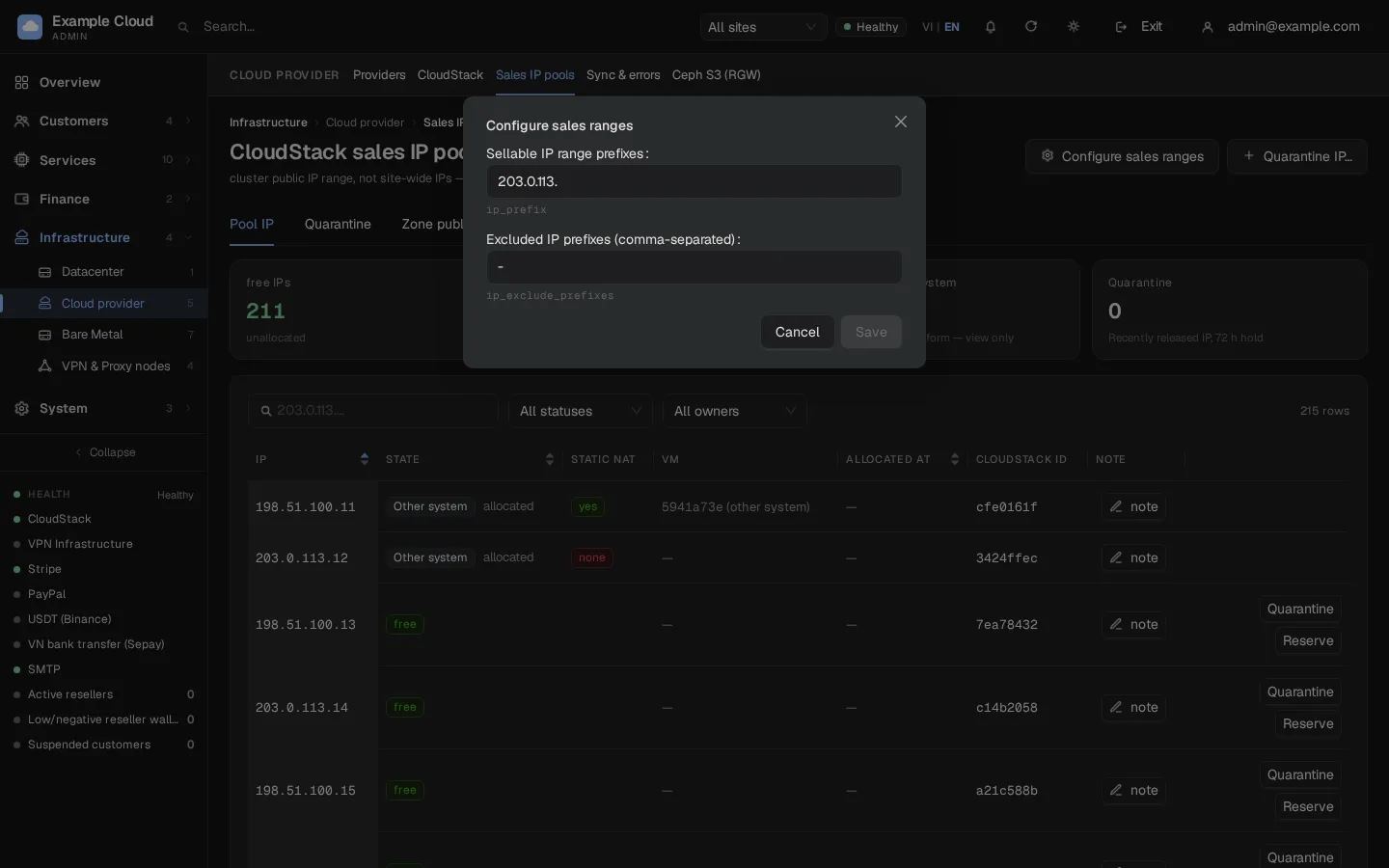
What NexCMP reads and writes
| Area | Reads | Changes |
|---|---|---|
| VMs | list, states, usage history, console endpoint | deploy, start, stop, reboot, reinstall, destroy, scale, reset password and SSH key |
| Disks and snapshots | volumes, VM snapshots, backups | create, attach, detach, resize, delete, snapshot, restore |
| Networking | networks, routers, public IPs, firewall, port forwarding, load balancer rules | associate and release public IPs, static NAT, firewall, port forwarding, egress rules, networks and ACLs for Private Cloud |
| Catalog | service, disk and network offerings, templates, ISOs, OS types | register and delete templates and ISOs (Images), service offerings when creating custom plans |
| Kubernetes | supported versions, clusters, configuration | projects, resource limits, networks, clusters (module Kubernetes) |
| Read-only key | hosts, clusters, storage pools, system VMs, capacity, VLAN IP ranges | nothing |
Live CPU and RAM, and bandwidth
- Hot-plug. A running VM can be resized without a reboot only when its template allows it (dynamically scalable) and the guest brings new CPUs and RAM online. NexCMP turns Auto Scaling on for templates whose name ends in
vNwith N of 6 or more, or when you set it by hand in the template's vCPU/RAM hot-plug field. See Templates. - Bandwidth source. With the default settings NexCMP measures traffic from CloudStack VM statistics (
listVirtualMachinesUsageHistory, polled every 5 minutes and summed per VM network interface). The figures include traffic between VMs, so they can be a little higher than an edge router would count. Keep CloudStack VM statistics collection enabled; gaps longer than the statistics retention are skipped. See Bandwidth.
Verify
- Test connection returns "Write key: OK" with your zone and the CloudStack version.
- Infrastructure › Cloud provider › Providers shows the provider as active with a recent test time. The dashboard health panel no longer says "CloudStack: not connected".
- Sales IP pools lists free addresses (it refreshes about once a minute).
- Order a small VM from the customer portal or the admin console and check that it reaches Running, has a public IP and that you can open the console.
Limits and notes
- One CloudStack cluster can be connected in this NexCMP release. The Add cloud provider dialog can test a second cluster's keys but cannot save it.
- One CloudStack zone is attached to NexCMP's default zone; a CloudStack with several zones is scoped to the zone you enter, so other zones' VMs, IPs and networks are ignored.
- Deleting the guest network in CloudStack makes every new deployment fail. The admin console shows a red notice when the network disappears.
- Credentials never leave the server. The API returns only the last four characters.
Troubleshooting
| Symptom | Cause | Fix |
|---|---|---|
listCapabilities: cloudstack 401: unable to verify user credentials and/or request signature | Wrong API key or secret, key from another user, or a clock problem on the panel server | Generate the keys again with cmk generate userkeys and paste both. Check the panel server time. |
Test: listZones: … or timeout | The panel server cannot reach the API URL | Check DNS, firewall and the exact /client/api path. |
| Wizard: "network not found in that zone for this API key" | The chosen network belongs to another account or zone | Create the network in the dedicated account (see above) and run Test connection again. |
| Wizard: "pick a zone and a network" | Test not run, or no zone or network selected | Click Test connection and choose both lists. |
| Banner "CloudStack key not configured" | No key saved yet ("Connect later") | Fill the Connection card, Save connection, then Test connection. |
| Banner "CloudStack connection is OFF" | The Enable CloudStack connection switch is off | Switch it on and save. |
| Read-only key: "unusable …" in the test | Missing role permission or wrong account | Check the six allowed commands and that the account is in the ROOT domain. |
| "Zone public IP ranges not measured yet" or "no public IP ranges declared" | No read-only key, or the zone really has no public range | Add the read-only key, or add a public IP range in CloudStack. |
| "Pool empty — wait 60 s for vmd sync" | The IP list is refreshed by the worker once a minute | Wait a minute and reload. |
| "out of Free IPs in range 203.0.113." | Every address in the sellable prefix is taken | Add addresses to the zone, widen the prefix or release unused IPs. |
| "Failed to fetch network data (CloudStack not responding or key lacks permissions)" | Key lost access, or CloudStack is down | Run Test connection; check the account is enabled. |
| "Guest network DOES NOT exist" | The network was deleted in CloudStack | Create the network again and set it as the default under Provisioning. |