Managing customers
Where in the admin: Customers › Customers › List (
/customers), Deletion requests (/customers/requests), Service transfers (/customers/transfers) and API keys (/customers/apikeys).
What it does
The Customers area is where support staff look up an account, see its wallet, services, tickets and sign-in history, and act on it: lock, unlock, verify e-mail, reset the password, add or remove credit, impersonate, create a VM or close the account.
Requirements
| Item | Requirement |
|---|---|
| Role | An administrator. Every write action asks for a reason and is written to the audit log (System › Logs › Admin actions). |
| Password reset and invitation e-mails need a working SMTP configuration. |
The customer list
Open Customers › List. Customers are accounts of your main site; accounts of resellers appear too and can be filtered by site.
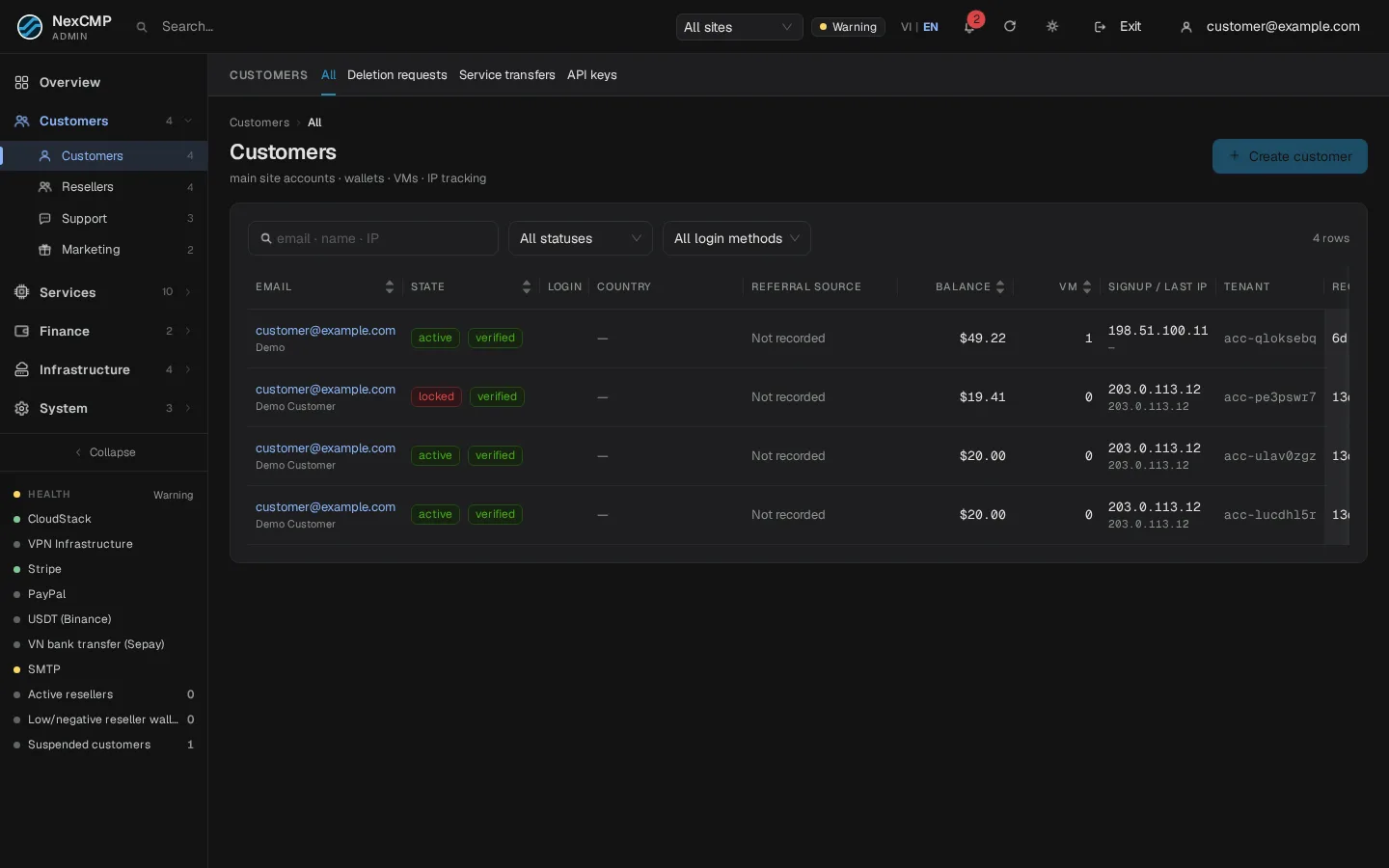
| Column | Meaning |
|---|---|
| Email (and name) | Click to open the customer. |
| State | Active, Locked or Deleted, plus verified or unverified e-mail. Hover over a lock tag to read the reason. |
| Login | Sign-in methods the customer has: password, Google, GitHub, passkey. |
| Country | Flag and name derived from the IP address: the country of the registration IP, or, when that is unknown, of the last sign-in IP. The tooltip says which one was used. |
| Referral source | Referral with a link to the referrer and the referral code when the customer signed up through an affiliate link; otherwise "Not recorded". |
| Balance, VMs | Wallet balance (negative values in red) and the number of live VMs. |
| IP registered / last | The IP used at sign-up and at the last sign-in with a two-letter country. Use it to spot several accounts from one address. |
| Tenant | The customer's internal tenant ID. |
| Created, Last login | Relative times. |
| Site | Shown when you have resellers. |
Search accepts e-mail, name or IP. Filters: state (all, active, locked, deleted), login method (any, Google, GitHub, passkey, no password yet) and site. Filters are kept in the URL, so a filtered list can be bookmarked or shared with a colleague.
Sorting is global. Clicking the header of Email, State, Balance, VMs, Created or Last login sorts the whole customer base on the server, not only the page you are looking at, and the page number goes back to 1.
The list updates by itself. It refreshes every few seconds while you look at it (it pauses while a dialog is open or while you type), so new sign-ups and balance changes appear without reloading. The customer page refreshes about every 30 seconds while visible; each tab loads its own data when first opened.
Create a customer
- Click Create customer.
- Enter the e-mail, an optional display name, an optional password (empty = the customer sets it through the invitation link) and choose whether to send the invitation e-mail.
- Confirm. A hand-made account counts as verified when you send the invitation.
A customer's page
Click a row. The page has eight tabs; the selected tab is kept in the URL so you can bookmark it. Tabs load when first opened and retain their state when you switch away.
| Tab | Content |
|---|---|
| Overview | Identity, registration and last sign-in information, wallet and service summary |
| Services | One table for the customer's services, with type and state filters, search, server-side sorting and pagination |
| Billing | Wallet and credit, ledger, invoices, payments, refunds, saved payment method and auto top-up |
| Quota | Resource limits and overrides; see Quotas |
| Security | Sessions, authentication, sign-in methods, sign-in history and API keys; see API keys |
| Support | Recent tickets |
| Affiliate | Referral programme status |
| Log | Audit and activity history |
Action buttons in the header (hidden for deleted accounts):
| Button | What it does |
|---|---|
| Lock account / Unlock | Blocks sign-in and API access. Optionally also stops all VMs (without deleting them). Prepaid services that are not VMs (Kubernetes, Private Cloud, VPN and so on) are stopped as well. VMs locked by an administrator must be opened separately on the VM page. |
| Verify email | Marks the e-mail as verified without the customer clicking a link. |
| Send reset link | E-mails a password-reset link (valid 1 hour, single use). If SMTP is not configured the link is shown once so you can send it yourself. An administrator never sees the password. |
| Impersonate | Signs in as the customer for one hour. See Log in as a customer. |
| Credit / debit | Adds or removes wallet money by a ledger adjustment. See Invoices and ledger. |
| Revoke sessions | Signs the customer out everywhere; app tokens stop working. |
| Create VM | Creates a VM for the customer. |
| Soft delete | Closes the account. You must type the e-mail to confirm. |
Manage an individual service
Open the customer's Services tab, find a service by name, ID, IP or configuration, and use its row actions. The same actions are available in the service's own admin list. The dialog only offers actions supported by that service and its current state.
| Action | Effect |
|---|---|
| Lock | Stops the service while keeping its data. The customer sees it as locked and cannot operate it. Topping up does not remove an administrator's lock; automatic renewal is blocked while locked. |
| Unlock | Reverses the administrator's lock. It does not remove an unrelated abuse or other protection lock. |
| Cancel without refund | Cancels the service without a refund ledger entry. The confirmation warns that cancellation cannot be undone. |
| Cancel and refund | Shows the original payments, their wallet/credit allocation, previous refunds and the maximum refundable amount. Review the amount before confirming. |
Enter a reason for every action. The reason is for administrators; the customer receives a neutral service event or notification. Refunded wallet money returns to the wallet, and credit or promotional allocations return to credit. This action does not send money back through Stripe, bank transfer or PayPal.
For several services of the same type, select up to 50 rows and choose a bulk action. The result lists success or failure for each row. Bulk refunds use each service's suggested amount; services whose suggested refund is zero are skipped in refund mode and need individual review or cancellation without refund.
DDoS Shield, disks and backups are read-only rows here. Bandwidth add-ons follow their parent service. AI Models access can be locked, but it has no subscription to cancel. To lock a rented Bare Metal server, act on its subscription rather than its order.
Closing an account (soft delete)
The account is set to deleted, blocked, its sessions are revoked and its referral commissions that were not yet paid are reversed. Invoices and the ledger stay for accounting. The action is refused while the customer still has any live service (VM, Kubernetes, Private Cloud, Dedicated, VPN, IPv6 proxy), an S3 account or unsettled S3 usage. Delete those first.
Deletion requests
A customer can ask for deletion from their account page. Requests appear under Customers › Deletion requests (default filter: pending) with the customer, reason, number of live VMs, balance and request time.
- Approve deletion is possible only when the customer has no live VM. Type the e-mail to confirm. The account is soft-deleted; the remaining wallet balance is not refunded automatically — create a refund first if you owe it.
- Reject needs a reason.
Service transfers
Customers › Service transfers lists requests to move a VM or a VPN subscription from one account to another account on the same site.
- The screen is read-and-create-only: you can create a request on behalf of a customer or cancel one. There is deliberately no button to approve it for the owner or the recipient.
- Flow: the owner confirms through a single-use e-mail link (valid 30 minutes, with TOTP if enabled), then the recipient signs in and accepts (the recipient takes over the payment obligations). A request not accepted within 7 days expires.
- Rules: the service must be active, with no unpaid invoice and no running job; the recipient must be an active customer with a verified e-mail on the same site. A VM transfer removes the SSH key and turns auto-renew off; a VPN transfer changes the connection passwords.
- Invoices already issued stay with the previous owner; the new owner can read the service's billing history with the previous owner's data hidden.
- Customers can create their own requests under Transfers in the portal (5 requests per hour and 3 open at a time).
Verify
- Create a customer with an invitation e-mail. The new account appears at the top of the list within a few seconds.
- Sort by Balance: the order covers all customers.
- Lock the customer: the state tag turns to Locked and the customer can no longer sign in. Unlock it.
Limits & notes
- The country column is a guide based on IP, not proof of residence. Private or unknown addresses give no country.
- Locking an account does not refund anything and does not delete VMs unless you also choose to stop them.
- Unlocking the account does not unlock VMs that an administrator locked; open them separately on the VM page.
Troubleshooting
| Symptom | Cause | Fix |
|---|---|---|
| "Customer still has live services ... stop/delete first" | The customer has services or an S3 account | Remove them, then soft delete. |
| Delete approval says "N VMs alive" | Same reason | Delete the VMs first. |
| Reset link shown instead of "e-mail queued" | SMTP not configured | Configure e-mail, or send the link yourself. |
Cannot remove a sign-in method (last_login_method) | It is the customer's only way to sign in | Add another method first. |
| Lock does not stop prepaid services | Stop errors were reported | Read the message after locking; the system retries stopping automatically. |
| A transfer cannot be created | Unpaid invoice, a running job, recipient on another site or unverified | Fix the condition and retry. |