Stripe
Where in the admin: Finance › Payment channels › Stripe (
/payments/stripe). Switches and fees: Finance › Payment channels › Fees & limits (/payments/fees).
What it does
Stripe takes card payments for wallet top-ups. With the same account you can also offer Apple Pay, Google Pay, Link and Alipay, and let customers save a card for automatic top-up. Use it as the primary channel for international customers.
Requirements
| Item | Requirement |
|---|---|
| Stripe account | A Stripe account that can accept payments in USD. Alipay is charged in JPY and has to be activated by Stripe for your account. |
| Keys | A secret key (sk_live_... or sk_test_...) and a publishable key (pk_live_... or pk_test_...). The form only accepts keys with these prefixes. |
| Network | Your panel must be reachable over HTTPS from the Internet (Stripe calls the webhook) and must reach api.stripe.com on port 443. |
| Domain (wallets only) | The customer-facing domain has to serve /.well-known/apple-developer-merchantid-domain-association — NexCMP does this for you. |
| Dependencies | None. |
Shared Stripe accounts
NexCMP only processes webhook events for payments it created itself, so you can use a Stripe account that also serves another application.
Prepare the infrastructure
On the Stripe side:
- Sign in to the Stripe Dashboard. Switch Test mode on or off to decide whether you are doing a trial run or going live. Keys of one mode never work with the other.
- Open Developers › API keys. Copy the Publishable key and reveal and copy the Secret key. Keep the secret key private.
- (Optional) Open Settings › Payment methods and activate Alipay if you want to offer it.
- You do not have to create the webhook by hand — NexCMP can create it for you (see step 5 below). If you prefer to do it manually, create an endpoint in Developers › Webhooks with the URL and events listed in Webhook.
Connect in NexCMP
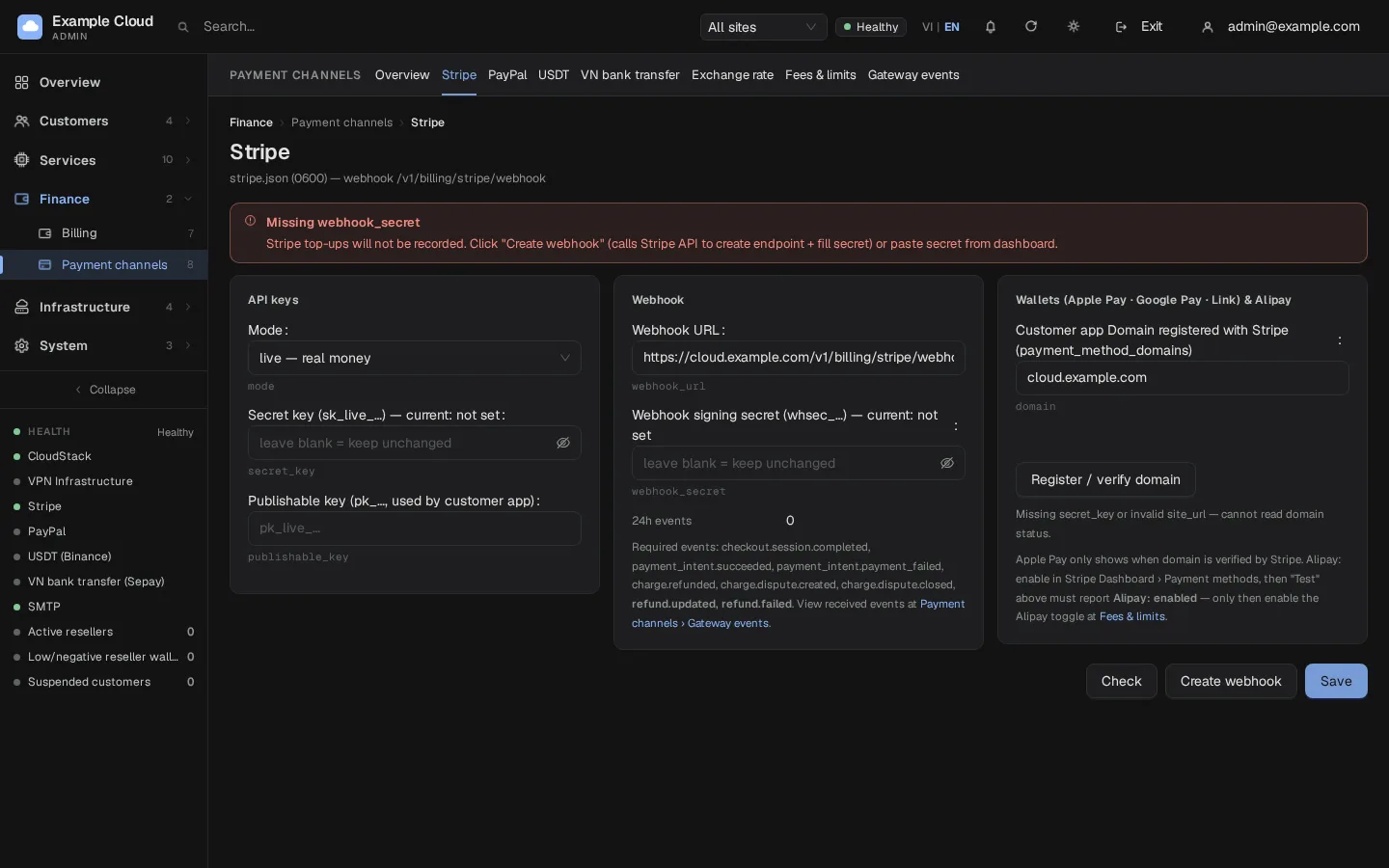
- Open Finance › Payment channels › Stripe (
/payments/stripe). - In the API keys card choose Mode (
liveortest), paste the Secret key and the Publishable key. - Click Save. The keys are written to a configuration file on the server that only the NexCMP service account can read. They are never sent back to the browser; afterwards the page shows only the last 4 characters.
- Click Check. A dialog reports the connection, mode, available and pending balance, account ID, whether charges are enabled, whether a webhook exists and whether Alipay is available. A red line means that part needs attention.
- In the Webhook card click Create webhook and confirm. NexCMP asks Stripe to create the endpoint with every required event and fills Webhook signing secret (
whsec_...) automatically. The URL pre-filled in the field ishttps://<your-domain>/v1/billing/stripe/webhook, for examplehttps://cloud.example.com/v1/billing/stripe/webhook. - Open Fees & limits (
/payments/fees), keep Card (Stripe) on, set Stripe fee % and Stripe fixed fee (cents) to your real tariff and click Save channels & fees. See Payment channels.
Webhook
The red banner "Missing webhook_secret" stays until a signing secret is saved. Without it Stripe top-ups are not recorded, even though Stripe took the money.
| Item | Value |
|---|---|
| URL | https://<your-domain>/v1/billing/stripe/webhook |
| Events | checkout.session.completed, payment_intent.succeeded, payment_intent.payment_failed, charge.refunded, charge.dispute.created, charge.dispute.closed, radar.early_fraud_warning.created, refund.updated, refund.failed |
| Signature | Stripe Stripe-Signature header, HMAC-SHA256, 300 seconds tolerance. Requests with a bad signature get HTTP 400. |
| Idempotency | Each event ID is stored once; a repeated delivery never credits twice. |
If you upgraded from a release that registered fewer events, click Create webhook again — the old endpoint is kept, so delete it by hand in the Stripe Dashboard afterwards.
The 24h events and Latest event rows in the Webhook card tell you whether Stripe is reaching the panel. Individual events are listed in Payment channels › Gateway events (/payments/events, tab Stripe), where each event can be viewed (Payload) or replayed (Replay).
Apple Pay, Google Pay and Link
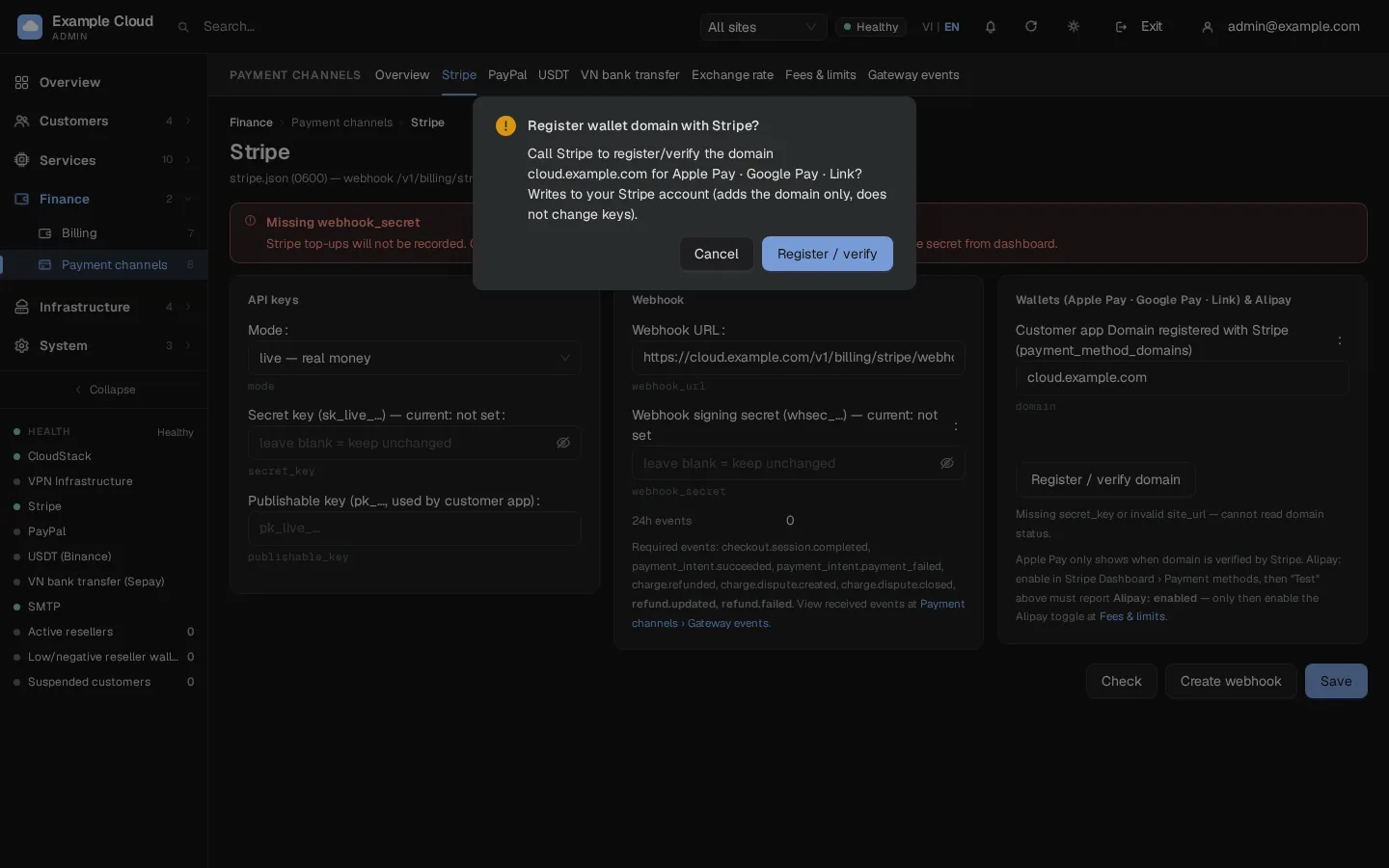
- In the Wallets (Apple Pay · Google Pay · Link) & Alipay card, the field Customer app Domain registered with Stripe is pre-filled with your site's host name (for example
cloud.example.com). - Click Register / verify domain and confirm. NexCMP registers the domain in Stripe's payment method domains and asks Stripe to validate it.
- The result shows the status of Apple Pay, Google Pay and Link. Apple Pay shows only when the status is
active. - In Fees & limits keep Apple Pay · Google Pay · Link on.
Apple Pay stays inactive
Apple Pay needs the domain-association file to answer HTTP 200 on your public domain. If you put Cloudflare or another proxy in front, do not block /.well-known/.
Alipay
Alipay is optional. Activate it in Stripe Dashboard › Settings › Payment methods, click Check and wait until the dialog shows that Alipay is available, then turn on Alipay (Stripe, JPY display) in Fees & limits. Set Alipay fee %, Alipay fixed fee, the ¥/USD rate (50–500) and the FX spread % (0–20). Update the ¥/USD rate regularly; the page warns when it is older than 7 days.
Verify
- In test mode, sign in to the portal as a test customer, open Billing, click Deposit, choose Card and pay the minimum with the Stripe test card
4242 4242 4242 4242(any future date, any CVC). - The balance rises within seconds and the payment appears under Finance › Billing › Top-ups with the status Completed.
- Open Payment channels › Gateway events › Stripe: you should see
checkout.session.completedorpayment_intent.succeededwith a processed time. - Back on the Stripe page, 24h events is above 0.
Before going live, switch Mode to live, paste the live keys and click Create webhook again (webhooks of test and live mode are separate).
Limits & notes
- Amounts and currency. Wallets are in USD. Card, wallet and link payments are charged in USD; Alipay is shown to the customer in JPY and converted at your rate.
- Fees. Stripe's real fee is not read back automatically; the fee percentage you set decides what the customer sees and what the wallet is credited. Choose Customer pays top-up fee in Fees & limits to charge the fee on top.
- Saved cards. When the customer ticks Save card for auto top-up the card is stored at Stripe, not on your server. See Saved payment methods.
- Refunds. Refunding to the card is a two-step process: an admin creates a refund request for a completed payment (Finance › Billing › Top-ups, refund action on the payment) and then approves it under Finance › Payouts › Card refunds (
/billing/payouts). Alipay refunds are asynchronous; a failed one (refund.failed) returns the held amount to the wallet. - Disputes. On
charge.dispute.createdNexCMP blocks the customer's account, stops their prepaid services (nothing is deleted) and sends an admin alert. If you win (charge.dispute.closed), the amount is credited back to the wallet. - Waiting payments. If a webhook never arrives, NexCMP checks payments that stayed pending for more than 10 minutes against Stripe on its own and completes them. Payments older than 7 days are ignored.
- Resellers can connect their own Stripe account (webhook
https://<their-domain>/v1/billing/stripe/webhook/r/<id>); see Resellers.
Troubleshooting
| Symptom | Cause | Fix |
|---|---|---|
| "Secret key must start with sk_live_/sk_test_" | Wrong key pasted | Paste the secret key from Developers › API keys. |
| "Secret key does not match live/test mode" | Mode and key disagree | Make the Mode match the prefix of the key. |
| "Publishable key must start with pk_" | Wrong key | Use the publishable key. |
| Check says the connection failed | Wrong key, key revoked, or the server cannot reach api.stripe.com | Re-paste the key; test with curl -I https://api.stripe.com from the server. |
| Red banner "Missing webhook_secret" | The signing secret is not saved | Click Create webhook or paste the whsec_... secret from the Stripe Dashboard and Save. |
| Money taken but the balance did not change | Webhook not delivered or signature failing | Check the URL ends with /v1/billing/stripe/webhook, the secret matches the endpoint, and replay the event in Gateway events. In Stripe, open the endpoint and look at the delivery attempts (HTTP 400 means a wrong signing secret). |
| "Create webhook" fails | The URL is not HTTPS or not reachable | Use your public https:// domain. |
| Apple Pay status not active | Domain not validated | Click Register / verify domain again after the domain-association file answers 200. |
| Alipay not available in the Check dialog | Not activated at Stripe | Activate it in the Stripe Dashboard, then click Check. |
| Customer sees no card form | Card (Stripe) is off or no secret key | Turn it on in Fees & limits and save keys. |