Modules
Where in the admin: System › Admin › License & updates (
/license), the card Module.
What it does
A module is a service or feature that you can switch on or off as a whole. A module that is off is hidden from the admin menu and customers cannot buy it; its API routes answer 404 module_disabled where the module is an add-on. Turning a module on only exposes the feature: the infrastructure behind it still has to be connected (see the last column).
Requirements
| Item | Requirement |
|---|---|
| Account | An administrator with write access. Read-only staff can see the switches but not change them. |
| Infrastructure | See the table: each module lists what it needs. |
| Depends on | Some modules need others (DDoS Shield needs DDoS & BGP). |
Prepare the infrastructure
Not required for the switch itself. Connect the infrastructure of each module as described on the page linked in the table.
Connect in NexCMP
- Open System › Admin › License & updates and scroll to the card Module. It says that disabled modules are hidden from the admin menu and cannot be purchased by customers.
- Use the switch of a module. The page confirms Saved: reloading menu and reloads, so the menu changes at once.
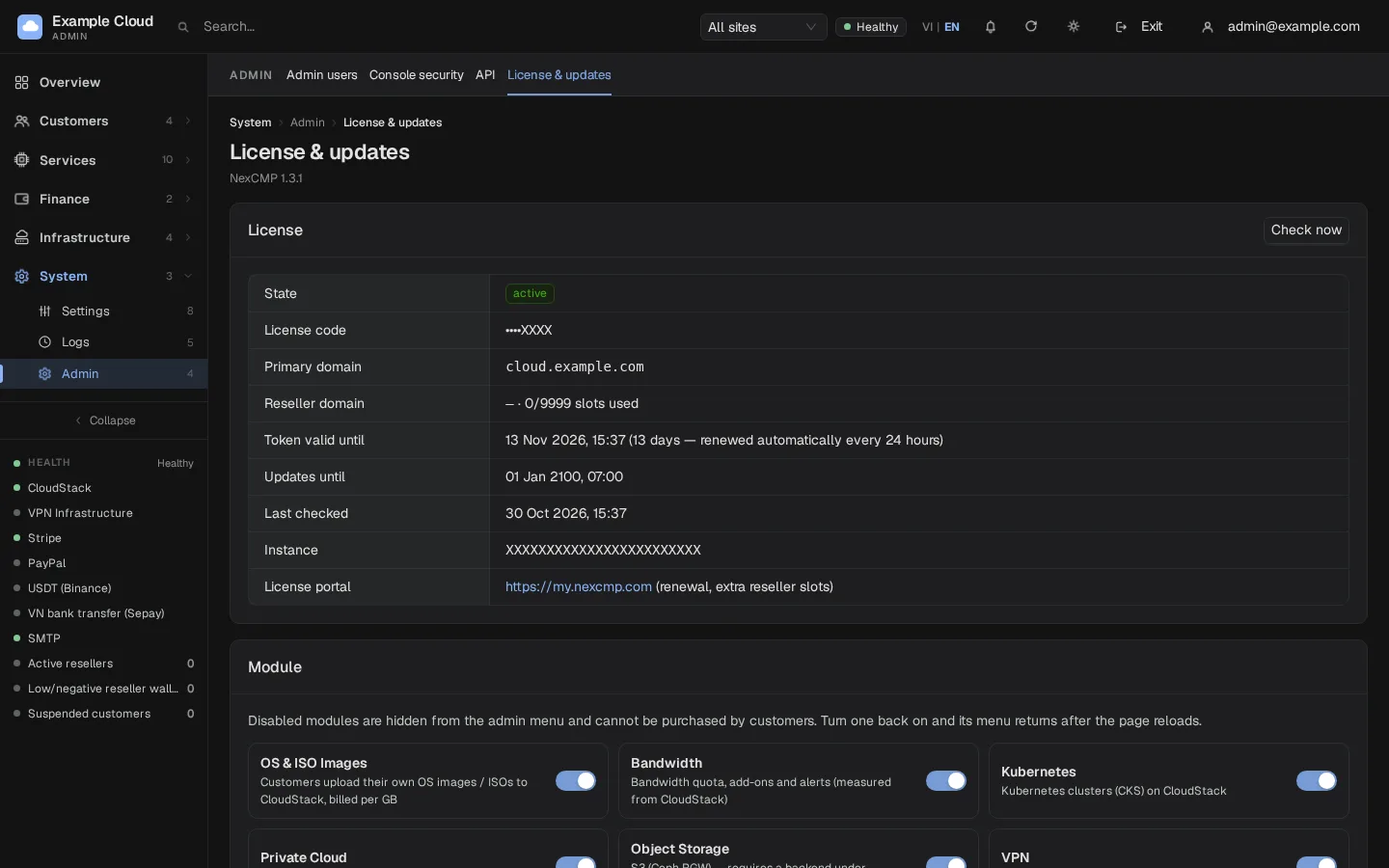
The modules
| Module (as shown) | Default | What it adds | Needs | Page |
|---|---|---|---|---|
| Virtual Machines | always on | VM catalog, orders, console, snapshots | CloudStack or Proxmox VE | CloudStack, Proxmox VE |
| Bandwidth | on | Quotas, add-ons, alerts and overage actions for VMs, Kubernetes and S3 | Nothing extra (CloudStack VM statistics) | Bandwidth |
| OS & ISO Images | off | Customers register their own OS images and ISOs, billed per GB | CloudStack; Internet access for its secondary storage VM | Requirements |
| Kubernetes | off | Kubernetes clusters (CKS) | CloudStack with CKS enabled | Kubernetes and Private Cloud |
| Private Cloud | off | VPC with dedicated-bandwidth plans | CloudStack VPC and network offerings | Kubernetes and Private Cloud |
| Object Storage | off | S3 accounts on Ceph RGW, pay as you go | Ceph RGW and a zone with the S3 service | S3 |
| VPN | off | VPN on your own nodes | Nodes running cmp-agent | VPN and proxy nodes |
| IPv6 Proxy | off | IPv6 proxy on your own nodes | Proxy nodes with an IPv6 prefix | VPN and proxy nodes |
| Bare Metal | off | Dell servers through iDRAC: orders, OS install, console, power | iDRAC 9 on a management network | Dedicated servers |
| AI Models | off | A gateway that sells access to AI models: one key for many models, per-model prices, usage limits, logs, wallet billing | Model sources you bring: an OpenAI-compatible or Anthropic-compatible API with your own key | AI Models |
| AI | off | AI Chat (automated support) and AI Agent (VM administration in plain language) | An OpenAI-compatible provider | AI providers |
| DDoS Shield | off | IP protection for customers; needs DDoS & BGP, so its switch stays disabled without it | The DDoS & BGP add-on | below |
| DDoS & BGP | off, add-on | Edge router console: BGP, RTBH, XDP, sessions and edge traffic | An edge host with root daemons | below |
Which switch does what
- Bare Metal has two layers. The module switch shows the admin menu and the API. Selling to customers is a separate switch with a typed confirmation under Services › Dedicated Server, and every write to an iDRAC is blocked until you turn on live ops under Infrastructure › Bare Metal › Safety. See Dedicated servers.
- For Kubernetes, Private Cloud, VPN, IPv6 Proxy and Images the module switch and the sales switch on the service page act on the same setting.
- AI also needs a provider configured under System › Settings › AI provider.
- AI Models has two layers. The module switch shows the admin menu and the API. Selling to customers is a separate sale switch at the top of the AI Models pages, off by default. See AI Models.
Modules read at start-up
Three features are not ordinary switches. They are read once when the services start and need infrastructure that the standard installation does not include.
| Feature | Setting | State | What it needs |
|---|---|---|---|
| DDoS & BGP | module_ddos | Shown as Add-on package when off, Installed when on. There is no switch in the console. | Edge-router daemons (BGP, RTBH, XDP, flow statistics) that run as root. The panel runs as an unprivileged user and cannot run them. |
| AI | module_ai | A normal switch. The routes follow it at once; AI Chat's background jobs (ticket investigation, scheduled replies) start at the next restart of the services. The console says a restart is recommended. | The AI provider. |
| Web SSH terminal | feature_ssh_web | Off by default, no switch in the console | A separate SSH proxy service and its route. Without it the portal's Console tab shows only VNC. The AI Agent does not need it: it runs commands over an SSH connection that the panel makes itself. |
After a change to a start-up setting, restart the services: sudo systemctl restart nexcmp nexcmp-vmd.
Verify
- The menu entry of the module appears (or disappears) after the reload.
- For a customer-facing module, the portal shows the new menu entry for a signed-in customer. A module that is off shows nothing or "coming soon".
Limits and notes
- Turning a module off does not delete anything. Running VMs, clusters, S3 accounts and subscriptions keep running and billing; customers just cannot create new ones.
- Quota pages list only the services whose modules are on.
Troubleshooting
| Symptom | Cause | Fix |
|---|---|---|
| The menu entry did not appear | The page was not reloaded | Reload the admin console. |
| DDoS Shield switch is disabled | DDoS & BGP is not installed | DDoS Shield needs the DDoS & BGP add-on. |
| "This module is an add-on package and cannot be switched here" (HTTP 409 or 422) | You (or a script) tried to switch DDoS & BGP | It is an add-on package; there is no switch. |
| "DDoS Shield needs the DDoS & BGP add-on" | Same, for DDoS Shield | Install the add-on first. |
A module route answers 404 module_disabled | The module is off | Switch the module on. |
| AI Chat answers but ticket investigation never starts | The AI module was switched on without a restart | sudo systemctl restart nexcmp nexcmp-vmd. |
| Read-only staff cannot save | Their role is read-only | Use an administrator account. |