Telegram and admin alerts
Where in the admin: System › Settings › Admin alerts (
/settings/alerts). Support shortcuts: Customers › Support › Tickets (/support/tickets), tab Settings.
What it does
NexCMP notifies you — the operator — when something needs attention, and when a customer signs up or a deposit is credited. Alerts go to one or more channels: Telegram, a webhook, or e-mail.
Events sent to the admin channels include: deployment failure, VM missing, network down, free IPs below 30, an expiring item (1-hour warning), a Stripe dispute, a dead worker, cluster RAM above its threshold, new customer sign-up, and credited deposits. Customer events are queued durably and retried with increasing delay (30 seconds up to 1 hour) until Telegram accepts them.
Requirements
| Item | Requirement |
|---|---|
| Telegram | A bot created with @BotFather (token) and the chat ID of the group or user that should receive messages |
| Network | Outbound HTTPS to api.telegram.org |
| Webhook (alternative) | An HTTPS endpoint that accepts the alert payload |
Prepare Telegram
- In Telegram open @BotFather, send
/newbot, choose a name; copy the bot token (123456789:AA...). - Create a group, add the bot to it, and send any message.
- Find the chat ID: open
https://api.telegram.org/bot<token>/getUpdatesin a browser and readchat.id(group IDs start with-).
Connect in NexCMP
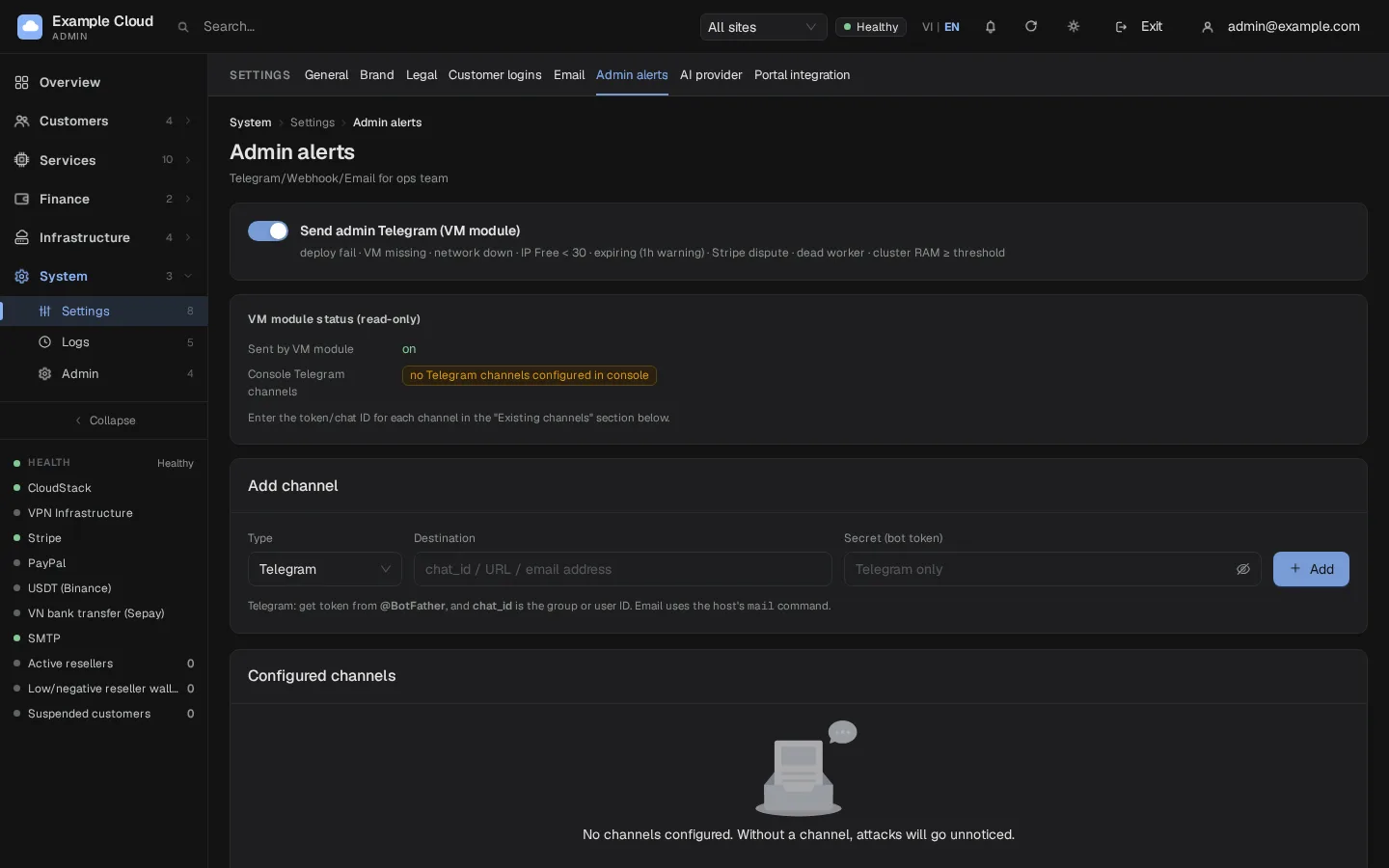
- Open System › Settings › Admin alerts.
- In Add channel choose Type: Telegram, set Destination to the chat ID and Secret (bot token) to the token. Click Add.
- Make sure the toggle Send admin Telegram (VM module) is on; the line VM module status (read-only) shows "on".
Verify
The channel appears under Configured channels. Trigger an event (for example register a test customer) and the message arrives in the group. If no channel is configured the page warns "Without a channel, attacks will go unnoticed" and, in the log, Telegram events are only recorded locally.
Support shortcuts for customers
The customer support widget can show Telegram and Zalo buttons. They are hidden until configured in the support settings: enter a https://t.me/... link for Telegram and the Zalo link or QR. Only https:// links are accepted. The support chat can also notify your Telegram group with the question and a draft answer — see AI Chat.
Limits and notes
- The bot token is stored with the channel and never shown again.
- Telegram events use the first enabled Telegram channel that has both a destination and a token.
Troubleshooting
| Symptom | Cause | Fix |
|---|---|---|
| No message arrives | Wrong chat ID, bot not in the group, or the bot was never messaged | Re-check the ID with getUpdates; send a message to the bot or group first. |
| Works for a while then stops | Token revoked in BotFather | Create a new token and update the channel. |
Telegram: no channel in logs | No enabled Telegram channel | Add one as above. |