示例提示词
**管理后台位置:**任何管理页面上的 AI Chat (
/agent) 或悬浮的 Ask AI 按钮。相同的提示词在通过 MCP 连接的任何 AI 客户端中同样有效。
功能说明
这些提示词展示了如何提问。每个提示词都列出了助手在幕後执行的操作、其所需的权限范围(针对外部客户端或密钥)以及您被要求批准的位置。请将示例值替换为您自己的值。
切勿在聊天文本中输入机密信息
对于密码、API 密钥和令牌,请使用 AI Chat 输入框旁边的 Secret 字段(details)。AI 只能看到代表该机密的占位符,而看不到实际值。对于外部 AI 客户端,机密会通过该客户端传输,因此建议优先在管理后台中输入。
检查您的当前位置
text
Check my setup progress and tell me the next three things to do, in order.助手会调用 setup_checklist 和 system_health(范围 admin:read)并根据真实状态回答。请参阅 Setup progress checklist。
首次设置
text
Help me finish the initial setup. Go through the checklist, explain each open step
in one sentence, ask me for what you need, and show me every change before it is applied.
这与 MCP 提示词 initial-setup 相同。它需要 admin:read 以及您接受的步骤的范围。AI Chat 中的每项更改都会显示一个确认卡片。
添加 Proxmox VE 集群
text
I want to sell servers from my Proxmox VE cluster at https://pve.example.com:8006.
Add it, test the connection, create a zone called "New York" in the US, attach the cluster
to it, and then propose starter plans.
操作过程:
- 助手会索取 API 令牌 ID (
user@realm!tokenid) 及其密钥。请将密钥填入 Secret 字段。请先创建一个权限受限的令牌:Proxmox VE。 - 它会调用
proxmox_add、proxmox_test、zone_create和proxmox_attach_zone。 - 它会提出带有
plans_from_offerings的方案并等待您的批准(请参阅下一个示例)。
范围:infra:write、secrets:write、catalog:write、admin:read。
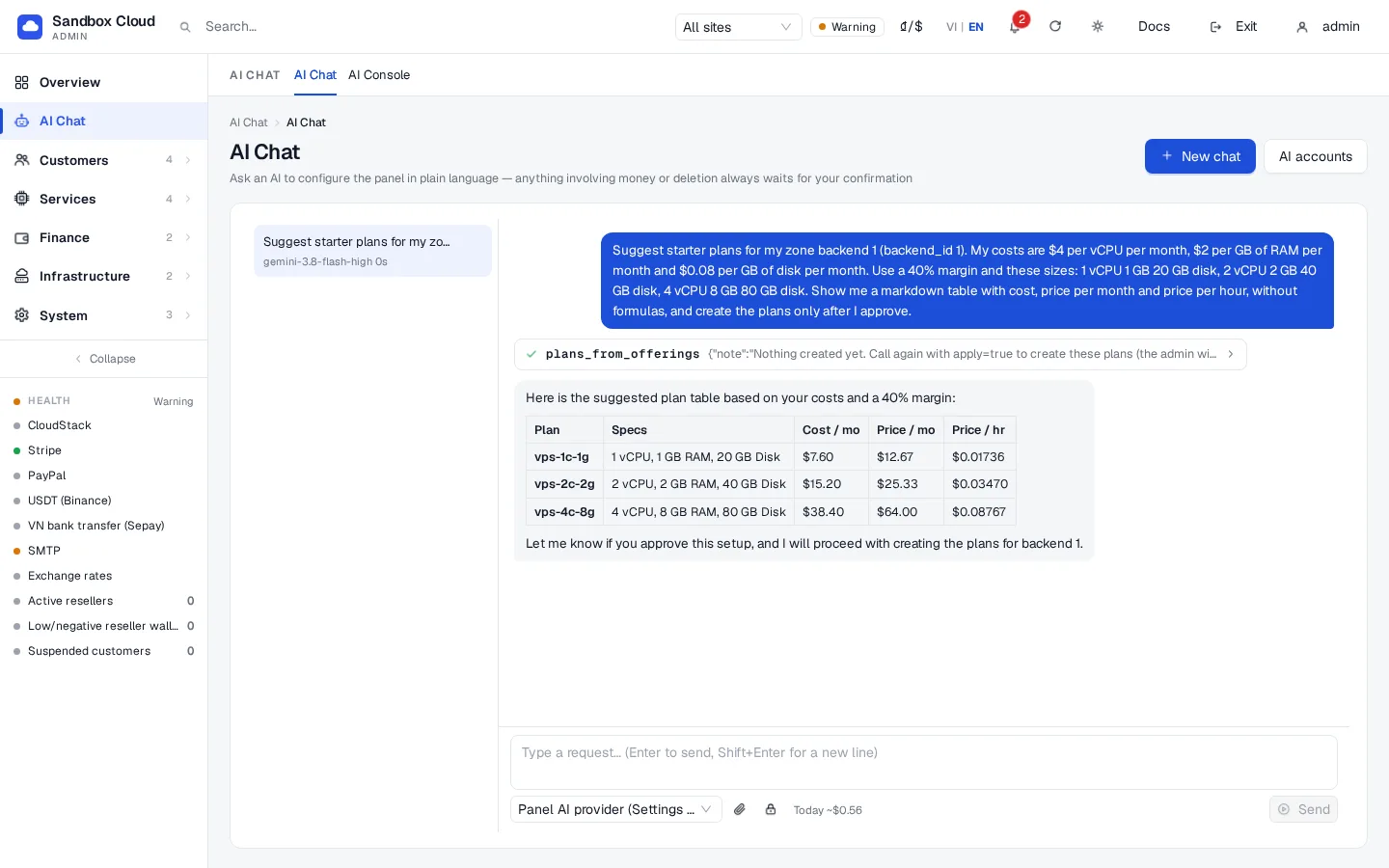
创建毛利率为 40% 的方案表
text
Suggest a starter plan table from my CloudStack offerings. My costs are $4 per vCPU per month,
$2 per GB of RAM per month and $0.08 per GB of disk per month. Use a 40% margin, show me the
table with cost, price per month and price per hour, and create the plans only after I approve.
助手会带上 plans_from_offerings、margin_pct 40 以及您的成本调用该工具。利润率指利润占售价的比例:在 40% 时,成本为 $60 的套餐售价为 $100。首次调用仅返回预览。当您批准后,它会带上 apply=true 再次调用该工具,由于涉及价格,该操作会一步创建套餐并要求进行一次确认。对于 Proxmox,它使用 backend_id 和默认规格列表(1、2、2 和 4 vCPU)。权限范围:catalog:write、admin:read。参见 Plans。
配置电子邮件并发送测试消息
text
Configure outgoing email with smtp.example.com, port 587, STARTTLS, user "mailer@example.com",
sender name "Example Cloud", sender address "no-reply@example.com". Use my Secret field for the
password "smtp_password". Then send a test email to admin@example.com.
助手会调用 smtp_get、smtp_configure 和 smtp_test,并告知您消息是否已被接受。范围:settings:write、secrets:write。请参阅 SMTP and e-mail templates。
设置 Stripe
text
Set up Stripe in test mode. My publishable key is pk_test_XXXX. Use the secret key and the
webhook secret from my Secret field (names stripe_secret_key and stripe_webhook_secret).
Then test the credentials and tell me which webhook URL I must add in Stripe.
payment_configure 始终是一个两步操作:您会看到一个机密值被遮罩的预览并予以批准。然后 payment_test 会与 Stripe 一起检查凭据。范围:billing:write、secrets:write。仅在完成测试支付后切换到实时模式。请参阅 Stripe。
开启 Telegram 警报
text
Add my Telegram chat 123456789 for admin alerts. The bot token is in my Secret field as
telegram_bot_token. Send a test message.
助手会调用 telegram_configure 和 telegram_test。范围:settings:write、secrets:write。请参阅 Telegram notifications。
查找客户并添加余额
text
Find the customer with e-mail customer@example.com, show me their balance and servers,
and add $10.00 of credit because of the outage on Monday.
助手会调用 customers_search 和 customer_get(只读),然后带上 customer_adjust_balance、delta_cents 1000 及原因调用该工具。这始终需要您的批准:确认卡片显示“更改客户余额”,并显示将写入审计日志的金额和原因。权限范围:admin:read、billing:write。
导出我的配置
text
Export my whole configuration as YAML. Do not include secrets. Then tell me which settings
differ from a typical new installation.
助手会调用 config_export。机密会被 secret:// 引用替换。将结果保存为 nexcmp.yaml 并将其保存在版本控制中。请参阅 Configuration as code。范围:admin:read。
编写优秀的提示词
- 提供目标和事实:名称、价格、电子邮箱。请勿粘贴密钥。
- 对于任何涉及付费或删除数据的操作,请先要求预览。
- 要求助手“在更改前读取当前值”。内置说明中已经包含了这一点。
- 如果发现结果有误,请询问“你调用了哪个工具,使用了什么参数?”。AI Chat中的工具卡片会同时显示这两者。
故障排查
| 症状 | 原因 | 解决办法 |
|---|---|---|
| 助手称其没有可用于某事的工具 | 未授予该工具的权限,或者该操作对AI关闭 | 检查Admin API keys,或在管理后台中进行操作。 |
| 它要求你粘贴密码 | 模型忽略了说明 | 拒绝;使用Secret字段或在管理后台中输入该值。 |
| 执行“do it”后没有任何变化 | 更改正在等待你的确认 | 滚动到确认卡片并点击Confirm。 |
| 创建的计划价格不符合预期 | 提示词中的成本或利润率有误 | 在计划页面编辑计划或让助手重新定价;价格更改需要确认。 |