以程式碼作為設定
管理員位置: System › Settings › Import/Export(
/agent/config)。伺服器端:指令nexcmp config export、plan與apply,以及nexcmp admin <tool>。
功能
您的面板設定(品牌、一般設定、電子郵件、Telegram 警報、模組、貨幣、付款閘道、限制、區域、方案、AI 提供者以及法律頁面)可以儲存為單一 YAML 檔案。您可以自行編輯檔案、請 AI 助理編輯、将其納入版本控制,或套用到相同或另一個面板。在任何變更生效前,您總是能看到差異清單。機密資訊絕不會寫入檔案中。
可用於將設定複製到第二個安裝環境、在正式上線前審查變更、在發生錯誤後還原設定,或是讓 AI 提出您可以作為單一文件閱讀的完整設定。
需求
| 項目 | 需求 |
|---|---|
| NexCMP | 1.4.0 或更新版本。 |
| 命令列 | 您是 root 在面板伺服器上(請使用 sudo)。此指令會自行向面板要求臨時金鑰(15 分鐘,所有範圍)。若要改用較窄的金鑰,請將 NEXCMP_KEY 設定為 admin API key 並透過 sudo 保留它,例如 sudo --preserve-env=NEXCMP_KEY nexcmp config plan -f nexcmp.yaml。 |
| 管理員頁面 | 已登入管理員。在展示面板上此頁面為唯讀。 |
| 機密 | 在套用時提供的數值(請參閱 Secrets);絕不直接放在檔案中。 |
匯出、編輯、預覽、套用
匯出目前組態:
bashsudo nexcmp config export -o nexcmp.yaml若沒有
-o,YAML 將會列印到畫面上。編輯
nexcmp.yaml(請參閱下方的 example)。請將version: 1保持在頂部。預覽將會變更的內容。這不會改變任何東西:
bashsudo nexcmp config plan -f nexcmp.yaml每一行顯示區段、項目、欄位與
old → new。標記為$的行屬於計費區段(請參閱 Billing sections)。如果面板已經與檔案相符,您會看到「No changes」。套用。若沒有
--yes,此指令為 dry run 且僅列印相同的清單:bashsudo nexcmp config apply -f nexcmp.yaml --yes讀取結果:
applied、pending(等待您的確認)、skipped與errors。
| 選項 | 含意 |
|---|---|
-f <file> | YAML 檔案(用於 plan 與 apply 為必要)。 |
--yes | 實際套用。若沒有它,apply 將會是 dry run。 |
--confirm-billing | 同時套用計費區段(payments、currency、plans)。若沒有它,這些區段將被略過。 |
--section <name> | 僅套用此區段。多個區段請重複此選項。 |
-o <file> | 搭配 export:將 YAML 寫入檔案。 |
當所有項目皆已套用或沒有任何變更時,結束代碼為 0;傳回錯誤時為 1;發生用法或金鑰錯誤時為 2。
機密
檔案包含參考而非密鑰,例如 password: secret://smtp_password。在套用時,數值來自名為 NEXCMP_SECRET_ 加上大寫參考名稱的環境變數:
bash
sudo -i
read -rs NEXCMP_SECRET_SMTP_PASSWORD && export NEXCMP_SECRET_SMTP_PASSWORD
read -rs NEXCMP_SECRET_STRIPE_SECRET_KEY && export NEXCMP_SECRET_STRIPE_SECRET_KEY
nexcmp config apply -f nexcmp.yaml --yes --confirm-billing如果參考沒有數值,則面板中先前儲存的密鑰會被保留。從未儲存且未提供的密鑰將保持空白。
| 參考名稱 | 其去向 |
|---|---|
smtp_password | email.smtp.password |
telegram_bot_token | telegram.bot_token |
stripe_secret_key, stripe_webhook_secret | payments.stripe |
paypal_client_secret | payments.paypal.client_secret |
binance_api_key, binance_api_secret | payments.crypto |
sepay_api_token, sepay_webhook_secret | payments.bank |
ai_provider_key | ai_provider.api_key |
範例檔案
yaml
# NexCMP configuration. Preview: nexcmp config plan -f nexcmp.yaml
version: 1

branding:
  name: Example Cloud
  primary: "#1677ff"
  currency: usd
  seller_name: Example Cloud LLC

settings:
  brand_name: Example Cloud
  support_email: support@example.com
  default_lang: en
  invoice_prefix: EX
  company_name: Example Cloud LLC
  company_address: "1 Example Street, New York, NY"
  min_topup_cents: 500

email:
  smtp:
    host: smtp.example.com
    port: 587
    security: starttls
    username: mailer@example.com
    password: secret://smtp_password
    from_email: no-reply@example.com
    from_name: Example Cloud
    reply_to: support@example.com

telegram:
  enabled: true
  chat_id: "123456789"
  bot_token: secret://telegram_bot_token

modules:
  s3: true
  k8s: false

currency:
  site_currency: usd
  manual_rate_vnd: 0        # 0 = automatic

payments:
  stripe:
    mode: test
    publishable_key: pk_test_XXXX
    secret_key: secret://stripe_secret_key
    webhook_secret: secret://stripe_webhook_secret
  bank:
    bank_code: BANK
    account_number: "0000000000"
    account_name: EXAMPLE CLOUD LLC
    prefix: EX
    api_token: secret://sepay_api_token
  channels:
    pay_card_enabled: true

quotas:
  quota_enabled: true
  quota_max_vms_24h: 5
  quota_max_vms_30d: 30

zones:
  - slug: new-york
    name: New York
    country: US
    city: New York
    enabled: true
    is_default: true

plans:
  - slug: vps-1c-1g
    name: 1 vCPU, 1 GB RAM, 25 GB
    cpu: 1
    ram_mb: 1024
    disk_gb: 25
    hourly_usd: 0.0112
    cs_offering_id: OFFERING_ID
    enabled: true
    visible: true

ai_provider:
  enabled: true
  name: Example AI
  base_url: https://api.example.com/v1
  model: example-model
  fallback_models: [example-model-mini]
  reasoning_effort: low
  api_key: secret://ai_provider_key

legal:
  terms:
    en: |
      # Terms of service
      Your terms in simple markdown (no HTML).
  privacy:
    en: |
      # Privacy policy
      Your policy in simple markdown (no HTML).
檔案可包含任何區段子集。您略過的區段不會被觸及。大於 1 MB 的檔案、缺少 version: 1、版本號不同或未知的區段將在執行前遭到拒絕。
章節
| 區段 | 其控制內容 | 注意事項 |
|---|---|---|
branding | 品牌名稱(最多 60 個字元)、主色、顯示貨幣(usd 或 vnd)、賣方名稱。 | 標誌不屬於檔案的一部分;請使用 branding page。 |
settings | 一般設定的固定清單:brand_name、support_email、support_telegram_url、default_lang、require_email_verified、min_topup_cents、max_topup_cents、invoice_prefix、company_name、company_address、company_tax_id、auto_destroy_days、low_balance_cents。 | 其他金鑰會被忽略。 |
email.smtp | SMTP 主機、連接埠、安全性(starttls、tls、none)、使用者、密碼、寄件者名稱與地址、回信地址。 | SMTP and e-mail templates。變更主機、連接埠或安全性需要重新輸入密碼。 |
telegram | 警報頻道開關、聊天 ID、機器人權杖。 | Telegram notifications。 |
modules | 選用模組開關 (key: true/false)。 | 只有面板允許切換的金鑰。參見 Modules。 |
currency | 顯示貨幣與手動 USD 對 VND 匯率 (0 自動,否則為 15000 至 50000)。 | 計費區段。參見 Currency and exchange rates。 |
payments | stripe、paypal、crypto、bank 憑證與 channels 開關 (pay_card_enabled、pay_wallets_enabled、pay_alipay_enabled、pay_paypal_enabled、pay_usdt_enabled、pay_sepay_enabled)。 | 計費區段。參見 Payment channels。 |
quotas | quota_* 限制。 | 參見 Quotas。 |
zones | 依 slug 劃分的區域 (必填:slug、name、country;選填 city、enabled、is_default)。 | 建立新區域。檔案不會變更已存在的區域。參見 Zones。 |
plans | 依 slug 劃分的方案 (必填:slug、name、cpu、ram_mb、disk_gb、hourly_usd;選填 cs_offering_id、backend_id、zone_id、enabled、visible、sort、description)。 | 計費區段。建立新方案,現有方案則透過 slug 更新。價格以每小時 USD 計算。參見 Plans。 |
ai_provider | 客戶端 AI Chat 與 AI Agent 所使用的面板 AI 提供者。 | AI provider。 |
legal | 各語言的條款與隱私權文字 (en、vi)。 | Legal pages。 |
套用的順序與上方相同:基礎設施類項目優先於方案。
應記住的規則
- 冪等性。 第二次套用相同的檔案不會做任何變更。
plan會顯示「No changes」。 - 不會刪除。 檔案絕不會移除區域、方案或設定。從檔案中移除項目不會改變面板現狀。
- 一般安全規則仍然適用。 從命令列進行的每項變更都會透過與 API 變更相同的檢查:範圍與 IP 規則。需要確認的變更 (例如全站開關) 會在
pending下方以預覽回報,而不會直接套用,除非您傳遞--confirm-billing來全部確認。 - AI 用戶端無法解鎖計費。 當 MCP 用戶端呼叫
config_apply時,confirm_billing會被忽略;金錢變更需由您手動處理。 - 套用前請先檢查。 JSON Schema 描述了每個欄位。請將您的編輯器指向它,或提供給 AI 以便寫出有效的 YAML:
https://cloud.example.com/v1/admin/agent/config/schema.json(公開可讀)。
計費區段
payments、currency 與 plans 會變更價格或金錢路徑。nexcmp config apply --yes 會略過它們,除非您加入 --confirm-billing;這樣它們才會列在 skipped 底下 (「billing section - pass confirm_billing」)。此旗標即為您的確認:有了它,檔案中的每個計費變更 (以及任何其他會要求確認的變更) 都會直接套用,不再二次提示。請先執行 plan 並閱讀標有 $ 的每一行。
當 AI (MCP 用戶端中的 config_apply 工具或 AI Chat) 套用相同的檔案時,此旗標將被忽略,金錢變更改為等待您的批准。
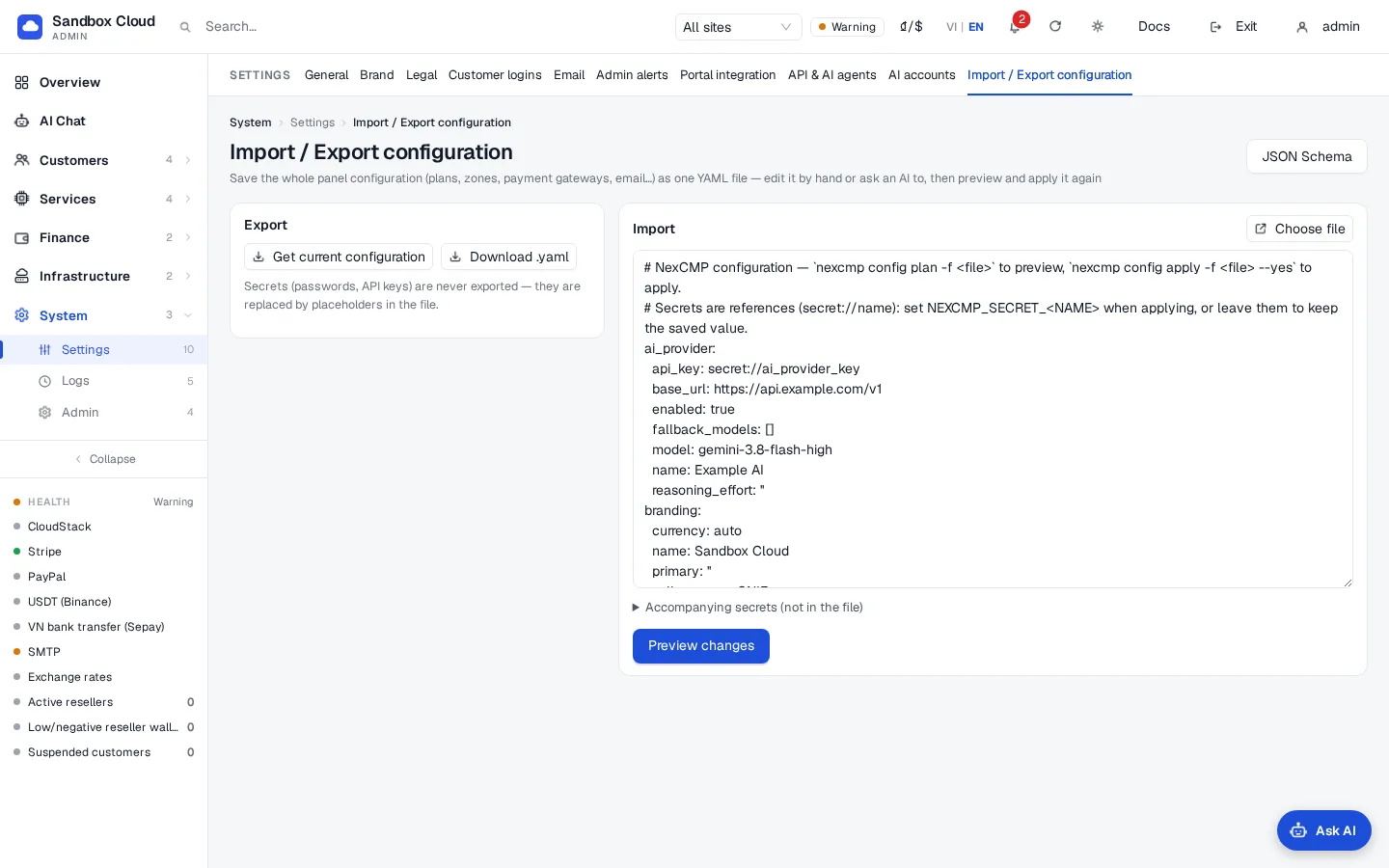
使用「匯入/匯出」頁面
- 開啟 System › Settings › Import/Export。
- 在 Export 下方按一下 Get current configuration,然後 Download .yaml 以儲存
nexcmp.yaml。機密會顯示為佔位符。 - 在 Import 下方選擇檔案、將其拖曳至方塊中,或貼上 YAML。
- 選用:開啟 Secrets that come with it (not in the file) 並為每個參照新增名稱與數值,例如
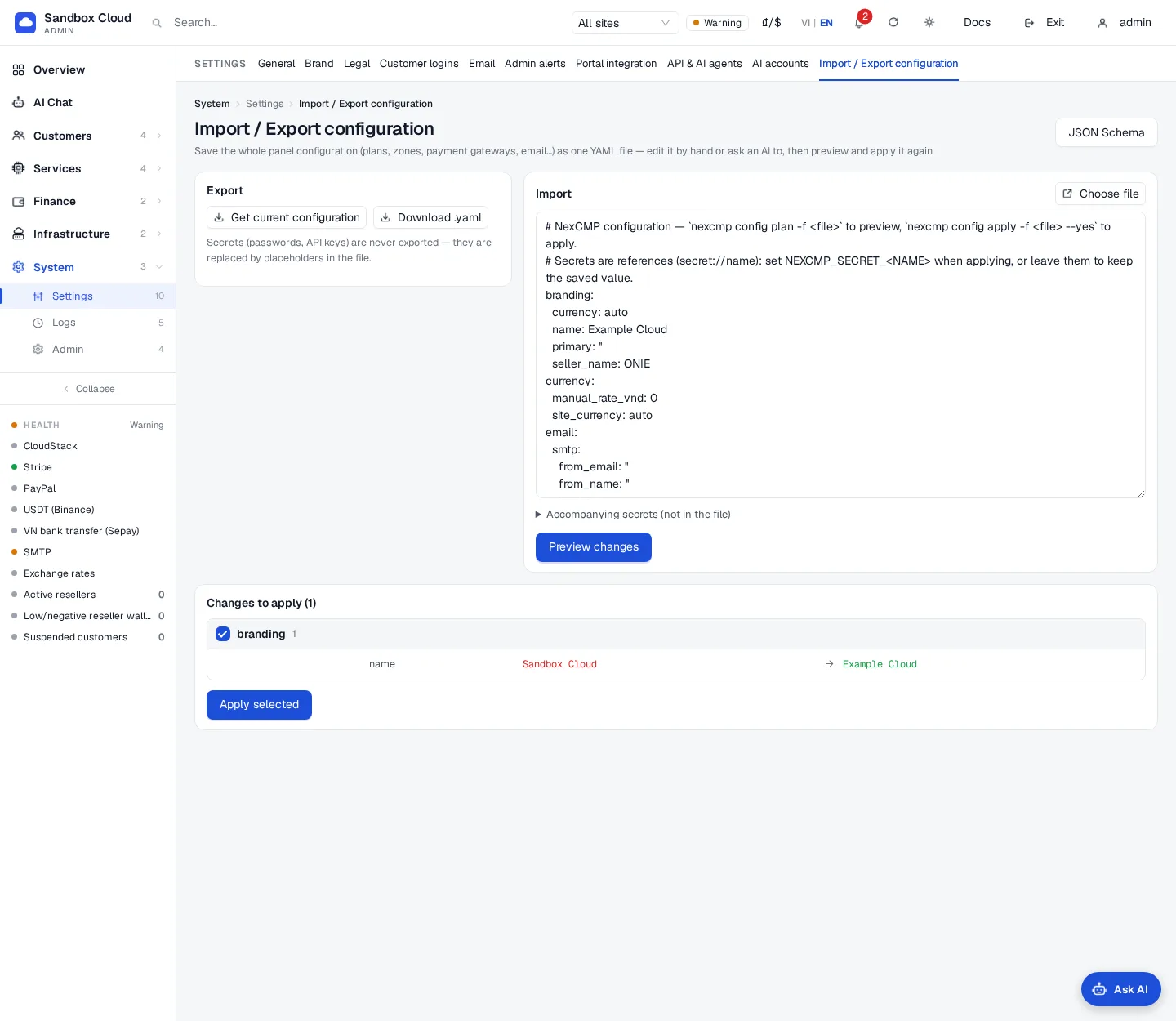
smtp_password。 - 按一下 Preview changes。表格會依區段將變更分組;與金錢相關的區段帶有「Money-related」標籤。取消勾選您不需要的區段。
- 如果列出了與金錢相關的區段,請勾選 Also apply money-related changes (prices, payment gateways, balances)。若未勾選則會略過。
- 按一下 Apply selected。結果會顯示已套用、已略過或失敗的項目。傳回為等待確認的變更會以確認卡片顯示;請在其上按下 Confirm。
右上角的 JSON Schema 按鈕會開啟結構描述。
從命令列執行任何工具
nexcmp admin 執行與 AI 助理相同的工具(the tool list)並輸出 JSON:
bash
sudo nexcmp admin tools                       # name, scope and title of every tool
sudo nexcmp admin system_health
sudo nexcmp admin customers_search q=customer@example.com
sudo nexcmp admin settings_update --json '{"values":{"support_email":"support@example.com"}}'
引數可以是 key=value 對(值會在可解析時讀作 JSON,否則讀作文字)或一個 --json '{...}' 物件。如果動作需要確認,命令會印出預覽並以結束代碼 3 與「Nothing changed」停止。請讀取預覽,然後再次使用 --yes 執行相同的命令來套用它。以 root 身份執行時,命令會取得包含所有範圍的 15 分鐘金鑰,因此確認步驟是您的防護機制;若使用 NEXCMP_KEY 則套用金鑰本身的範圍。
驗證
sudo nexcmp config plan -f nexcmp.yaml緊接在apply --yes後方會列印「No changes」。- 在管理介面中,您變更的頁面會顯示新值,且 Logs › Admin actions 會列出變更。
- 再次套用相同的檔案不會有任何變更。
限制與注意事項
- 此檔案涵蓋上述設定,不包含客戶、伺服器、發票或基礎設施來源(CloudStack 與 Proxmox 連線)。請透過 AI Chat 或管理頁面連線這些項目。
- 區域與方案透過
slug進行對應。請勿在檔案中重新命名 slug:否則會被建立為新項目。 - 客戶已在使用的方案無法變更其大小;請改為建立新方案。
- 請妥善保管匯出的檔案,即使其中不包含機密:它們列出了您的價格、地址與帳戶名稱。
故障排除
| 症狀 | 原因 | 修正方式 |
|---|---|---|
missing version: 1 | 檔案未以 version: 1 開頭 | 將其加入。 |
unsupported version 2 | 檔案具有不同的版本號碼 | 此面板僅讀取版本 1。 |
unknown section 'x' (known: ...) | 拼寫錯誤或不支援的頂層金鑰 | 請使用上述區段。 |
YAML error: ... | 無效的 YAML(縮排、字元對齊) | 修正訊息中指定的行。 |
config is larger than 1 MB | 檔案太大 | 請分割檔案並使用 --section。 |
no API key: set NEXCMP_KEY=ak_... or run as root on the server | 命令找不到金鑰 | 使用 sudo 執行,或匯出 NEXCMP_KEY 並透過 sudo 保留。 |
panel not reachable | 面板服務未在預設連接埠上執行 | 檢查 sudo nexcmp status。 |
skipped 下方的計費行 | 計費區段需要 --confirm-billing | 新增旗標並先檢閱 $ 行。 |
pending 下方的項目 | 變更需要確認 | 開啟 API & AI agents 或匯入/匯出結果,並在卡片上按下 Confirm。 |
| 有密鑰未更新 | 未設定 NEXCMP_SECRET_<NAME> 值,因此保留已儲存的密鑰 | 匯出變數並再次套用。 |
errors 下方的項目包含 HTTP 403 insufficient_scope | 金鑰缺少該區段的範圍 | 使用具有該範圍的金鑰,或以 root 身份執行。 |
errors 下方的項目包含 HTTP 403 demo_read_only | 展示面板 | 在真實安裝環境上套用。 |